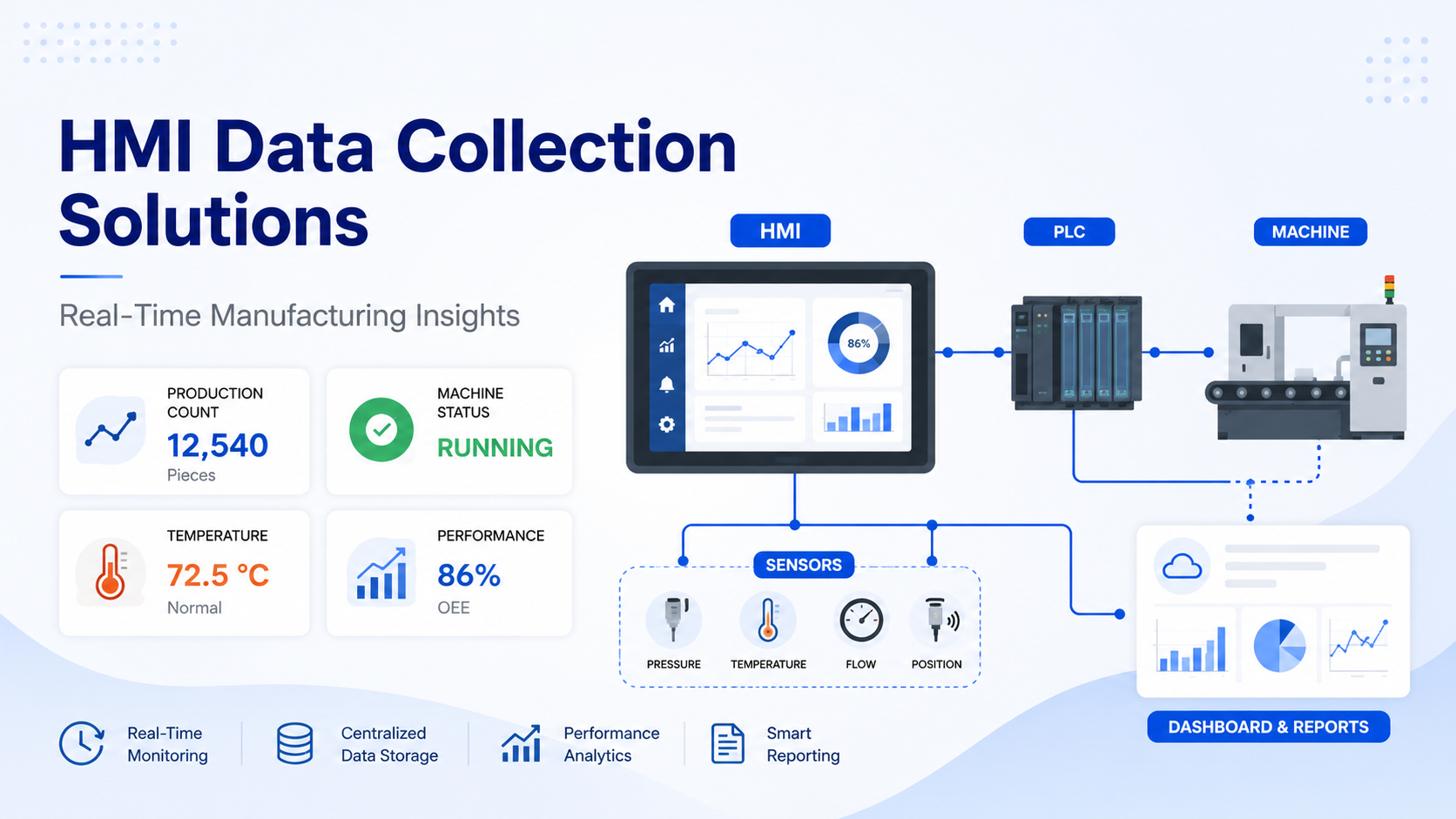
HMI data collection solutions are software and hardware systems that use Human-Machine Interfaces to automatically capture production data from machines, PLCs, and sensors on the factory floor. They collect metrics such as cycle times, machine status, downtime, and quality results in real time, storing this data in industrial databases for monitoring, reporting, traceability, and operational decision-making.
What Is an HMI Data Collection Solution?
An HMI, or Human-Machine Interface, is the touchscreen panel or industrial display operators use to interact with machines on the shop floor. It shows real-time machine status, allows operators to input commands, and visualizes process parameters.
But an HMI does more than display information. It also acts as a data gateway between the machine and the rest of your production system. When connected properly to PLCs, sensors, and industrial networks, the HMI captures machine and process data automatically, without manual input.
An HMI data collection solution refers to the complete setup that uses this gateway function to collect, store, and transmit production data across the plant. Instead of an operator writing down a machine reading on a clipboard, the HMI captures that value automatically every few seconds, logs it with a timestamp, and sends it to a database where it can be analyzed, visualized, and reported.
The key distinction is this: the HMI was always an operator interface. An HMI data collection solution turns it into an active participant in your production intelligence infrastructure.
Why Manufacturing Plants Need HMI Data Collection
Most manufacturing plants that rely on manual data collection face the same recurring problems.
Paper logs get lost, filled in incorrectly, or completed hours after the fact. A machine might have stopped for forty minutes, but by the time the operator records it, the reason is already unclear. Supervisors spend time chasing numbers instead of acting on them. End-of-shift reports take time to compile and are already outdated by the time they reach management.
Common pain points include:
No real-time visibility. Without live data, you only find out about problems after they have already affected output.
Inaccurate downtime records. Manual downtime logging is inconsistent. Operators underreport stops, misclassify reasons, or simply forget.
Missing production history. Paper records from six months ago are often gone. You cannot trend data you never captured.
Delayed maintenance. Equipment degradation shows up in the data before it fails. Without data collection, you cannot see the warning signs.
Inaccurate OEE calculations. Overall Equipment Effectiveness requires accurate availability, performance, and quality data. Manual recording introduces errors at every step.
Regulatory gaps. In food, pharma, and chemical manufacturing, traceability is a compliance requirement. Paper-based systems struggle to meet audit demands.
HMI data collection solves all of these by replacing manual recording with automatic, timestamped, digital capture at the source.
How HMI Data Collection Works
The data collection process follows a structured flow from physical machine to management dashboard.
Machine generates process data through sensors, encoders, actuators, and controllers.
PLC reads sensor signals and controls the machine. It stores values in memory registers, such as production counts, status flags, temperatures, and fault codes.
HMI connects to the PLC over an industrial protocol and reads those register values. It displays them for the operator and, in a data collection setup, logs them to local memory or directly to a database.
SCADA may sit above the HMI layer, aggregating data from multiple PLCs and HMIs across the plant.
Database receives the logged data, typically a SQL-based historian or industrial database, where it is stored with timestamps for future querying.
Dashboard, Reports, ERP, MES sit at the top of the stack. Managers and analysts access the data through visualizations, automated reports, or integrations with enterprise systems.
The intelligence increases at every layer. The PLC knows what the machine is doing. The HMI shows it. The database stores it. The dashboard makes it actionable.
Types of Data Collected Through HMIs
| Data Type | Example |
|---|---|
| Production Count | Parts produced per shift |
| Machine Status | Running, Idle, Alarm, Fault |
| Cycle Time | Seconds per part |
| Downtime | Planned and unplanned stops |
| Operator Inputs | Batch ID, product code |
| Quality Checks | Pass/Fail inspection results |
| Temperature | Furnace, oven, or process temperature |
| Pressure | Hydraulic or pneumatic pressure |
| Energy Usage | kWh consumption per machine |
| Alarm History | Fault codes and timestamps |
Key Components of an HMI Data Collection System
Industrial HMI is the primary interface for operators and the data collection point. It connects to PLCs, reads tag values, and logs data locally or to a remote system.
PLC is the controller that manages machine operations. It holds the process variables the HMI reads.
Sensors measure physical parameters such as temperature, pressure, flow, and position. They feed values into the PLC.
SCADA provides plant-level data aggregation when multiple machines or cells need to be monitored from one place.
Historian Database stores time-stamped process data at high frequency. Systems like OSIsoft PI, InfluxDB, or SQL Server are commonly used.
Industrial Network is the communication backbone. Ethernet, PROFINET, or EtherNet/IP connects the devices.
Cloud Platform allows remote monitoring, long-term storage, and cross-site visibility.
Reporting Dashboard presents collected data to operators, engineers, and management in charts, KPIs, and alerts.
Benefits of HMI Data Collection in Manufacturing
Real-time production visibility. Supervisors see live output, machine status, and performance without walking the floor.
Reduced paperwork. Data is captured automatically. Operators do not fill forms, and clerks do not transcribe them.
Faster troubleshooting. When a machine faults, the alarm history and process data from the moment of failure are already in the database.
Better quality control. Inspection results and process parameters are logged together, making it possible to correlate quality issues with process deviations.
Improved OEE. Accurate availability, performance, and quality data means your OEE figure reflects reality, not estimates.
Predictive maintenance. Trending vibration, temperature, and cycle time data helps identify equipment degradation before it causes unplanned downtime.
Regulatory compliance. Timestamped production records support audits in pharmaceutical, food, and chemical manufacturing.
Digital traceability. Every batch, every part, and every process step is linked to a record in the database.
Lower production losses. Faster response to downtime and quality deviations reduces scrap, rework, and lost production time.
Faster reporting. Shift reports, OEE summaries, and downtime analyses are generated automatically from live data.
HMI Data Collection vs Manual Data Recording
| Factor | Manual Recording | HMI Data Collection |
|---|---|---|
| Data capture method | Paper logs | Automatic |
| Accuracy | Prone to human error | Accurate from source |
| Reporting speed | Delayed | Live dashboard |
| Historical records | Often incomplete or lost | Complete and searchable |
| Time required | Time-consuming for operators | No operator effort |
| Trend analysis | Difficult | Built-in analytics |
HMI Data Collection vs SCADA Data Collection
| Factor | HMI | SCADA |
|---|---|---|
| Scope | Single machine or cell | Entire plant |
| Interface | Local operator interface | Central monitoring station |
| Historical storage | Limited | Large-scale historian database |
| Reporting | Basic | Advanced analytics |
| Cost | Lower | Enterprise scale |
The two are not competing systems. Most plants use both together. The HMI serves as the local data collection and operator interface point. SCADA aggregates data from multiple HMIs and PLCs across the facility into a single monitoring and reporting platform.
Common Communication Protocols
Modbus RTU is a serial protocol widely used with older PLCs and sensors. It is simple, reliable, and supported by most industrial devices.
Modbus TCP is the Ethernet version of Modbus. It runs over standard TCP/IP networks and is easy to implement with modern controllers.
EtherNet/IP is used primarily with Allen-Bradley and other Rockwell Automation PLCs. It runs on standard Ethernet infrastructure and supports real-time data exchange.
PROFINET is the standard for Siemens PLCs and devices. It is an industrial Ethernet protocol designed for deterministic communication in automation systems.
PROFIBUS is a serial fieldbus protocol commonly found in legacy Siemens systems. Many plants still run PROFIBUS and connect it to modern HMIs through protocol gateways.
OPC UA is a platform-independent, secure communication standard that enables HMIs, SCADA systems, MES, and cloud platforms to exchange data with a unified data model. It is the preferred protocol for IIoT and Industry 4.0 implementations.
MQTT is a lightweight publish-subscribe protocol well-suited for sending data from edge devices and HMIs to cloud platforms.
BACnet is used in building automation systems and occasionally in industrial HVAC and energy monitoring applications.
Industries Using HMI Data Collection Solutions
Automotive plants use HMI data collection to track cycle times, weld quality, torque values, and assembly line output across hundreds of stations.
Food processing facilities rely on it for temperature logging, batch traceability, and hygiene compliance records required by food safety standards.
Pharmaceutical manufacturers need complete production records for regulatory compliance. HMI data collection provides timestamped records of every process variable across every batch.
Chemical plants use it to monitor pressure, flow, and temperature continuously, with automatic alarms and historian records for safety and compliance.
Packaging facilities track machine speeds, material consumption, downtime causes, and output per SKU.
Steel and metal manufacturing uses it to monitor furnace temperatures, rolling speeds, and product dimensions.
Textile factories collect data on machine efficiency, thread breaks, and shift output.
Electronics manufacturing uses it for traceability, solder temperature monitoring, and quality inspection records.
Water treatment plants monitor flow rates, chemical dosing, tank levels, and equipment status continuously.
Cement plants collect data on kiln temperatures, motor loads, and production throughput.
Real-World Use Cases
Production monitoring. A packaging plant collects hourly output from each filling machine automatically. The HMI logs parts produced per shift, and the dashboard shows live OEE by line. Supervisors no longer wait for end-of-shift reports.
Machine downtime tracking. An automotive press shop logs every stop with a reason code and timestamp. When a downtime event occurs, the HMI prompts the operator to enter the cause. The data feeds into a weekly Pareto analysis that guides maintenance priorities.
Quality inspection records. A pharmaceutical manufacturer links in-process quality check results directly to the batch ID and timestamps in the historian. Every deviation is traceable to the exact process conditions at the time it occurred.
Batch traceability. A food processing plant captures ingredient lot numbers, mix times, temperatures, and operator IDs for every batch. The complete record is stored in the database and retrievable within seconds for audits.
Energy monitoring. A textile factory connects power meters to the HMI and logs kWh consumption per machine per shift. The data identifies high-consumption machines that are candidates for efficiency upgrades.
Operator performance tracking. A metal fabrication facility tracks output and downtime by operator across all shifts. The data is used for training, not punishment, and has reduced skill-based variation in cycle times.
HMI Data Collection Architecture
The architecture flows from physical equipment to management visibility:
Machines
    ↓
Sensors
    ↓
PLC
    ↓
HMI
    ↓
Industrial Ethernet
    ↓
SCADA
    ↓
SQL / Historian Database
    ↓
MES
    ↓
ERP
    ↓
Cloud Dashboard
    ↓
Managers / Analysts
Each layer serves a distinct purpose. Sensors and PLCs deal with physical control. HMI and SCADA handle visibility and collection. The database provides persistent storage. MES and ERP connect production data to business processes. The cloud dashboard delivers access from anywhere.
Most plants do not need every layer on day one. A single HMI connected to a SQL database is already a significant upgrade over paper-based recording. The architecture scales as requirements grow.
Best Practices for Implementing HMI Data Collection
Standardize tag naming. Consistent, descriptive tag names such as Line1_Press_CycleTime make databases readable and maintenance straightforward. Avoid ambiguous codes.
Design simple HMI screens. Operators should see what they need without searching. Keep data collection prompts minimal and clearly labeled.
Capture only meaningful data. Logging everything at maximum frequency generates noise and storage costs. Define which KPIs matter, then collect those well.
Secure industrial networks. Separate the OT network from corporate IT using firewalls and VLANs. Limit remote access to authorized users through secure VPN or DMZ architecture.
Schedule regular backups. Database backups should run automatically. Test restores periodically to confirm backup integrity.
Validate sensor accuracy. A historian full of incorrect readings is worse than no historian at all. Calibrate sensors on a schedule and log calibration records.
Maintain timestamp synchronization. All devices should be synchronized to a common time source. Without this, correlating events across machines becomes unreliable.
Use alarm management. Configure meaningful alarm limits. Too many nuisance alarms lead to alarm fatigue and operators ignoring critical events.
Train operators. Show operators how the data they help capture is used to improve their working environment. Engagement improves data quality.
Review KPIs regularly. Production priorities change. Revisit your data collection strategy quarterly and adjust what you measure to match current goals.
Challenges and How to Overcome Them
| Challenge | Solution |
|---|---|
| Legacy PLCs with no Ethernet | Protocol gateways to convert serial communication to modern networks |
| Poor network infrastructure | Industrial-grade managed switches and proper cable routing |
| Too much data, unclear value | Define KPIs first, then collect only what supports them |
| Cybersecurity exposure | Industrial firewalls, VLANs, and network segmentation |
| Operator resistance to new systems | Involve operators in design, provide training, show them the benefits |
Future Trends in HMI Data Collection
Edge computing moves data processing closer to the machine, reducing latency and bandwidth requirements. Edge devices can run analytics locally and only send summarized results to the cloud.
AI-assisted production analytics applies machine learning to historian data to detect patterns, predict failures, and recommend process adjustments automatically.
Predictive maintenance uses vibration, temperature, and performance trending to schedule maintenance before failures occur, replacing reactive and time-based maintenance schedules.
IIoT integration connects industrial devices directly to cloud platforms, enabling real-time monitoring from anywhere without requiring a traditional SCADA layer.
Cloud HMIs allow browser-based access to live HMI screens and production data from any device. This removes the dependency on dedicated workstations for monitoring.
Mobile dashboards give supervisors and plant managers live production KPIs on smartphones and tablets, enabling faster response to events even when they are away from the floor.
Digital twins use collected production data to maintain a real-time virtual model of physical equipment and processes, enabling simulation, testing, and optimization without stopping production.
Low-code industrial platforms allow engineers to configure data collection, visualizations, and reports without deep programming knowledge, reducing implementation time and cost.
How AutomatexLab Helps Implement HMI Data Collection Solutions
AutomatexLab designs and implements HMI data collection systems for manufacturing plants across industries. The work covers every layer of the architecture, from machine-level PLC integration to plant-wide SCADA deployment and cloud-connected dashboards.
Services include:
HMI development using platforms such as Siemens WinCC, Allen-Bradley FactoryTalk, and Weintek, configured for both operator interaction and automatic data logging.
PLC integration to connect existing or new controllers to the data collection infrastructure, regardless of the brand or protocol.
SCADA integration to aggregate data from multiple machines and cells into a centralized monitoring system.
SQL database setup for structured production data storage, including historian configuration, tag mapping, and backup procedures.
Dashboard creation that gives operators, supervisors, and managers the specific views they need, from live machine status to shift OEE summaries.
OEE monitoring systems that calculate availability, performance, and quality automatically from collected data.
OPC UA implementation to provide secure, standards-based data exchange between the shop floor and enterprise systems.
IIoT integration connecting on-premise systems to cloud platforms for remote monitoring and long-term data analysis.
Production reporting tools that generate automated shift reports, downtime analyses, and quality summaries without manual effort.
Legacy system modernization for plants with older PLCs and HMIs, using protocol gateways and middleware to bring historical systems into a modern data architecture.
The goal is to give your plant accurate, accessible production data so your team can make faster, better-informed decisions.
Key Takeaways
HMI data collection replaces manual recording with automatic, real-time digital monitoring at the machine level.
It enables accurate production tracking, downtime analysis, quality records, and performance reporting, all from data captured at the source without operator effort.
Combined with PLCs, SCADA, industrial databases, and reporting tools, HMI data collection forms the foundation for smart manufacturing and Industry 4.0 initiatives.
A scalable architecture means manufacturers can start with a single machine and a simple logging setup, then expand to plant-wide visibility as needs and budget grow.
The result is a plant where decisions are made on data, not estimates, and where problems are identified and resolved faster than manual systems allow.
FAQs
HMI data collection is the process of using a Human-Machine Interface to automatically capture production data, such as machine status, cycle times, output counts, and alarms, from PLCs and sensors. This data is logged digitally with timestamps and stored in an industrial database for analysis and reporting.
Yes. Most modern industrial HMIs include local data logging capabilities. They can store trend data, alarm history, and production records to internal memory or SD cards. For large-scale or long-term storage, the HMI typically transmits data to an external SQL database or historian.
An HMI is a local operator interface for a single machine or process area. SCADA is a centralized system that monitors and collects data from multiple machines, cells, or sites across an entire plant or across multiple facilities. Many plants use both: the HMI at the machine level and SCADA for plant-wide visibility.
All major PLC brands support HMI data collection, including Allen-Bradley, Siemens, Mitsubishi, Schneider Electric, Omron, and Delta. The communication protocol varies by brand, but modern HMI platforms support connections to all of them through native drivers or OPC UA.
Yes. Most industrial HMI and SCADA platforms can export data to CSV or Excel format for periodic reporting. For real-time or automated reporting, the data is typically stored in a SQL database and queried directly into Excel using ODBC connections or Power BI.
Yes. HMI platforms such as Siemens WinCC, FactoryTalk View, and Ignition support direct connections to SQL Server, MySQL, and other databases. Data can be written in real time from the HMI tag database to SQL tables for storage and reporting.
The most common protocols are Modbus TCP, EtherNet/IP, PROFINET, OPC UA, and MQTT. Protocol selection depends on the PLC brand, network infrastructure, and whether data needs to flow to cloud platforms or enterprise systems.
It can be, when implemented correctly. Security measures include network segmentation with firewalls and VLANs, encrypted communication through OPC UA or MQTT with TLS, VPN access for remote connections, and role-based access controls. Industrial cybersecurity standards such as IEC 62443 provide guidance for secure architectures.
Cost depends on the number of machines, the HMI platform used, database infrastructure, and integration requirements. A single-machine HMI logging setup can be implemented for a modest cost, while a full plant-wide SCADA and historian implementation is a larger investment. Contact AutomatexLab for an assessment based on your specific requirements.
Yes. Most plants can be upgraded without replacing all existing equipment. Protocol gateways allow older PLCs to connect to modern networks. Existing HMIs can often be connected to new database systems. AutomatexLab regularly implements data collection solutions in plants with mixed-age equipment.