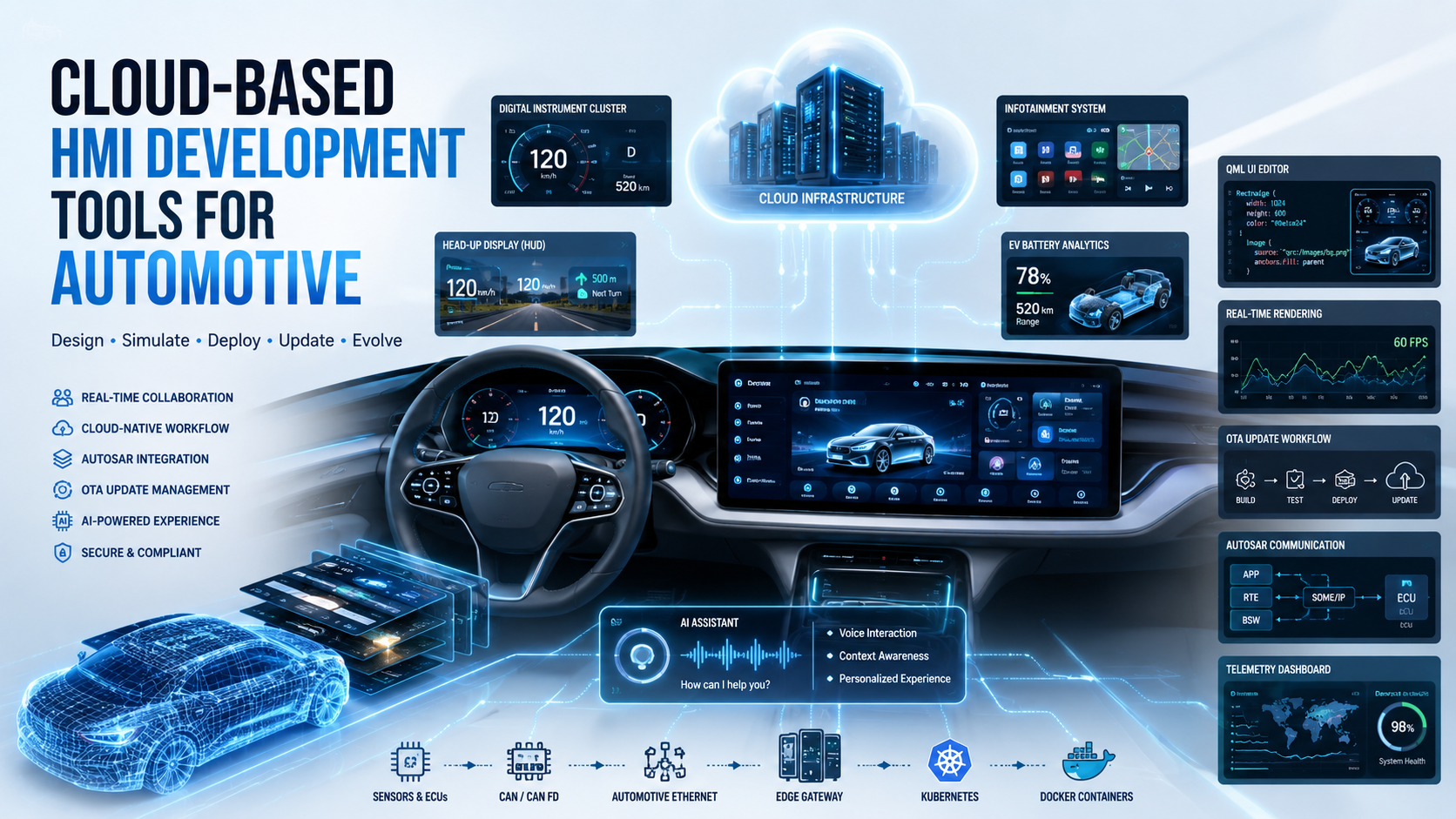
Cloud-based HMI development tools let engineers, UX designers, and software teams collaboratively design, simulate, deploy, and manage in-vehicle interfaces using browser-based or cloud-connected platforms. Instead of working on isolated local machines with proprietary toolchains, teams now build automotive interfaces through shared cloud environments that support real-time collaboration, version control, and continuous deployment.
Automotive companies are shifting toward cloud-native HMI engineering because modern vehicles are no longer just mechanical systems with screens bolted on. They are software platforms that require fast iteration, remote updates, and global team coordination. The software-defined vehicle (SDV) movement is pushing this transformation even further, making cloud tools a core requirement rather than a convenience.
This blog covers the architecture of cloud HMI tools, the platforms used across the industry, how the development workflow operates, AI integration, cybersecurity considerations, and where things are headed.
What Are Cloud-Based HMI Development Tools in Automotive?
Automotive HMI (Human-Machine Interface) refers to every screen, control, and visual element a driver or passenger interacts with inside a vehicle. This includes infotainment systems, instrument clusters, heads-up displays (HUDs), EV dashboards, ADAS visualization panels, and full digital cockpit setups.
Traditional HMI tools were desktop-based and tightly coupled to specific embedded hardware. Engineers built interfaces locally, tested on physical boards, and shipped software updates through dealer visits or manual flashing. The process was slow, hardware-dependent, and poorly suited for multi-team collaboration.
Cloud-based HMI tools change that model. They bring the development environment into shared cloud infrastructure where:
- UI designers and embedded engineers work on the same assets simultaneously
- Simulation runs on virtual ECUs without physical hardware
- CI/CD pipelines automate build, test, and deployment cycles
- OTA delivery pushes updates directly to vehicles in the field
The result is a SaaS-style engineering workflow applied to automotive software development.
Why Automotive OEMs Are Adopting Cloud-Based HMI Platforms
Automotive OEMs are adopting cloud HMI platforms to reduce development cycle time, enable over-the-air updates, support global team collaboration, and align with SDV architecture requirements.
Tesla fundamentally changed expectations in this space. Their ability to push UI updates and new features over the air forced every major OEM to rethink how vehicle software is built and maintained. That shift created immediate demand for cloud-native development pipelines that could support continuous delivery to vehicles already on the road.
Key drivers behind OEM adoption:
- Faster iteration – UI changes that previously took weeks of hardware flashing now deploy through automated pipelines
- Parallel development – Design, engineering, and validation teams work simultaneously on shared repositories
- Global synchronization – Teams across the US, Germany, China, and India collaborate on the same codebase in real time
- Centralized asset management – Fonts, icons, animations, and component libraries live in cloud repositories accessible to every stakeholder
- OTA compatibility – Cloud-built software is inherently packaged for remote deployment
- Reduced hardware dependency – Virtual ECUs and cloud simulators eliminate the need for physical dev boards during early design phases
The EV market acceleration is adding pressure too. EV buyers expect software-first experiences with frequent updates, subscription-unlockable features, and AI-powered interfaces. That cannot be delivered through traditional embedded-only development workflows.
Core Architecture of Cloud-Based Automotive HMI Development Tools
These tools combine frontend UI frameworks, cloud rendering infrastructure, automotive middleware, simulation engines, and deployment pipelines into an integrated development environment.
Frontend HMI Layer
The interface itself is built using rendering frameworks optimized for automotive-grade graphics:
- QML – Declarative language used with Qt for high-performance UI rendering
- HTML5 – Used in web-based HMI prototyping and browser-rendered infotainment
- Flutter – Google’s framework gaining traction in automotive for cross-platform UI consistency
- Qt Framework – Industry standard for embedded automotive UI
- Kanzi – High-performance 3D rendering engine designed specifically for automotive cockpits
- Unity and Unreal Engine – Used for immersive 3D cluster and digital cockpit experiences
Cloud Infrastructure Layer
The cloud backend handles compute, simulation, storage, and deployment:
- AWS Automotive Cloud – Provides EC2-based simulation instances, S3 asset storage, and IoT Core for vehicle connectivity
- Microsoft Azure Connected Vehicle Stack – Offers Azure Digital Twins, IoT Hub, and automotive SDKs
- Google Cloud Automotive – Powers Android Automotive OS integrations and ML inference services
- Kubernetes – Orchestrates containerized HMI build and test workloads
- Docker – Packages HMI applications for consistent deployment across embedded targets
- Edge-cloud synchronization – Keeps in-vehicle software aligned with cloud-managed configurations
Automotive Middleware Integration
Middleware connects the HMI layer to vehicle systems:
- AUTOSAR Adaptive – Modern middleware standard for high-compute automotive ECUs
- DDS (Data Distribution Service) – Publish-subscribe messaging used in ADAS and autonomous driving systems
- SOME/IP – Service-oriented middleware for Ethernet-based vehicle networks
- MQTT – Lightweight protocol used for connected vehicle telemetry
- OPC UA – Used in manufacturing-side automotive HMIs for factory floor systems
Vehicle Communication Layer
HMI tools must integrate with physical vehicle networks:
| Protocol | Bandwidth | Primary Use |
|---|---|---|
| CAN Bus | 1 Mbps | Classic ECU communication |
| CAN FD | 8 Mbps | High-speed sensor data |
| LIN | 20 Kbps | Low-speed actuators |
| Automotive Ethernet | 100 Mbps+ | Infotainment and ADAS |
| FlexRay | 10 Mbps | Safety-critical systems |
| V2X | Variable | Vehicle-to-infrastructure |
Backend Services
The backend layer handles operational intelligence:
- OTA update management and versioning
- Telemetry collection and analytics
- Driver behavior data processing
- Remote diagnostics
- Cloud API management for third-party integrations
Major Cloud-Based HMI Development Tools Used in Automotive
The most widely used automotive HMI tools include Qt, Kanzi, EB GUIDE, Altia, Crank Storyboard, Unity, and Android Automotive development platforms.
Qt for Automotive HMI
Qt is the most widely deployed HMI framework in automotive. Qt Design Studio provides a visual design environment where UX designers and QML developers collaborate on the same project files without constant hand-off friction.
Key technical capabilities:
- GPU acceleration through OpenGL ES and Vulkan backends
- Embedded Linux compatibility for IVI systems running on ARM SoCs
- Cross-platform deployment from desktop simulation to production hardware
- Qt Safe Renderer for functional-safety-certified display elements (ISO 26262)
- Cloud collaboration through Git-based repositories and shared design component libraries
Qt integrates with major automotive SoCs from Qualcomm, NXP, Renesas, and Texas Instruments. Its main limitation is that deep 3D visualization requires additional tooling or engine integration. It excels in instrument clusters, infotainment menus, and settings-heavy UI systems.
Kanzi
Kanzi is a real-time 3D rendering engine built specifically for automotive cockpit development. It handles GPU-intensive animations, physics-based rendering, and high-frame-rate cluster graphics that standard UI frameworks struggle with.
Technical strengths:
- Scene graph architecture optimized for automotive rendering pipelines
- Hardware abstraction layer supporting multiple GPU vendors
- Cloud simulation environment for design review without physical hardware
- OEM-grade animation pipelines with keyframe and procedural animation support
Kanzi is the preferred tool for premium EV and luxury automotive clusters where visual quality is a differentiator. Brands like BMW and Mercedes-Benz tier displays rely on Kanzi-based pipelines for their high-resolution 3D gauges and animated transitions.
EB GUIDE
EB GUIDE from Elektrobit uses model-based HMI engineering. Designers build state machine models that describe interface behavior, which EB GUIDE then generates into optimized embedded code.
Key features:
- AUTOSAR integration for direct vehicle signal mapping
- Rapid prototyping with live simulation on desktop
- Vehicle signal wiring through EB GUIDE Traffic
- Built-in voice UI development capabilities
EB GUIDE is particularly effective in compliance-heavy programs where traceability from requirements to implementation is mandatory.
Altia
Altia focuses on embedded deployment with aggressive optimization for constrained hardware. It generates production C code from graphical UI designs, eliminating the need for a full runtime engine on low-resource microcontrollers.
Automotive fit:
- Hardware acceleration using vendor-specific GPU APIs
- Automated code generation for MISRA-compliant embedded targets
- Strong AUTOSAR compatibility
- Used heavily in instrument clusters running on lower-power MCUs
Crank Storyboard
Crank Storyboard targets embedded graphics with a workflow that moves from cloud-connected design tools to production deployment on automotive hardware.
- Supports ARM Cortex-M and Cortex-A targets
- Real-time data binding for live vehicle signal visualization
- Cloud-connected design environment for team collaboration
- Used in dashboard UI development across mid-range automotive programs
Unity and Unreal Engine in Automotive HMIs
Both game engines are entering automotive HMI development for use cases requiring immersive 3D visualization.
Unity is used for:
- Digital twin cockpit simulation
- AR-HUD content development
- Real-time 3D cluster prototyping
- Cloud rendering through Unity Cloud Build
Unreal Engine is used for:
- Photorealistic HMI visualization in early design phases
- Automotive UX demonstrations and stakeholder presentations
- High-end cluster experiences with ray-traced lighting
The main limitation is AUTOSAR compatibility. Both engines require integration work to connect to automotive middleware, and neither is natively safety-certified. They work best in design exploration and high-fidelity prototyping rather than production-safety-critical displays.
Cloud-Based HMI Development Workflow in Automotive
Automotive HMI cloud workflows involve UI design, simulation, middleware integration, validation, CI/CD deployment, and OTA delivery.
UI/UX Design Phase
- Teams start in Figma or Adobe XD for wireframes and visual design systems
- Design tokens, color palettes, typography, and component libraries are shared across cloud repositories
- Automotive UX standards (glanceability, NHTSA distraction guidelines) are applied at this stage
Cloud Collaboration Phase
- All design and code assets live in Git repositories (GitHub, GitLab, or Bitbucket)
- Engineers and designers conduct async and synchronous reviews through cloud-hosted preview environments
- Branch-based workflows allow parallel feature development without conflicts
Simulation and Testing
- Virtual ECUs running on cloud VMs simulate vehicle signal behavior
- Frame rate, touch latency, and animation performance are benchmarked in cloud simulators
- Driver behavior simulation tests UI responses across edge-case scenarios
Integration Phase
- HMI connects to vehicle signals via SOME/IP, DDS, or CAN abstractions
- API integrations for navigation, media, and third-party services are validated
- Sensor data visualization (ADAS overlays, energy flow displays) is tested against live signal feeds
Validation and Compliance
- ISO 26262 functional safety requirements are verified through formal analysis
- ASPICE process assessments validate development process quality
- Cybersecurity testing targets OTA attack surfaces and API vulnerability points
Deployment Phase
- OTA packages are built, signed, and distributed through cloud update management systems
- Containerized deployment ensures consistency between simulation and production environments
- Continuous update pipelines allow post-launch feature additions without dealer intervention
Automotive Operating Systems Supporting Cloud HMI Development
Modern automotive HMI systems run on Android Automotive, Linux-based systems, QNX, and custom SDV operating environments.
- Android Automotive OS – Google’s automotive-grade Android build used by Volvo, GM, Polestar, and Renesas-based platforms
- Automotive Grade Linux (AGL) – Open-source Linux distribution for IVI systems maintained by the Linux Foundation
- QNX Neutrino – Real-time OS from BlackBerry used in safety-critical clusters and ADAS systems
- Hypervisor Architecture – Systems like Green Hills INTEGRITY or OpenSynergy COQOS run multiple OS instances on a single SoC, allowing Android for infotainment and QNX for safety-critical clusters simultaneously
Cloud HMI Integration with Software-Defined Vehicles
SDVs rely on cloud-native HMI systems because vehicle functionality increasingly depends on software updates and centralized computing rather than fixed ECU programming.
The architecture shift is significant:
- Centralized compute replaces dozens of distributed ECUs with high-performance vehicle computers running automotive-grade SoCs
- Zonal architecture reduces wiring complexity and consolidates control domains
- OTA feature unlocking allows manufacturers to enable hardware features through software subscriptions (heated seats, driver assistance modes, display themes)
- Cloud synchronization keeps vehicle UI preferences, profiles, and settings consistent across multiple vehicles tied to a user account
- AI-powered personalization adapts the interface layout, font sizes, shortcuts, and content based on driver behavior patterns learned over time
Role of AI in Cloud-Based Automotive HMI Platforms
AI improves automotive HMIs through voice interfaces, adaptive UI systems, predictive analytics, and intelligent personalization.
Current applications:
- AI voice assistants – Large language model (LLM)-powered assistants handle natural language commands for navigation, climate, media, and vehicle settings without menu drilling
- Driver emotion detection – Camera-based systems detect fatigue, distraction, or stress and adapt the interface or trigger alerts accordingly
- Predictive maintenance UI – AI analyzes telemetry and surfaces maintenance predictions directly in the cluster or infotainment before failures occur
- Context-aware interfaces – The HMI automatically simplifies its layout during highway driving and expands content options when parked
- Generative AI dashboards – Experimental systems use LLMs to dynamically generate UI layouts based on user intent rather than fixed menu trees
Real-Time Rendering Technologies in Automotive HMIs
Automotive HMIs use GPU acceleration, Vulkan, OpenGL ES, and hardware abstraction layers for smooth real-time rendering.
- Vulkan – Low-level GPU API that delivers maximum performance on automotive SoCs with predictable frame timing
- OpenGL ES – Widely supported across embedded automotive GPUs, used in most production cluster and infotainment systems
- GPU pipeline optimization – Shader pre-compilation, texture compression, and draw call batching are standard techniques for achieving stable 60 FPS rendering
- Frame buffering – Double and triple buffering strategies prevent tearing during animation-heavy transitions
- Embedded GPU targets – Imagination Technologies PowerVR, ARM Mali, and Renesas R-Car GPUs each require vendor-specific optimization paths
Automotive HMI Cybersecurity Challenges in Cloud Environments
Cloud-connected automotive HMIs face risks involving OTA security, API vulnerabilities, vehicle data privacy, and remote attack surfaces.
Key risk areas and mitigations:
| Risk | Mitigation |
|---|---|
| OTA package tampering | Code signing, encrypted update packages |
| API exploitation | Zero-trust API gateways, rate limiting |
| Unauthorized remote access | Vehicle firewalls, secure boot chains |
| Data privacy violations | Anonymized telemetry, GDPR/CCPA compliance |
| Supply chain attacks | Verified software bill of materials (SBOM) |
Applicable standards:
- ISO/SAE 21434 – Automotive cybersecurity engineering standard
- UNECE WP.29 R155 – UN regulation requiring cybersecurity management systems for vehicle type approval
- Cloud IAM – Role-based access controls for cloud-based development environments prevent unauthorized code deployment
Automotive Functional Safety Requirements for HMI Platforms
Automotive HMIs must comply with safety standards to prevent driver distraction, inaccurate visualization, or system failure.
- ISO 26262 defines Automotive Safety Integrity Levels (ASIL A through D) for hardware and software components
- Instrument cluster elements showing speed, fuel, or warning indicators typically require ASIL B or higher certification
- Safety-critical UI elements must use Qt Safe Renderer or equivalent tools that render independently from the main application layer
- Redundant display systems ensure that if the primary rendering pipeline fails, safety-critical information still reaches the driver
- Diagnostic monitoring continuously checks rendering integrity and flags failures to the vehicle safety manager
Cloud-Based Automotive HMI Testing and Validation
Automotive HMI testing combines simulation, automated testing, hardware-in-loop validation, and real vehicle testing.
- SIL (Software-in-Loop) – HMI software runs against simulated vehicle models in cloud environments
- HIL (Hardware-in-Loop) – Software connects to real ECUs in a lab setting to validate signal integration
- Virtual cockpit simulation – Cloud-hosted 3D environments simulate full vehicle cockpit interactions before hardware availability
- Touch latency testing – Measures response time from screen input to visual feedback (target is under 100ms for automotive grade)
- OTA validation – Update packages are tested in staged rollout environments before fleet-wide deployment
- Stress testing – Thermal throttling, memory pressure, and CPU load scenarios validate performance under worst-case conditions
Automotive OEMs Using Cloud-Based HMI Technologies
| OEM | HMI Platform | Key Features |
|---|---|---|
| Tesla | Proprietary Linux stack | Full OTA UI updates, AI autopilot visualization |
| Mercedes-Benz | MBUX (Android + Unity) | AI assistant, 3D cluster, cloud personalization |
| BMW | iDrive (AGL + Kanzi) | Curved display, gesture control, OTA updates |
| Volkswagen | VW.OS (Android Automotive) | App store, cloud-connected ID cockpit |
| Rivian | Linux-based custom stack | Adventure-focused UI, OTA feature unlocking |
| Lucid Motors | Proprietary + Android | 34-inch Glass Cockpit, cloud-synced profiles |
Challenges of Cloud-Based HMI Development in Automotive
Major challenges include latency, hardware fragmentation, cybersecurity risks, compliance complexity, and GPU optimization.
- Real-time constraints – Cloud latency cannot be introduced into safety-critical display rendering loops
- Embedded hardware limitations – Automotive SoCs have GPU and RAM constraints that cloud-built assets must be optimized for
- Hardware fragmentation – Supporting dozens of display resolutions, GPU vendors, and OS versions increases QA complexity significantly
- OTA failure risks – Failed updates in the field can brick vehicle systems, requiring careful rollback architecture
- Multi-display synchronization – Keeping instrument clusters, center stacks, and passenger displays in sync without frame-timing issues is technically demanding
- Thermal management – Automotive environments reach high temperatures that cause GPU throttling, impacting rendering performance
Future Trends in Automotive Cloud HMI Development
The future includes AI-native cockpits, mixed reality dashboards, cloud-rendered interfaces, and fully software-defined vehicle experiences.
- Generative UI systems – AI generates interface layouts dynamically based on driver context and preferences rather than following fixed design templates
- AR windshield displays – Full windshield HUDs overlay navigation, ADAS alerts, and vehicle data onto the real world at scale
- Cloud-streamed HMIs – High-compute UI rendering offloaded to edge cloud servers with low-latency streaming to in-vehicle displays
- Autonomous vehicle UX – As ADAS matures, HMI shifts from driving controls to passenger entertainment, productivity, and ambient environment control
- Voice-first interfaces – LLM-powered voice replaces most touch interactions, especially in hands-free driving scenarios
- Digital twin integration – Vehicle digital twins in the cloud enable predictive UI testing against real-world usage data before deployment
- Personalization engines – Cloud-managed driver profiles adapt every aspect of the interface from layout to content to accessibility settings across multiple vehicles
Best Practices for Selecting Automotive Cloud HMI Tools
Choose tools based on rendering performance, AUTOSAR compatibility, cloud integration, scalability, safety compliance, and OTA support.
Selection checklist:
- GPU compatibility with your target SoC (Qualcomm, Renesas, NXP, TI)
- Embedded OS support (QNX, AGL, Android Automotive, Linux)
- AUTOSAR Adaptive middleware integration capability
- Cloud deployment pipeline support (CI/CD, containerization, OTA packaging)
- ISO 26262 certification readiness for safety-critical display elements
- Multi-team collaboration features (Git integration, shared design systems)
- Long-term OEM scalability (multi-model, multi-region deployment support)
- Vendor support track record in production automotive programs
Comparison Table of Automotive Cloud-Based HMI Tools
| Tool | Rendering Capability | Cloud Support | AUTOSAR Compatibility | 3D Support | OTA Friendly | Best Use Case |
|---|---|---|---|---|---|---|
| Qt | High | Strong | Medium | Medium | Yes | Digital Cockpit |
| Kanzi | Very High | Medium | High | Excellent | Yes | Premium EV UX |
| EB GUIDE | Medium | Medium | Very High | Low | Yes | Compliance-heavy programs |
| Altia | Medium | Medium | High | Medium | Yes | Embedded HMIs |
| Crank Storyboard | Medium | Medium | Medium | Medium | Yes | Embedded Dashboards |
| Unity | Very High | Strong | Low | Excellent | Medium | Immersive Cockpits |
| Unreal Engine | Very High | Medium | Low | Excellent | Low | Design Visualization |
Conclusion
Cloud-based HMI development tools are no longer optional additions to the automotive engineering stack. They are central infrastructure for any OEM or supplier building software-defined vehicles.
The shift is structural. Vehicles are becoming software platforms that require the same development velocity, collaboration tooling, and deployment pipelines that consumer software companies have used for over a decade. Cloud-native HMI engineering is how automotive teams match that pace while meeting the safety, compliance, and quality standards the industry demands.
AI is accelerating the transformation further. Cockpit systems are moving from static, menu-driven interfaces to adaptive, voice-first, context-aware environments that update continuously throughout a vehicle’s operational life.
The automotive HMI is no longer just a display system. It is the primary interface between the vehicle’s software platform and the humans who depend on it. Building that interface well, at scale, and with the ability to evolve it continuously, requires exactly the kind of cloud-native toolchain this space is converging toward.
FAQs
Cloud-based automotive HMI development is the practice of designing, simulating, testing, and deploying in-vehicle user interfaces using cloud-connected platforms, shared repositories, and automated CI/CD pipelines rather than isolated local development environments.
Qt is the most widely used tool for automotive dashboards due to its strong embedded Linux support, GPU acceleration, and cross-platform deployment capability. Kanzi is preferred for premium 3D cluster experiences.
Yes. Qt is used across infotainment, instrument clusters, and digital cockpit systems by a large share of global OEMs and Tier 1 suppliers including Bosch, Continental, and Visteon.
Cloud computing enables multi-team collaboration, virtual ECU simulation, CI/CD automation, OTA update management, and telemetry-based analytics for automotive HMI systems.
OTA updates allow manufacturers to push UI changes, new features, bug fixes, and performance improvements to vehicles already in the field without requiring physical service visits.
Automotive HMIs run on Android Automotive OS, Automotive Grade Linux (AGL), QNX Neutrino, and custom Linux distributions, often managed by hypervisors running multiple OS instances on a single SoC.
Unity can be used for automotive cockpit prototyping, digital twin simulation, and immersive 3D visualization. It is not natively AUTOSAR-compatible or safety-certified for production safety-critical displays without additional integration work.
Software-Defined Vehicles (SDVs) are vehicles where the majority of functionality, features, and user experience is delivered and updated through software rather than fixed hardware programming, enabling OTA feature delivery and continuous improvement.
AI is introducing voice-first interfaces powered by LLMs, adaptive UI layouts that respond to driver context, predictive maintenance alerts, driver monitoring systems, and generative UI concepts that move beyond static menu design.
The primary standards are ISO/SAE 21434 for automotive cybersecurity engineering and UNECE WP.29 R155 for regulatory compliance. These cover OTA security, API protection, secure boot, and cybersecurity management system requirements across the vehicle development lifecycle.