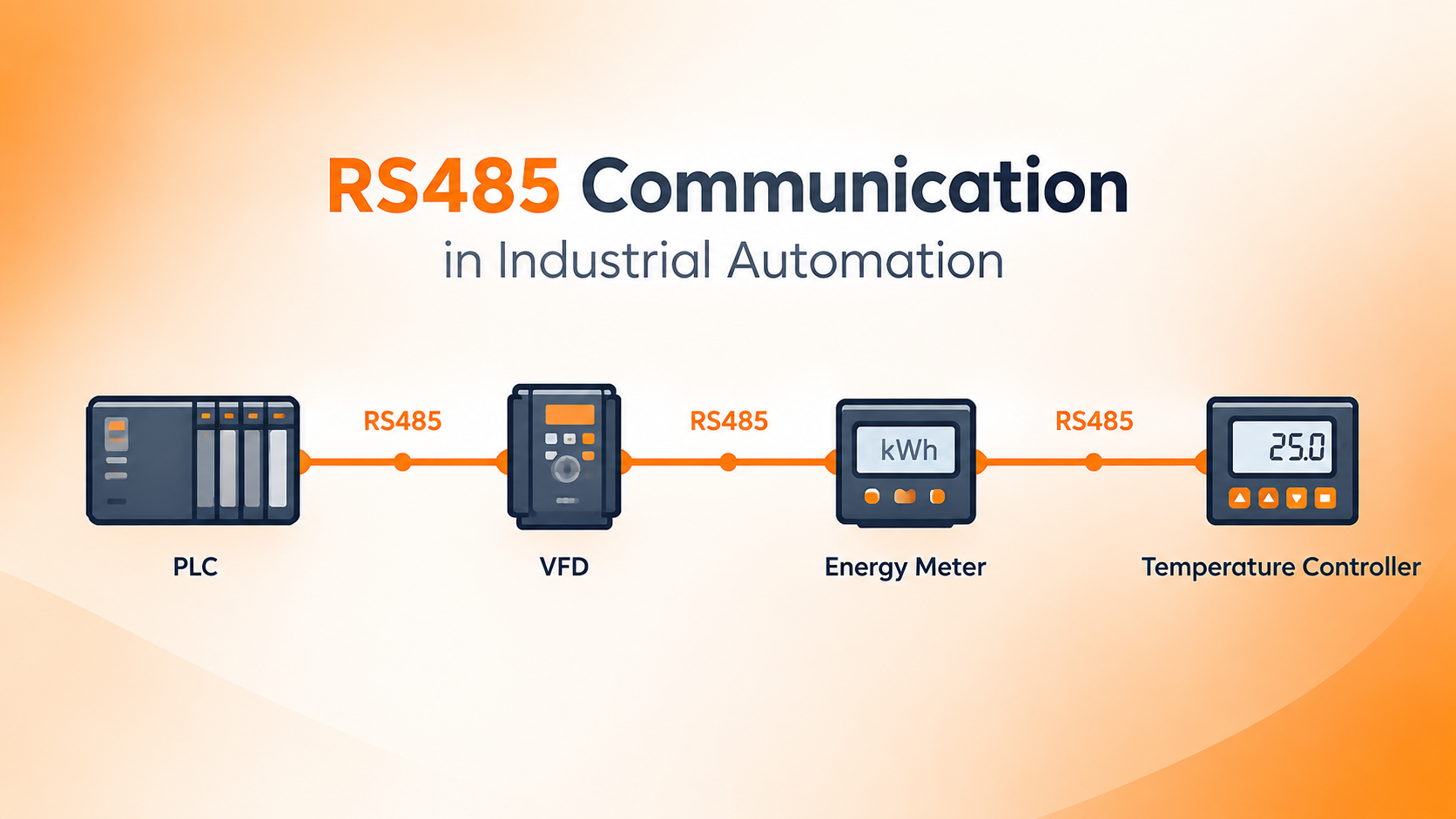
RS485 is one of the most common communication standards in industrial automation. It connects PLCs, HMIs, VFDs, sensors, meters, and many other devices over long distances in noisy factory environments.
This guide explains what RS485 is, how it works, how to wire it, how Modbus RTU fits in, and how to troubleshoot common problems. It is written for engineers, technicians, and anyone who works with industrial control systems.
Introduction to RS485 Communication
Industrial automation depends on devices talking to each other. A PLC needs to read a sensor. An HMI needs to display motor speed. A controller needs to adjust a drive. Without reliable communication, none of this works.
Simple serial communication like RS232 works well over short distances. But RS232 has limits. It cannot handle long cables, it cannot connect many devices on one line, and it is easily affected by electrical noise.
RS485 solves these problems. It uses differential signaling to reject noise, supports long cable runs, and allows multiple devices to share one communication bus. You will find RS485 in factory floors, water treatment plants, energy monitoring systems, building automation, and process control.
Here is a quick comparison between RS485 and RS232.
| Feature | RS485 | RS232 |
|---|---|---|
| Signaling | Differential | Single ended |
| Devices on bus | Many | Usually two |
| Distance | Long | Short |
| Noise immunity | High | Low |
| Industrial use | Very common | Limited |
This article covers RS485 fundamentals, wiring, termination, Modbus RTU, PLC integration, real applications, and troubleshooting.
What Is RS485?
RS485 is a physical layer communication standard. It defines the electrical characteristics of a serial interface. It does not define the protocol or the data format. That means RS485 only describes how signals travel on the wire, not what those signals mean.
Key points about RS485:
- It uses differential signaling
- It supports balanced transmission
- It works with two wire or four wire configurations
- It supports half duplex and full duplex
- It allows multiple devices on one bus
- It is common in industrial applications
RS485 is often confused with Modbus RTU. They are not the same thing. RS485 is the physical layer. Modbus RTU is a protocol that can run over RS485.
How RS485 Communication Works
RS485 communication happens through a pair of wires. One wire carries the A signal and the other carries the B signal. The receiver looks at the voltage difference between these two wires, not the voltage on each wire relative to ground.
Differential Signaling
Differential signaling means the data is represented by the difference between two lines. If A is higher than B, that represents one logic state. If B is higher than A, that represents the other logic state.
This method improves noise immunity. Electrical noise usually affects both wires equally. Since the receiver only cares about the difference, the noise cancels out. This is called common mode noise rejection.
Data Transmission
Data travels as binary signals over the differential pair. A transceiver on each device converts the serial data from the UART into differential signals and back again.
The UART inside the device handles the timing and framing of the data. The RS485 transceiver handles the electrical signaling. This is why RS485 and UART are related but not the same.
Half Duplex Communication
In a two wire RS485 network, devices take turns transmitting. This is called half duplex. Only one device can talk at a time.
For example, a PLC sends a request to a VFD. The VFD listens, processes the request, and then responds. The PLC waits for the response before sending another request. This request and response cycle keeps the network orderly.
If two devices transmit at the same time, data collision occurs and communication fails.
RS485 Wiring and Pinout
Wiring is one of the most practical parts of RS485. Mistakes here cause most communication problems.
RS485 uses two main terminals labeled A and B. Some manufacturers use D+ and D-. Others use positive and negative. Always check the device manual because labeling can vary.
A reference ground connection may be needed. This provides a common voltage reference and helps prevent communication errors. Not all systems require it, but it is good practice in industrial environments.
Shielding protects the signal from electrical noise. Use shielded twisted pair cable. Connect the shield at one end only to avoid ground loops.
Cable polarity matters. If A and B are swapped, communication will not work. Always verify polarity before powering up.
Here is a simple wiring diagram for a typical RS485 network.
PLC → RS485 cable → VFD → Energy meter → Temperature controller
Each device connects to the same A and B lines. The cable goes from one device to the next in a daisy chain.
RS485 Network Topology
The physical arrangement of devices on an RS485 network affects reliability.
Daisy Chain Topology
Daisy chain wiring is the recommended topology. Devices are connected one after another along a single cable path. This keeps the network clean and reduces signal reflections.
Star Topology
Star wiring connects devices to a central point. This can cause signal reflections and communication problems. Star topology is generally avoided in RS485 networks.
Branches and Stub Length
Long branches or stubs from the main cable can create signal integrity problems. Keep stubs as short as possible. If a device must be connected with a branch, keep it under a few feet.
Recommended layout is a clean daisy chain. Poor layout is a star with long branches.
RS485 Termination and Biasing
Termination and biasing make the network electrically stable.
Termination Resistors
Termination resistors are placed at both physical ends of the network. A typical value is 120 ohms. They match the characteristic impedance of the cable and prevent signal reflections.
Do not terminate every device. Only the two ends of the bus need termination. Adding termination at every device increases load and can cause communication failure.
Biasing Resistors
Biasing resistors maintain a known idle state on the bus. When no device is transmitting, the bus can float and cause false data. Bias resistors pull A and B to known voltages so the receiver sees a stable idle condition.
Some devices have built in biasing. Others require external bias resistors. Check the device manual.
Grounding and Shielding
A signal reference helps keep communication stable. Connect the shield at one end only. Ground loops can cause noise and damage equipment.
Electrical isolation is useful when devices are far apart or on different power systems. Isolated RS485 interfaces prevent ground potential differences from causing problems.
RS485 Cable Selection
Choosing the right cable matters for reliable communication.
Look for these features:
- Twisted pair construction
- Correct characteristic impedance, typically 120 ohms
- Shielding for noisy environments
- Low capacitance
- Appropriate conductor size
- Suitable for industrial conditions
Cable length affects signal quality. RS485 can run up to 4000 feet under good conditions. Higher baud rates reduce maximum distance.
Keep RS485 cable away from VFD cables and motor power cables. These sources of electrical noise can interfere with communication. Route communication cable separately from power cable.
RS485 Communication Parameters
All devices on the network must use the same communication settings.
Key parameters include:
- Baud rate
- Data bits
- Parity
- Stop bits
- Device address
- Communication mode
A common configuration is 9600 baud, 8 data bits, even parity, 1 stop bit.
If settings do not match, communication fails. The PLC may not detect the device, or data may be corrupted. Always verify settings on both ends.
RS485 vs RS232 vs RS422
Here is a practical comparison for automation.
| Feature | RS485 | RS232 | RS422 |
|---|---|---|---|
| Signaling | Differential | Single ended | Differential |
| Multi device | Yes | Generally no | Limited |
| Noise immunity | High | Lower | High |
| Typical distance | Long | Shorter | Long |
| Industrial use | Very common | Limited | Common in some applications |
| Communication | Half or full duplex | Full duplex | Full duplex |
RS485 is the most common choice for multi device industrial networks.
RS485 vs Modbus RTU
RS485 and Modbus RTU are often confused. They are different layers.
RS485 is the physical layer. It defines voltage levels, wiring, and signaling.
Modbus RTU is a communication protocol. It defines message structure, function codes, and data addressing.
They work together like this:
PLC → RS485 physical layer → Modbus RTU protocol → VFD
RS485 can carry other protocols too. Examples include Profibus DP, BACnet MS/TP, and manufacturer specific protocols.
Modbus RTU Over RS485
Modbus RTU is the most common protocol used over RS485 in industrial automation.
It uses a master and slave model. The master sends requests. The slaves respond.
Key concepts:
- Master or client
- Slave or server
- Device address
- Function codes
- Registers
- Read and write operations
- CRC error checking
- Request and response messages
A simple example: The PLC sends a request to read the VFD frequency. The VFD responds with the register data. The PLC updates its memory and the HMI displays the value.
RS485 Applications in Industrial Automation
RS485 is used in many industrial applications.
PLC and VFD Communication
PLCs exchange start and stop commands, speed references, running status, fault codes, current, and frequency with VFDs.
PLC and HMI Communication
HMIs display field device data from the PLC over RS485.
Energy Meters
Energy meters transmit voltage, current, power, energy consumption, and power factor.
Temperature Controllers
Temperature controllers send process temperature, setpoint, alarm status, and control output.
Remote I/O
Distributed I/O modules communicate with a PLC through RS485.
Sensors and Instrumentation
Pressure, flow, temperature, level, and humidity sensors use RS485 to send data.
RS485 Communication in PLC Systems
RS485 fits into PLC architecture in several ways.
Example connections:
PLC → RS485 → Remote I/O
PLC → RS485 → VFD
PLC → RS485 → Energy Meter
PLC communication ports may include built in RS485, RS485 expansion modules, or serial communication modules. Serial communication instructions and Modbus configuration are used in the PLC program.
Device addressing must be unique on the network.
How to Connect an RS485 Device to a PLC
Follow these steps for a successful connection.
Step 1: Check the PLC Communication Interface
Confirm whether the PLC has built in RS485, an RS485 communication module, or a serial expansion module.
Step 2: Check the Field Device Manual
Identify A and B terminals, baud rate, parity, slave address, protocol, and register map.
Step 3: Wire the Network
Connect RS485 A, RS485 B, reference ground where required, and shield appropriately.
Step 4: Configure Communication Parameters
Match PLC and device settings for baud rate, data bits, parity, and stop bits.
Step 5: Configure the Protocol
For Modbus RTU, configure device address, function code, register address, and data type.
Step 6: Test Communication
Verify response from the device, correct register values, error codes, and communication status.
Common RS485 Communication Problems
Troubleshooting is a major part of working with RS485.
PLC Cannot Detect the Device
Possible causes include wrong A and B polarity, incorrect device address, incorrect baud rate, wrong parity, incorrect protocol, wiring problem, or device not powered.
Intermittent Communication
Possible causes include electrical noise, poor shielding, incorrect termination, long cable branches, loose terminals, and grounding problems.
CRC Errors
CRC errors can be caused by noise, incorrect baud or parity configuration, corrupted data, wiring problems, and improper termination.
Communication Works at Short Distance but Fails at Longer Distance
Check cable quality, signal reflections, termination, cable routing, network topology, and baud rate.
Devices Stop Communicating When a VFD Starts
Switching noise from VFDs and motors can interfere with communication wiring. Keep cables separated and use shielding.
RS485 Troubleshooting Checklist
Use this quick checklist:
- Check device power
- Confirm A and B polarity
- Verify device address
- Match baud rate
- Match parity
- Check stop bits
- Confirm protocol
- Inspect cable continuity
- Check termination
- Check shielding and grounding
- Separate communication and power cables
- Test one device at a time
RS485 Best Practices for Industrial Automation
Follow these recommendations for reliable networks.
- Use proper twisted pair cable
- Prefer daisy chain topology
- Terminate both physical ends
- Keep stubs short
- Avoid unnecessary star topology
- Keep RS485 cables away from high noise power cables
- Use shielded cable where appropriate
- Document device addresses
- Keep communication parameters consistent
- Use isolated interfaces when required
- Follow the equipment manufacturer wiring specifications
RS485 Communication Example
Here is a complete example of PLC and VFD communication over RS485 using Modbus RTU.
PLC → RS485 → VFD
The PLC sends a command. The VFD receives the request. The VFD processes the command. The VFD returns a response. The PLC updates status. The HMI displays the result.
This request and response cycle repeats continuously in a real system.
RS485 Network Architecture Example
A typical industrial architecture looks like this:
PLC
↓ RS485
VFD 1
↓ RS485
VFD 2
↓ RS485
Energy Meter
↓ RS485
Temperature Controller
Each device has a unique address. The PLC communicates with one device at a time on the shared bus.
RS485 Communication Safety and Reliability Considerations
RS485 is robust but not automatically safe. Reliability depends on installation quality.
Consider electrical isolation, ground potential differences, surge protection, industrial EMI, shielding, proper cable routing, environmental conditions, and maintenance documentation.
Do not assume RS485 is safe just because it is robust. Proper installation is essential.
Conclusion
RS485 is a robust differential serial communication interface that allows industrial devices to exchange data over a shared network. It is the physical layer that carries protocols like Modbus RTU.
Success with RS485 depends on proper wiring, correct termination, matching communication parameters, and good network design. Troubleshooting skills are just as important as installation skills.
Remember the key distinctions. RS485 is the physical layer. Modbus RTU is a protocol. Wiring and termination affect reliability. Device configuration must match across the network.
Use proper cable, follow best practices, and document your network. These steps will keep your RS485 communication stable and reliable in any industrial automation system.
Frequently Asked Questions About RS485
What is RS485 used for in automation?
RS485 is used as the physical communication layer that connects industrial devices over a shared serial bus. In automation, it links PLCs, HMIs, VFDs, sensors, energy meters, temperature controllers, remote I/O modules, and RTUs.
Its main value is that it supports long cable runs, survives electrically noisy factory environments, and allows many devices to share one communication line. This reduces wiring cost and simplifies network expansion. A single RS485 bus can carry data from multiple field devices back to a PLC or SCADA system without running separate cables for each device.
Is RS485 the same as Modbus?
No. RS485 and Modbus are two different things that work together.
RS485 is the physical layer. It defines voltage levels, differential signaling, wiring, termination, and how bits travel on the wire.
Modbus RTU is a communication protocol. It defines message structure, device addressing, function codes, register mapping, and error checking.
Think of RS485 as the road and Modbus RTU as the traffic rules. RS485 can also carry other protocols such as Profibus DP, BACnet MS/TP, and manufacturer specific protocols. Modbus RTU can also run over other physical layers like RS232 in some cases.
How many devices can connect to RS485?
A standard RS485 segment supports up to 32 unit loads. A unit load is a measure of electrical load that a transceiver places on the bus. Many modern transceivers are designed as one eighth or one quarter unit load, which means you can connect more than 32 devices on a single segment.
If you need more devices or longer distance, use an RS485 repeater. A repeater creates a new segment, refreshes the signal, and allows additional devices to join. In practice, most industrial networks use far fewer than 32 devices per segment for simplicity and reliability.
What is the maximum RS485 cable length?
RS485 can run up to 4000 feet or about 1200 meters under good conditions. This distance assumes proper twisted pair cable, correct termination, and a moderate baud rate.
Higher baud rates reduce maximum distance. For example, 9600 baud can reach the full 4000 feet, but 115200 baud may only work reliably over a few hundred feet. Cable quality, noise, and network topology also affect real world distance.
If you need to go farther, use a repeater or convert to another medium like fiber optic.
What baud rate should be used for RS485?
Common RS485 baud rates include 9600, 19200, 38400, 57600, and 115200. The right choice depends on your device support, cable length, and required data speed.
For most industrial automation systems, 9600 or 19200 baud is sufficient. These rates are stable over long distances and work well in noisy environments. Use higher baud rates only when you need faster updates and your cable and network can support it.
The most important rule is that every device on the network must use the same baud rate. A mismatch causes communication failure or corrupted data.
Does RS485 require a twisted pair cable?
Yes. Twisted pair cable is strongly recommended for RS485. The twisting helps cancel electromagnetic interference because noise couples equally into both wires. Since RS485 reads the voltage difference between the two wires, the common noise cancels out.
Shielded twisted pair cable is even better in noisy industrial environments. The shield protects against external electrical noise when connected properly at one end.
Using untwisted cable may work over short distances in clean environments, but it is not reliable for industrial use.
Why are termination resistors used in RS485?
Termination resistors prevent signal reflections at the ends of the bus. When a signal reaches the end of a cable and finds no termination, it reflects back and interferes with incoming data.
A typical RS485 network uses 120 ohm termination resistors at both physical ends of the bus. These resistors match the characteristic impedance of the cable and absorb the signal energy.
Only the two ends need termination. Adding termination at every device increases bus load and can cause communication failure.
Should RS485 use A and B or D+ and D-?
Both labeling conventions are used in industry. A and B are common, but D+ and D- are also widely used. Some manufacturers use positive and negative, or even reverse the A and B labels compared to other vendors.
There is no universal standard that all manufacturers follow. This is why you must always check the device manual before wiring.
If communication does not work, try swapping A and B. This is one of the most common wiring mistakes and the easiest to fix.
Can RS485 communicate with a PLC?
Yes. RS485 is one of the most common communication interfaces on industrial PLCs. Many PLCs have built in RS485 ports. Others support RS485 through expansion modules or communication cards.
The PLC acts as the master or client on the network. It sends requests to field devices and reads their responses. Common protocols used over RS485 with PLCs include Modbus RTU, Profibus DP, and manufacturer specific protocols.
When selecting a PLC for RS485 communication, check whether it supports the protocol your field devices use.
Can RS485 communicate with a VFD?
Yes. RS485 is widely used for PLC to VFD communication. It allows the PLC to send start and stop commands, speed references, and parameter changes. The VFD can return running status, fault codes, current, voltage, frequency, and other data.
This replaces traditional analog signals and discrete wiring with a single communication cable. It reduces wiring complexity and gives the PLC access to more data from the drive.
Modbus RTU is the most common protocol for VFD communication over RS485.
Why does RS485 communication fail intermittently?
Intermittent failures are usually caused by electrical or installation issues rather than device faults. Common causes include electrical noise from motors or VFDs, poor or missing shielding, incorrect termination, long cable branches, loose terminals, and grounding problems.
Intermittent problems are difficult to diagnose because they come and go. Start by checking termination, shielding, and cable routing. Keep communication cable away from power cable. Test one device at a time to isolate the problem.
If the issue appears when a motor starts, noise is the likely cause.
What causes CRC errors in RS485?
CRC errors mean the received data does not match the transmitted data. The most common causes are electrical noise, incorrect baud rate or parity settings, corrupted data from bad wiring, and improper termination.
CRC errors often increase with cable length, higher baud rates, and noisy environments. Check that all devices use the same communication parameters. Verify termination and shielding. Route communication cable away from noise sources.
If CRC errors continue, lower the baud rate and inspect the cable for damage.
Is RS485 better than RS232 for industrial automation?
Yes. RS485 is almost always the better choice for industrial automation. It supports longer distances, allows multiple devices on one bus, and has much better noise immunity because of differential signaling.
RS232 is limited to short distances, usually two devices, and is more vulnerable to noise. It is fine for local configuration or bench testing, but not for factory floor networks.
RS485 is the standard for connecting PLCs, VFDs, sensors, and meters in industrial environments.