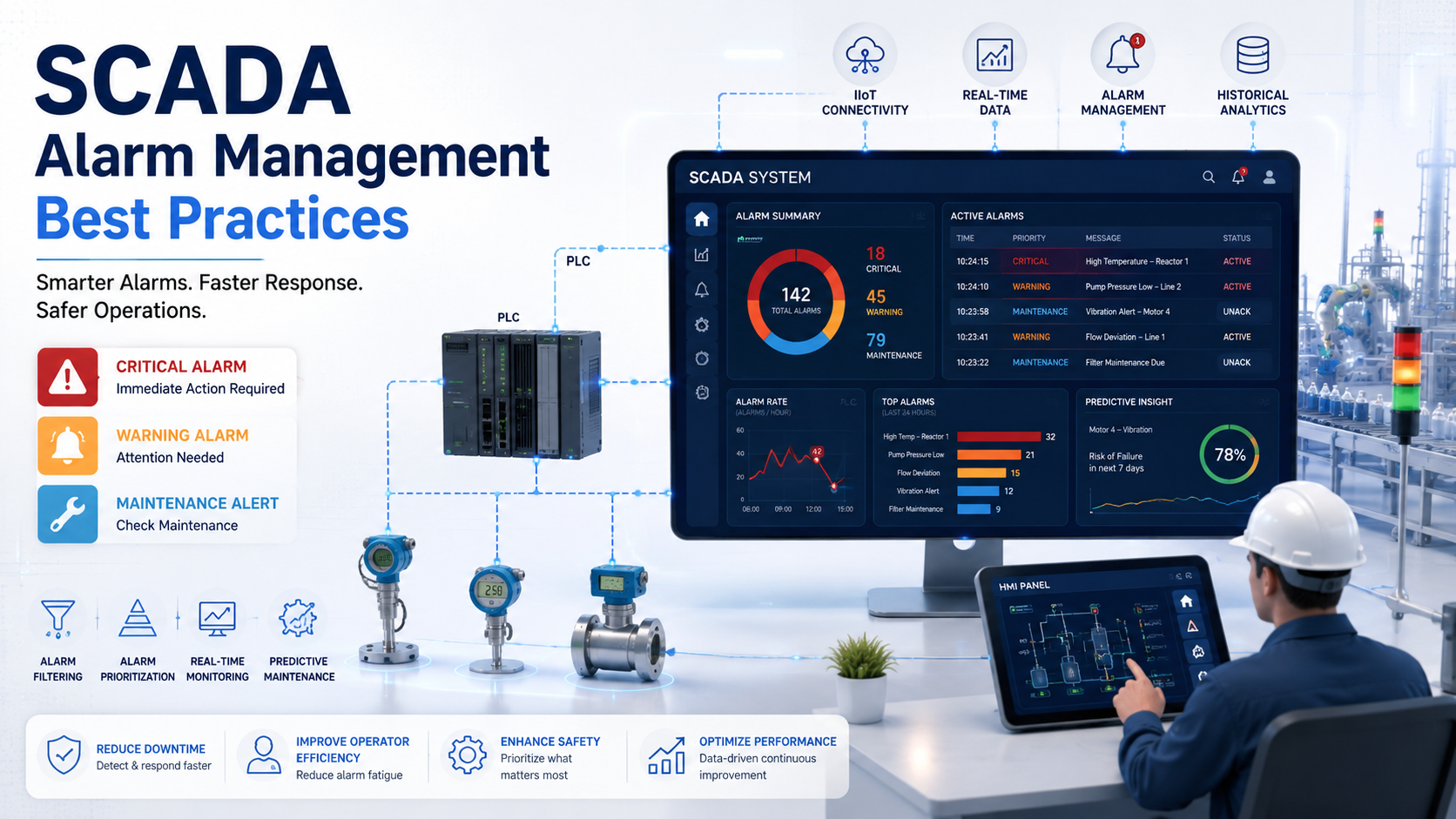
SCADA alarm management is one of the most overlooked areas in industrial operations. Plants invest heavily in sensors, PLCs, and control systems but then let alarm configurations run unchecked for years. The result? Operators drowning in alerts, critical alarms getting missed, and unnecessary downtime eating into production.
This guide covers what actually works, based on industry standards and real operational experience.
What Is SCADA Alarm Management?
SCADA alarm management is the process of designing, prioritizing, monitoring, and continuously optimizing alarms within industrial control systems so operators receive actionable alerts without getting overloaded.
An alarm in SCADA is not just a notification. It is a specific signal that requires an operator to take action within a defined timeframe. That distinction matters.
Alarms vs. Events vs. Alerts
- Alarm — Requires immediate operator action to prevent equipment damage, safety risk, or production loss
- Alert — Informational notification that does not require immediate response
- Event — A logged system occurrence such as a mode change or operator login
Many plants configure events and alerts as alarms. That single mistake inflates alarm counts and burns out control room operators fast.
Where SCADA Alarms Fit in the Automation Stack
SCADA alarms interact with multiple layers of the control system. Sensors detect abnormal process conditions. PLCs process the signal and trigger logic. The SCADA platform generates the alarm. The HMI displays the notification to the operator. The historian logs everything for review and analysis.
Industries relying on well-managed SCADA alarms include water treatment plants, oil and gas facilities, power generation, food and beverage manufacturing, and automotive assembly lines.
Why Poor Alarm Management Causes Major Industrial Problems
Bad alarm management does not just annoy operators. It causes real financial and safety damage.
Alarm Flooding
Alarm flooding happens when a single process upset triggers hundreds or thousands of alarms in minutes. During abnormal conditions, operators may see 500 to 2,000 alarms per hour. At that rate, identifying the root cause becomes nearly impossible.
Operator Fatigue
When operators see constant alarm activity, they start tuning it out. This is called alarm fatigue. Critical alarms get buried under low-priority noise, and response times slow. In some documented industrial incidents, critical safety alarms were acknowledged without action simply because operators had been trained by habit to dismiss repetitive alerts.
Downtime Caused by Delayed Response
A conveyor line fault may generate a single critical alarm followed by dozens of cascading warnings. If the operator cannot identify the root cause alarm quickly, they may apply wrong corrective actions, extend downtime by 20 to 40 minutes, or miss the window to prevent secondary equipment damage.
Real Cost of Poor Alarm Systems
| Problem | Operational Impact |
|---|---|
| Alarm flooding | Root cause buried, slow response |
| Standing alarms | Critical conditions ignored |
| False alarms | Operator trust in system declines |
| No prioritization | Every alarm feels equally urgent |
| Poor HMI layout | Information hard to process under stress |
How SCADA Alarm Systems Actually Work
Understanding the alarm lifecycle helps engineers configure better systems and helps operators respond more effectively.
The Alarm Lifecycle
Every SCADA alarm moves through defined stages:
- Generation — Process value crosses a configured threshold or a logic condition triggers
- Notification — HMI displays the alarm, annunciator sounds, operator receives alert
- Acknowledgment — Operator confirms they are aware of the condition
- Shelving — Alarm temporarily suppressed during planned maintenance
- Resolution — Process returns to normal state
- Logging — Event recorded in historian for future analysis
Types of SCADA Alarms
- High and Low Alarms — Process value exceeds upper or lower threshold
- Critical Alarms — Immediate shutdown or safety risk if not addressed
- Warning Alarms — Early indicators of deteriorating conditions
- Communication Alarms — Network or device connectivity failures
- Safety Alarms — Tied to safety instrumented systems
- Maintenance Alarms — Equipment requiring scheduled service
Each alarm type serves a different operational purpose. Mixing them without categorization creates confusion on the HMI and during shift handovers.
SCADA Alarm Management Standards
Following established standards is not just about compliance. It produces measurable operational improvements.
ISA-18.2
ISA-18.2 is the primary industrial standard for alarm management in the US. It defines the full alarm lifecycle, sets performance benchmarks, and provides a framework for alarm rationalization, design, and continuous improvement.
Key ISA-18.2 benchmarks include:
- Acceptable alarm rate: under 6 to 12 alarms per operator per hour during normal operations
- Maximum manageable alarm rate: around 10 alarms per 10-minute window during upset conditions
- Standing alarms: should not exceed a small percentage of total configured alarms
IEC 62682
IEC 62682 is the international equivalent of ISA-18.2. It aligns closely with the ISA standard and is used in global operations. Plants operating across multiple countries benefit from designing alarm systems to IEC 62682 specifications.
EEMUA 191
The Engineering Equipment and Materials Users Association published EEMUA Publication 191, which established early benchmarks for alarm rates and HMI design. Many alarm KPI targets still referenced today originate from EEMUA 191 guidance.
OSHA Process Safety Considerations
For facilities under OSHA PSM (Process Safety Management) requirements, alarm management is part of broader process hazard analysis obligations. Unmanaged alarm systems can become a compliance liability in addition to an operational one.
SCADA Alarm Management Best Practices
Perform Alarm Rationalization
Alarm rationalization is the systematic review of every configured alarm to determine whether it belongs in the system.
For each alarm, engineers ask:
- Is this alarm necessary?
- Does the operator have a defined action to take?
- What is the consequence if this alarm is not responded to?
- Is the setpoint correct for current process conditions?
Rationalization removes duplicate alarms, converts unnecessary alarms to events, adjusts priorities, and documents the approved response for each alarm. The output is usually a master alarm database that becomes the single source of truth for the system.
Alarm rationalization workshops typically involve control engineers, process engineers, operators, and safety personnel. Cross-functional input prevents alarms from being removed that matter to one group but not another.
Plants completing formal rationalization projects typically eliminate 20 to 40 percent of configured alarms and find that a significant portion of remaining alarms need priority adjustments.
Prioritize Alarms Properly
Priority levels tell operators what to deal with first.
Standard Priority Structure
| Priority | Level | Response Timeframe |
|---|---|---|
| Critical | P1 | Immediate, within minutes |
| High | P2 | Within 10 to 15 minutes |
| Medium | P3 | Within 30 minutes |
| Low | P4 | Within one shift |
Most plants that have not done formal rationalization have too many Critical and High alarms. When everything is urgent, nothing is urgent.
Color coding on HMIs reinforces priority. Most standards use red for critical, orange or amber for high, yellow for medium, and green or blue for low and informational states. Consistent color usage reduces cognitive load for operators during high-stress events.
Eliminate Nuisance Alarms
Nuisance alarms are the biggest driver of alarm fatigue. There are three main types:
Chattering Alarms — A single alarm that repeatedly triggers and clears because the process value oscillates around the setpoint. One chattering alarm can generate hundreds of entries in a single shift.
Repeating Alarms — Alarms that return frequently because the underlying condition is never fully resolved.
Standing Alarms — Alarms that have been in an active state for extended periods, often because no one believes they can be fixed or the threshold is set incorrectly.
Technical Solutions
- Deadband configuration — Creates a buffer zone so the alarm does not re-trigger until the value moves meaningfully away from the setpoint
- Delay timers — Requires the abnormal condition to persist for a defined period before the alarm fires
- Signal filtering — Smooths noisy sensor signals before they reach alarm logic
- Better sensor calibration — Addresses the root cause of signal instability
Use Alarm Shelving Carefully
Alarm shelving allows operators to temporarily suppress an alarm during planned maintenance or known abnormal conditions.
Used correctly, shelving prevents known nuisance alarms from cluttering the display during a maintenance window. Used incorrectly, shelving becomes a way to hide problems.
Best Practices for Shelving
- Require documented justification before shelving any alarm
- Set automatic expiration times so shelved alarms cannot stay suppressed indefinitely
- Make shelved alarms visible in a separate management view
- Review all shelved alarms during shift handover
- Track total shelved alarm count as a performance KPI
Design Better HMI Alarm Screens
The HMI alarm screen is where everything comes together for the operator. Poor design under normal conditions becomes a serious problem during process upsets.
Principles of Effective HMI Alarm Design
- Display only active alarms by default, not alarm history
- Group alarms by area, unit, or equipment to help operators locate the source quickly
- Include a brief description of the recommended operator action directly in the alarm display
- Use consistent alarm naming conventions across the entire system
- Avoid excessive blinking, animation, and sound layering that increases cognitive overload
Good vs. Bad Alarm Screen Design
| Good Design | Bad Design |
|---|---|
| Priority-based sorting | Alarms in chronological order only |
| Area-based grouping | All alarms in a single undifferentiated list |
| Clear action guidance | Alarm description only, no response guidance |
| Suppressed alarm visibility | No indication of what has been shelved |
| Acknowledging does not clear the alarm | Acknowledge and dismiss conflated |
Mobile SCADA notifications extend alarm visibility beyond the control room. Field technicians and supervisors can receive priority alarms on mobile devices, enabling faster response when the primary operator needs support.
Set Correct Alarm Thresholds
Incorrect thresholds are responsible for a large share of nuisance alarms in most plants.
Dynamic Alarm Limits
Static thresholds do not work well in processes that operate across different modes, loads, or seasonal conditions. A temperature alarm that makes sense at full production may be completely wrong during startup or low-load operation.
Dynamic alarm limits adjust setpoints based on:
- Current operating mode (startup, normal operation, shutdown)
- Production rate or load level
- Seasonal or environmental factors like ambient temperature
Avoiding Overly Sensitive Alarms
Engineers often set thresholds tight during commissioning and never revisit them. The result is alarms that fire under conditions that are operationally normal for that specific process.
Reviewing alarm trigger history against actual process behavior helps identify setpoints that need to be widened. The goal is alarms that fire when something is genuinely wrong, not when the process is operating within its normal range.
Implement Alarm Analytics
Alarm analytics turns historical alarm data into actionable improvement opportunities.
What to Analyze
- Top alarm contributors — The 10 alarms generating the most activations per week or month
- Alarm flood events — Periods where alarm rate exceeded acceptable limits and why
- Response time trends — Whether operators are acknowledging and resolving alarms faster or slower over time
- Standing alarm duration — Which alarms remain active the longest and why
SCADA historian integration makes this data accessible for continuous analysis. Most modern SCADA platforms have built-in alarm analytics or integrate with third-party reporting tools.
Key SCADA Alarm KPIs Every Factory Should Track
| KPI | Target Benchmark | Why It Matters |
|---|---|---|
| Average alarms per hour | Under 6 to 12 (normal ops) | Detect operator overload |
| Alarm flood frequency | Minimize events above 10/10 min | Measure abnormal situations |
| Standing alarm count | Under 5 percent of total | Identify ignored conditions |
| Operator response time | Trending downward | Measure efficiency gains |
| Alarm acknowledgment rate | Close to 100 percent | Monitor engagement |
| Shelved alarm count | Low and documented | Prevent suppression abuse |
Train Operators Continuously
Alarm management is not just a configuration problem. It is also a human factors problem.
What Operator Training Should Cover
- Understanding alarm priorities and expected response times
- Recognizing alarm flood conditions and applying pre-defined response procedures
- Shift handover procedures that include review of standing and shelved alarms
- Scenario-based simulation of high-alarm-rate events
- Emergency response protocols tied to specific alarm sequences
Operators who understand why alarms are configured the way they are respond more confidently and more accurately. Training reduces the risk of critical alarms being acknowledged without action during stressful operating periods.
Integrate Predictive Maintenance
Traditional SCADA alarms are reactive. Predictive maintenance integration makes them proactive.
How Predictive Alarms Work
IIoT sensors continuously monitor equipment health metrics like vibration, temperature, current draw, and pressure. Machine learning models analyze trends in this data and generate early-warning alarms before equipment reaches a failure threshold.
The difference in operational impact is significant. A reactive alarm fires when a bearing has already failed. A predictive alarm fires when vibration signatures indicate that bearing failure is likely in the next 48 to 72 hours, giving maintenance teams time to schedule a controlled repair.
Technologies Enabling Predictive Alarm Integration
- Vibration monitoring sensors on rotating equipment
- AI-driven anomaly detection platforms
- Edge computing devices that process data locally without cloud latency
- Digital twin integration that models expected process behavior and flags deviations
Audit and Improve Alarm Systems Regularly
Alarm systems degrade over time if not actively maintained. Process changes, equipment upgrades, and operational adjustments all create opportunities for alarm configurations to drift out of alignment with actual plant needs.
What a Regular Alarm Audit Covers
- Review alarm performance KPIs against benchmarks
- Identify new top nuisance alarm contributors
- Validate that alarm priorities still reflect current risk levels
- Remove or adjust alarms affected by process changes
- Review shelving records for any alarms that have been persistently suppressed
Quarterly reviews are a practical cadence for most plants. Larger facilities with active change management programs may benefit from monthly alarm performance reporting.
Cybersecurity is also part of alarm system maintenance. Alarm system configurations, historian data, and SCADA network access should be reviewed for vulnerabilities as part of any OT security program.
Common SCADA Alarm Management Mistakes
Most industrial alarm problems come from configurations that were never properly designed or maintained.
Alarm Overload
Configuring every process variable with an alarm because it seems safer. More alarms do not equal better safety. They equal faster operator fatigue.
Using Alarms for Events
Mode changes, operator logins, valve position confirmations, and routine status updates belong in the event log. Routing them to the alarm system inflates alarm counts and dilutes critical signal.
No Alarm Prioritization
Every alarm defaulting to the same priority level is functionally the same as having no priority system. Operators cannot differentiate what requires immediate action from what can wait.
Poor HMI Design
Alarm screens that require multiple navigation steps to reach, use inconsistent color coding, or lack actionable guidance force operators to work harder at the moment they can least afford it.
Ignoring Historical Analysis
Alarm data is one of the most valuable diagnostic datasets in a plant. Not analyzing it means repeatedly dealing with the same nuisance alarms and never identifying systemic problems.
Excessive Notifications
Sending every alarm to every supervisor, manager, and mobile device creates noise at the management level and delays acknowledgment at the operator level. Notification routing should be targeted and role-appropriate.
Poor Sensor Maintenance
Drifting sensors, corroded connections, and miscalibrated instruments generate false alarms at the hardware level. No software configuration can fully compensate for bad sensor data.
SCADA Alarm Management in Industry 4.0 Factories
Smart manufacturing environments are changing what alarm management looks like in practice.
AI-Powered Alarm Filtering
Machine learning models can assess incoming alarm streams in real time and suppress alarms that are statistically likely to be nuisance events based on historical patterns. This reduces operator workload without requiring manual alarm configuration changes.
Context-Aware Notifications
Modern SCADA platforms can route alarms based on operational context. During a planned startup sequence, alarms that would be critical during normal operations may be suppressed or reclassified because the condition is expected. Context-awareness reduces alarm rate during transitions without compromising safety.
Cloud-Based SCADA Alerts
Cloud-connected SCADA systems enable alarm visibility across multiple facilities from a single operations center. Remote operations models allow experienced engineers to support multiple plants simultaneously, with alarm data feeding centralized dashboards.
Edge Computing
Processing alarm logic at the edge reduces latency between sensor detection and alarm generation. For time-critical safety systems, edge-based alarm processing eliminates the round-trip delay of cloud-dependent architectures.
Digital Twin Integration
Digital twins model expected process behavior in real time. When actual process values deviate from the digital twin model, targeted alarms can be generated based on the deviation rather than simple threshold crossing. This approach produces more meaningful alarms with better operator guidance.
How to Build an Effective SCADA Alarm Philosophy Document
An alarm philosophy document defines how alarms are designed, categorized, prioritized, and maintained across all industrial systems in a facility.
Every plant should have one before configuring a single alarm.
What an Alarm Philosophy Document Should Include
- Alarm definitions — Clear distinction between alarms, alerts, and events
- Priority matrix — Criteria for assigning each priority level with consequence-based justification
- Naming conventions — Standardized alarm tag naming that operators can interpret quickly
- Alarm response procedures — Defined operator actions for each alarm category
- Performance targets — KPI benchmarks the alarm system is expected to meet
- Change management process — How new alarms are added, reviewed, and approved
- Shelving and suppression rules — Conditions under which alarms may be temporarily disabled
Without an alarm philosophy document, alarm configurations grow organically, inconsistently, and in ways that prioritize the preferences of individual engineers over operator usability.
Future Trends in SCADA Alarm Management
AI-Powered Alarm Generation
Next-generation alarm systems will generate alarms based on process model deviations rather than static thresholds. AI will assess context, equipment state, and historical patterns before deciding whether an alarm should be raised.
Voice-Enabled Industrial Alerts
Control rooms are beginning to integrate voice-based interfaces that allow operators to query alarm status, acknowledge alarms, and receive spoken guidance without leaving their primary workstation.
Remote Operations Centers
Centralized remote operations centers manage alarm streams from multiple facilities simultaneously. Experienced specialists handle complex alarm scenarios while local operators focus on physical response.
Autonomous Industrial Monitoring
Fully autonomous monitoring systems will handle routine alarm acknowledgment and response for low-priority conditions, escalating only situations that require human judgment. This is already happening in some advanced process industries.
Cybersecure Alarm Architectures
As SCADA systems become more connected, alarm system security is receiving increased attention. Secure alarm architectures include access controls, encrypted alarm data transmission, and audit trails that detect unauthorized configuration changes.
Improve Your Industrial Alarm Systems
At AutomatexLab, we help factories design smarter SCADA architectures, optimize alarm systems, reduce downtime, and improve operator efficiency using practical industrial automation strategies.
FAQs
Alarm flooding happens when operators receive too many alarms in a short period, making it impossible to identify critical issues. A single process upset can trigger hundreds of cascading alarms in minutes.
ISA-18.2 is an industrial automation standard published by the International Society of Automation. It defines best practices for alarm management lifecycle design, including rationalization, prioritization, and performance benchmarking.
Most industrial standards, including ISA-18.2 and EEMUA 191, recommend keeping alarm rates below 6 to 12 alarms per operator per hour during normal operations. Rates consistently above this threshold indicate an alarm management problem.
Common causes include poor sensor calibration, incorrect threshold setpoints, unstable process signals, bad alarm logic design, and failure to remove alarms that are no longer relevant to current operations.
Yes. AI reduces false alarms by identifying patterns in historical alarm data, predicts equipment failures before they trigger reactive alarms, and provides context-aware filtering that reduces operator workload during normal and abnormal operating conditions.