CNC programming is the process of creating machine instructions that tell a CNC machine how to move, cut, drill, mill, turn, or shape a material to produce a specific part. These instructions control important machining parameters such as tool movement, spindle speed, feed rate, cutting depth, tool changes, coolant, and other machine functions.
CNC stands for Computer Numerical Control. Instead of relying entirely on an operator to manually control a machine, CNC technology uses programmed instructions to automate machining operations.
CNC programming is used in industries such as automotive, aerospace, medical manufacturing, electronics, industrial equipment, and tool and die manufacturing. It allows manufacturers to produce accurate parts repeatedly while reducing manual intervention.
For beginners, CNC programming can look complicated because it involves coordinates, G-code, M-code, CAD, CAM software, cutting tools, feeds, speeds, and machine controllers. However, the basic concept is straightforward: CNC programming converts a part design into instructions that a CNC machine can understand and execute.
What Is CNC Programming?
CNC programming is the process of creating a sequence of instructions that controls how a CNC machine performs a manufacturing operation.
A CNC program tells the machine where to move, how fast to move, which tool to use, how quickly the spindle should rotate, and when specific machine functions should start or stop.
The program can be written manually using G-code and M-code, generated automatically through CAM software, or created through conversational programming on a CNC controller.
CNC Programming Definition
CNC programming translates engineering requirements into instructions that a CNC controller can interpret.
For example, suppose a manufacturer needs a metal bracket with several holes and accurately machined edges. The part can first be designed in CAD software. A CAM system can then determine how the machine should cut the part and generate a toolpath. A post-processor converts that information into code suitable for the specific CNC machine.
The CNC controller reads the program and sends commands to the machine’s motors, spindle, tools, and other components.
How CNC Programming Controls a Machine
A CNC program can control several aspects of machining, including:
- Tool movement
- X, Y, and Z coordinates
- Spindle speed
- Feed rate
- Cutting depth
- Tool changes
- Coolant functions
- Machine-specific operations
- Machining sequences
The exact commands depend on the CNC controller, machine type, and manufacturing process.
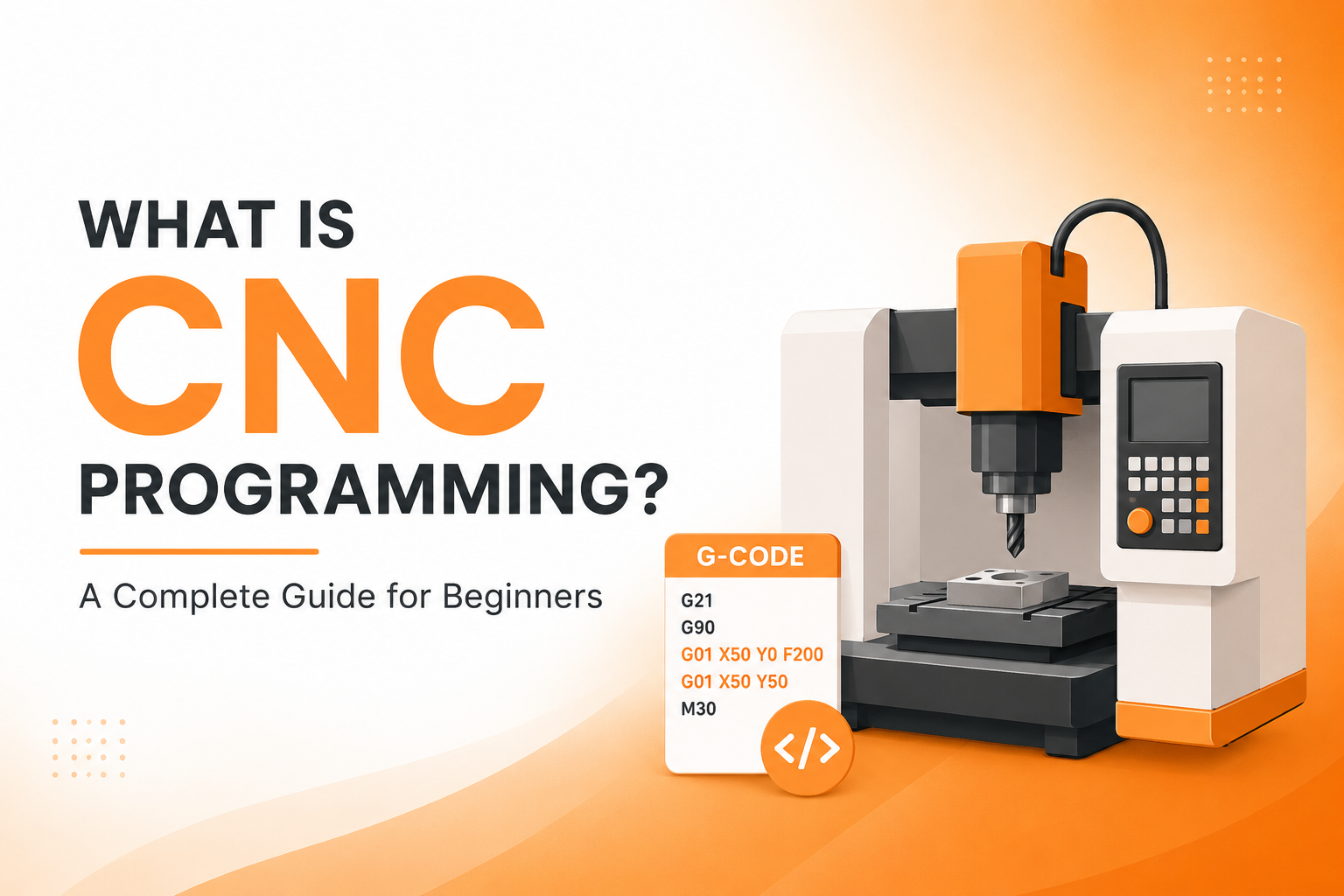
Simple CNC Programming Example
A basic CNC program might look like this:
G21
G90
G00 X0 Y0
G01 X50 Y0 F200
G01 X50 Y50
G01 X0 Y50
G01 X0 Y0
M30
This example uses metric units and absolute positioning before moving the tool around a simple square path.
The important point is that CNC programming is not simply about writing code. The programmer must understand the machine, coordinate system, tooling, material, cutting conditions, and desired finished part.
How Does CNC Programming Work?
CNC programming generally follows a workflow that starts with a digital design and ends with a physical component.
CAD design → CAM programming → Toolpath generation → Post-processing → CNC machine → Finished part
This CAD-to-CAM-to-CNC workflow is particularly important when manufacturing complex components.
Create the CAD Model
The process often starts with a CAD model.
CAD, or Computer-Aided Design, is used to create the geometry of the component. The model can contain dimensions, holes, curves, pockets, surfaces, tolerances, and other design information.
For example, an engineer might create a 3D model of an aluminum housing that needs to be machined on a CNC milling machine.
The CAD model provides the geometric information needed for the manufacturing process.
Generate Toolpaths Using CAM
CAM stands for Computer-Aided Manufacturing.
CAM software uses the CAD model to create machining operations and toolpaths. The programmer selects appropriate tools, defines machining strategies, sets feeds and speeds, and determines how material should be removed.
A CAM system may generate operations such as:
- Facing
- Pocketing
- Contouring
- Drilling
- Slotting
- Roughing
- Finishing
- Threading
The toolpath determines the route the cutting tool follows during machining.
Convert Toolpaths Into CNC Code
A CAM system does not simply send a generic toolpath directly to every CNC machine.
The toolpath is processed through a post-processor that converts the manufacturing instructions into code compatible with the target machine and controller.
This step is important because different CNC machines and controllers can use different programming conventions and machine-specific commands.
Transfer the Program to the CNC Machine
Once the CNC program has been generated and verified, it can be transferred to the machine.
Depending on the equipment, programs may be transferred through USB drives, computer networks, DNC systems, or direct machine connections.
The operator then loads the appropriate program into the CNC controller.
Simulate and Verify the Program
Program verification is an important part of CNC programming.
Simulation can help identify problems before the machine cuts material. The programmer can check the toolpath, machining sequence, tool movements, and possible collision risks.
Skipping verification can result in damaged tools, damaged workpieces, machine crashes, or wasted production time.
Run the CNC Machine
After verification, the operator prepares the machine.
This can include:
- Installing the workpiece
- Installing cutting tools
- Setting tool offsets
- Establishing work coordinates
- Checking the program
- Performing a safe initial run
- Inspecting the finished component
The completed part should then be measured against the required dimensions and quality specifications.
What Are the Types of CNC Programming?
There are three common CNC programming approaches: manual programming, CAM-based programming, and conversational programming.
Manual CNC Programming
Manual CNC programming involves writing CNC commands directly.
The programmer creates the program using G-code, M-code, coordinates, feed rates, spindle speeds, and other commands.
Manual programming can work well for relatively simple machining operations where the toolpath is easy to calculate.
Its main advantage is direct control over the program. The limitation is that writing complex programs manually can take significant time and increases the chance of programming errors.
CAM-Based CNC Programming
CAM-based programming uses specialized software to generate CNC toolpaths.
The programmer typically starts with a CAD model and defines machining operations inside the CAM system. The software calculates the toolpath and generates the required CNC code through a suitable post-processor.
CAM programming is especially useful for:
- Complex components
- 3-axis machining
- 4-axis machining
- 5-axis machining
- Repeated production
- Complicated surfaces
- Multi-operation parts
CAM reduces the amount of CNC code that needs to be written manually, but it still requires a skilled programmer who understands machining principles.
Conversational CNC Programming
Conversational programming allows an operator or programmer to create machining instructions through the CNC controller’s interface.
Instead of manually writing every command, the user enters information through prompts, menus, and predefined machining cycles.
This approach can be useful for simpler machining jobs and quick shop-floor programming.
What Is G-Code in CNC Programming?
G-code is a programming language commonly used to control movement and machining operations on CNC machines.
G-code commands can specify positions, movements, units, coordinate systems, and other machining instructions.
A CNC controller interprets these commands and uses them to control the machine.
Common G-Codes
| G-code | Common purpose |
|---|---|
| G00 | Rapid positioning |
| G01 | Linear movement |
| G02 | Clockwise circular interpolation |
| G03 | Counterclockwise circular interpolation |
| G20 | Inch units |
| G21 | Metric units |
| G90 | Absolute positioning |
| G91 | Incremental positioning |
The exact behavior of some commands can vary depending on the CNC controller and machine configuration, so programmers should always consult the relevant machine documentation.
Simple G-Code Example
Consider this example:
G21
G90
G00 X0 Y0
G01 X50 Y0 F200
G01 X50 Y50
M30
Here is what the commands generally mean:
G21: Selects metric units.
G90: Uses absolute positioning.
G00 X0 Y0: Rapidly moves the tool to the specified position.
G01 X50 Y0 F200: Makes a linear movement to the specified coordinates at the programmed feed rate.
G01 X50 Y50: Makes another linear movement.
M30: Ends and resets the program on many CNC controllers.
This is only a simplified example. A production CNC program would normally include additional information for tooling, spindle control, work offsets, safety positions, cutting conditions, and machine-specific requirements.
What Is M-Code in CNC Programming?
M-code is generally used for machine-specific auxiliary functions.
While G-code commonly defines geometric movement and positioning, M-code can control functions such as spindle operation, coolant, tool changes, and program termination.
Common M-Codes
| M-code | Common purpose |
| M03 | Start spindle clockwise |
| M04 | Start spindle counterclockwise |
| M05 | Stop spindle |
| M06 | Tool change |
| M08 | Coolant on |
| M09 | Coolant off |
| M30 | End and reset program |
M-code behavior is not always universal. The exact function can vary by CNC controller and machine manufacturer.
For production work, programmers should verify commands against the machine’s documentation before running a program.
CNC Programming Languages and Codes
CNC programming can involve more than basic G-code and M-code.
G-Code
G-code is primarily associated with movement, positioning, and machining instructions.
A program can use G-code to specify how a cutting tool moves through a workpiece.
M-Code
M-code is generally associated with machine functions such as spindle control, coolant, tool changes, and program control.
Macro Programming
Macro programming adds logic and variables to CNC programs.
A macro can use:
- Variables
- Conditional statements
- Loops
- Calculations
- Reusable routines
This can make programs more flexible and useful for repetitive machining operations.
Parametric Programming
Parametric programming uses variables and mathematical relationships to create adaptable CNC programs.
Instead of creating a completely separate program for every dimension, a programmer can use parameters to change specific values.
This can be useful when manufacturing families of similar components.
What Software Is Used for CNC Programming?
CNC programming can involve CAD software, CAM software, CNC simulation tools, and controller-specific software.
CAD Software
CAD software is used to create the digital design of a component.
The model defines the geometry that needs to be manufactured.
CAD is primarily focused on design rather than directly controlling the CNC machine.
CAM Software
CAM software converts design information into manufacturing operations and toolpaths.
Popular CAM platforms include:
- Autodesk Fusion
- Mastercam
- Siemens NX
- SolidCAM
- GibbsCAM
- Solid Edge CAM
The important difference is that CAM software is used to plan how the machine will manufacture the component.
CNC Simulation Software
Simulation software helps programmers verify CNC programs before production.
A simulation can show how tools move, where material is removed, and whether potential collisions or machining problems exist.
Simulation is especially valuable for complicated multi-axis machining because a programming error can be difficult and expensive to identify after the machine starts cutting.
What Types of CNC Machines Use CNC Programming?
CNC programming is used across many types of automated manufacturing equipment, including mills, lathes, routers, mill-turn machines, wire EDM equipment, and other CNC systems.
CNC Milling Machines
CNC milling machines use rotating cutting tools to remove material from a workpiece.
They can create features such as:
- Pockets
- Slots
- Holes
- Contours
- Flat surfaces
- Complex 3D surfaces
CNC Lathes
CNC lathes generally rotate the workpiece while cutting tools remove material.
They are commonly used to manufacture cylindrical components such as shafts, bushings, pins, and turned fittings.
CNC Routers
CNC routers are commonly used to cut materials such as wood, plastics, composites, and some non-ferrous materials.
They are widely used for signs, furniture components, panels, and fabrication work.
CNC Plasma Cutting Machines
CNC plasma machines use a plasma arc to cut electrically conductive materials.
Programming determines the cutting path, speed, and other process parameters.
CNC Laser Cutting Machines
CNC laser systems use a focused laser beam to cut or process materials.
The CNC program controls the movement of the cutting head and coordinates the cutting operation.
CNC Machining Centers
CNC machining centers combine automated machining capabilities with features such as automatic tool changing.
They can perform multiple operations without requiring the operator to manually change tools after every operation.
Three-Axis, Four-Axis, and Five-Axis CNC Machines
The number of axes affects CNC programming complexity.
A 3-axis machine typically moves along the X, Y, and Z axes.
A 4-axis machine adds another controlled axis, allowing additional machining orientations.
A 5-axis machine can control multiple axes simultaneously, allowing tools to approach complex surfaces from different angles.
As the number of controlled axes increases, programming, simulation, machine setup, and collision avoidance generally become more demanding.
Why Is CNC Programming Important?
CNC programming is important because it connects digital manufacturing instructions with physical machine operations.
High Precision
CNC programming allows machines to follow carefully defined coordinates and machining parameters.
This helps manufacturers produce components within required dimensional specifications.
Repeatable Production
Once a program has been properly verified, it can be reused to manufacture multiple components.
This supports consistent production across batches.
Faster Manufacturing
Automated tool movements and machining sequences can reduce manual intervention.
The machine can perform programmed operations continuously according to the production process.
Reduced Human Error
CNC automation can reduce errors associated with manually controlling every machine movement.
However, CNC does not eliminate human error. Incorrect programs, offsets, tooling, or machine settings can still create serious problems.
Better Production Efficiency
A well-designed CNC program can optimize toolpaths, machining sequences, feeds, speeds, and tool changes.
Better programming can reduce unnecessary machine movement and improve cycle time.
Ability to Manufacture Complex Parts
CNC machines can produce geometries that would be difficult or impractical to manufacture manually.
This becomes particularly important for complex aerospace, medical, automotive, and industrial components.
Reduced Material Waste
Accurate toolpaths and machining strategies can help control material removal.
Efficient programming can reduce unnecessary cuts and improve material utilization.
Automation of Repetitive Operations
CNC programming allows repetitive machining processes to be automated.
The machine can repeat the programmed sequence instead of requiring an operator to manually perform every movement.
What Does a CNC Programmer Do?
A CNC programmer creates and prepares programs that control CNC machining operations.
The role combines programming knowledge with manufacturing and machining expertise.
Main Responsibilities of a CNC Programmer
A CNC programmer may:
- Read engineering drawings
- Review CAD models
- Select machining strategies
- Select cutting tools
- Create CNC programs
- Set feeds and speeds
- Generate toolpaths
- Simulate programs
- Troubleshoot machining problems
- Optimize cycle times
- Work with machinists and engineers
A programmer may also support machine setup, process optimization, troubleshooting, and quality requirements.
Good CNC programming requires more than knowing G-code. The programmer needs to understand how tools behave, how materials respond to cutting, how machines operate, and how machining parameters affect part quality.
CNC Programming vs CNC Machining
CNC programming and CNC machining are related, but they are not the same thing.
| CNC programming | CNC machining |
| Creates machine instructions | Executes the instructions |
| Primarily involves software and code | Involves physical manufacturing |
| Defines toolpaths and parameters | Uses cutting tools to remove or shape material |
| Takes place before and during process preparation | Takes place during production |
A simple way to remember the difference is:
CNC programming tells the machine what to do. CNC machining is the physical process of doing it.
CNC Programming vs CAD vs CAM
CAD, CAM, and CNC have different roles in the manufacturing workflow.
CAD = Design
CAM = Manufacturing planning and toolpaths
CNC = Machine execution
The relationship can be summarized as:
CAD Model → CAM Toolpath → Post-Processor → G/M Code → CNC Controller → Finished Part
CAD creates the digital component design.
CAM determines how the component should be manufactured.
The post-processor converts the manufacturing instructions into code suitable for the target CNC machine.
The CNC controller interprets the program and controls the machine.
This distinction is important because CAD software does not automatically mean that a component is ready to manufacture. Manufacturing instructions, tooling, machining strategies, and machine-specific code are still required.
What Skills Are Needed for CNC Programming?
CNC programming requires technical knowledge and practical problem-solving skills.
Technical Skills
Important technical skills include:
- G-code and M-code knowledge
- Engineering drawing interpretation
- CAD and CAM knowledge
- Coordinate systems
- Tool selection
- Feeds and speeds
- CNC machine operation
- GD&T fundamentals
- Troubleshooting
A programmer should understand how a digital program translates into physical machine movement.
Soft Skills
CNC programmers also benefit from:
- Attention to detail
- Problem-solving
- Process thinking
- Quality awareness
- Analytical thinking
- Patience
Small programming mistakes can have significant consequences, so accuracy is critical.
Common CNC Programming Mistakes
CNC programming errors can damage tools, workpieces, and machines.
Common problems include:
- Incorrect coordinates
- Wrong tool selection
- Incorrect work offsets
- Incorrect feed rates
- Incorrect spindle speeds
- Missing tool-change commands
- Incorrect measurement units
- Collision risks
- Skipping simulation
- Using incompatible machine codes
How to Avoid CNC Programming Errors
The safest approach is to verify the program before production.
Useful practices include:
- Simulate the program
- Verify work offsets
- Check toolpaths
- Perform controlled dry runs
- Use the correct machine-specific post-processor
- Confirm tooling
- Inspect the first completed component
Program verification should not be treated as an optional step, especially for complicated machining operations.
Applications of CNC Programming
CNC programming is used in many manufacturing industries.
Automotive Manufacturing
CNC machines can manufacture engine components, transmission parts, shafts, brackets, housings, and other precision components.
Aerospace Manufacturing
Aerospace components often require complex geometries and tight manufacturing requirements.
CNC machining can be used for structural components, brackets, housings, and other precision parts.
Medical Device Manufacturing
CNC machining is used to manufacture precision components for medical equipment and devices.
Electronics Manufacturing
CNC equipment can produce housings, fixtures, panels, and precision mechanical components used in electronics manufacturing.
Industrial Machinery
Industrial equipment manufacturers use CNC machining to produce shafts, gears, housings, brackets, machine components, and custom parts.
Defense Manufacturing
CNC machining can support the production of precision mechanical components used in defense equipment.
Construction Equipment
Construction machinery contains many machined components, including shafts, pins, brackets, hydraulic components, and housings.
Consumer Products
CNC machining can be used to manufacture precision components and prototypes for consumer products.
Tool and Die Manufacturing
CNC machines are important for producing molds, dies, fixtures, and other tooling components.
Advantages and Limitations of CNC Programming
CNC programming provides major manufacturing benefits, but it also requires expertise and careful implementation.
Advantages of CNC Programming
Key advantages include:
- High precision
- Repeatable production
- Automation
- Improved productivity
- Complex geometry capability
- Consistent machining processes
- Reduced manual intervention
Limitations of CNC Programming
CNC programming also has limitations.
Programming requires trained personnel who understand both software and machining.
CNC machines and related software can require significant investment.
Setup and programming time can also be substantial, especially for complex components.
Another limitation is machine compatibility. A program designed for one controller may not work correctly on another machine without appropriate modifications or post-processing.
Programming mistakes can also cause tool damage, workpiece damage, or machine collisions.
Is CNC Programming Difficult to Learn?
CNC programming is learnable, but becoming proficient requires both theoretical knowledge and practical experience.
Basic G-code can be learned relatively quickly because the fundamental concepts involve coordinates, movement, units, feeds, speeds, and machine functions.
The difficulty increases when working with complex components, advanced CAM strategies, multi-axis machines, tight tolerances, and production optimization.
A beginner should focus on the fundamentals first:
- CNC machine basics
- Coordinate systems
- G-code
- M-code
- Tool selection
- Feeds and speeds
- Work offsets
- CAD
- CAM
- Program simulation
Learning basic CNC programming and becoming an expert 5-axis programmer are very different goals.
Hands-on practice is important because CNC programming involves both software instructions and physical machine behavior.
CNC Programming Career Opportunities
CNC programming can lead to several manufacturing and engineering roles.
CNC Programmer
A CNC programmer develops programs and toolpaths for CNC machines.
CNC Machine Operator
A CNC operator runs machines, loads workpieces, monitors machining, and performs basic production checks.
CNC Setup Technician
A setup technician prepares the machine, tools, workholding, offsets, and other requirements before production.
CAM Programmer
A CAM programmer specializes in creating machining strategies and toolpaths using CAM software.
CNC Machinist
A CNC machinist combines machine operation, setup, inspection, and machining knowledge.
Manufacturing Engineer
Manufacturing engineers focus on improving production processes, equipment, tooling, quality, and efficiency.
CNC Applications Engineer
A CNC applications engineer can work with customers, machines, tooling, software, and machining processes to develop manufacturing solutions.
Conclusion
CNC programming is the process of creating instructions that allow CNC machines to perform controlled manufacturing operations.
The basic workflow is straightforward: design the part, plan the machining process, generate the toolpath, convert it into machine-specific code, verify the program, and run the CNC machine.
G-code primarily controls movement and positioning, while M-code generally controls auxiliary machine functions. CNC programming can be performed manually, through CAM software, or using conversational programming.
Modern CNC manufacturing relies heavily on CAD and CAM workflows, particularly when producing complex components and multi-axis parts.
For beginners, the best starting point is to understand coordinate systems, G-code, M-code, tooling, feeds and speeds, CAD, CAM, and CNC machine operation. Once these fundamentals are clear, more advanced topics such as macro programming, parametric programming, 4-axis machining, and 5-axis machining become easier to understand.
CNC programming ultimately connects digital design with physical manufacturing. When the program, machine setup, tooling, and machining parameters are properly planned, CNC technology can deliver accurate, repeatable, and efficient production.
Frequently Asked Questions About CNC Programming
What is CNC programming in simple words?
CNC programming is the process of creating instructions that tell a CNC machine how to move and perform machining operations. The instructions control movements, tools, speeds, feeds, and other machine functions.
What is CNC programming used for?
CNC programming is used to control automated machines that cut, drill, mill, turn, shape, or process materials. It is widely used to manufacture precision components across industries.
What is the difference between CNC and G-code?
CNC refers to the computer-controlled manufacturing system and machine technology. G-code is a programming language commonly used to provide movement and machining instructions to CNC machines.
What are the three types of CNC programming?
The three common approaches are manual CNC programming, CAM-based programming, and conversational CNC programming.
What is G-code in CNC programming?
G-code is a set of commands commonly used to control CNC machine movement, positioning, and machining operations.
What is M-code in CNC programming?
M-code is generally used for auxiliary machine functions such as spindle control, coolant, tool changes, and program termination. Exact functions can vary between machines and controllers.
Is CNC programming difficult?
Basic CNC programming is not necessarily difficult to learn, but advanced CNC programming requires significant technical knowledge and hands-on experience. Complex multi-axis machining requires a deeper understanding of CAM, tooling, coordinates, machine kinematics, and collision avoidance.
What software is used for CNC programming?
Common CNC programming and CAM software includes Autodesk Fusion, Mastercam, Siemens NX, SolidCAM, GibbsCAM, and Solid Edge CAM. The appropriate software depends on the machine, manufacturing process, company requirements, and programmer’s workflow.
What is the difference between CAD, CAM, and CNC?
CAD is primarily used to create the component design. CAM is used to plan manufacturing operations and generate toolpaths. CNC refers to the machine control system that executes the resulting instructions.
How does a CNC programmer create a program?
A CNC programmer can create a program manually using G-code and M-code or use CAM software to generate toolpaths and machine-specific code. The program is then simulated, verified, transferred to the CNC controller, and prepared for production.
Can CNC programming be done automatically?
Yes. CAM software can automatically generate many CNC toolpaths and machine programs from CAD models. However, human expertise is still required to select machining strategies, tools, cutting parameters, post-processors, and safe production methods.