Mobile-enabled industrial monitoring is no longer a futuristic concept. It’s happening right now on factory floors, water treatment plants, solar farms, and oil rigs across the country. Engineers and operators are ditching the control room and managing entire facilities from their phones and tablets.
This guide breaks down exactly how mobile devices integrate with SCADA systems and IoT sensors, what architecture makes it work, which platforms lead the industry, and how to do it securely.
What Is Mobile SCADA Integration?
Mobile SCADA integration connects industrial control systems to smartphones and tablets, giving operators real-time access to machine data, alarms, and sensor readings from anywhere.
Traditional SCADA systems were built around fixed workstations inside control rooms. Operators had to be physically present to monitor production lines, respond to alarms, or check sensor data. That model works, but it creates bottlenecks when something goes wrong at 2 AM or across a facility spread over multiple buildings.
Mobile-enabled SCADA changes the game. It pulls live data from PLCs, RTUs, and IoT sensors and pushes it to a mobile app or web dashboard that authorized users can access from any location.
Traditional SCADA vs Mobile SCADA
| Feature | Traditional SCADA | Mobile SCADA |
|---|---|---|
| Access Location | Fixed control room | Anywhere with connectivity |
| Alarm Response | On-site operator required | Push alerts to mobile |
| Maintenance Coordination | Radio or phone calls | In-app data sharing |
| Multi-site Visibility | Limited | Real-time across all sites |
| Scalability | Hardware-dependent | Cloud-scalable |
Mobile HMI and web SCADA are often confused. A mobile HMI typically refers to a native app designed for touch-based interaction with industrial systems. Web SCADA runs in a browser and can be accessed from any device without installing software. Both approaches have valid use cases depending on your infrastructure.
Why Are Industries Integrating Mobile Devices with SCADA Systems?
The core reason is operational visibility. When engineers can see live system data from their phone, they respond faster, troubleshoot smarter, and prevent downtime before it hits production.
Key Operational Benefits
- Real-time monitoring from anywhere on the plant or off-site
- Faster alarm acknowledgment without needing to be at the HMI panel
- Predictive maintenance alerts based on sensor thresholds
- Better coordination between field technicians and control room staff
- Energy monitoring accessible to operations managers on the go
- Multi-site plant management from a single mobile dashboard
Industries Using Mobile SCADA Today
Water treatment plants use mobile SCADA to monitor pump stations, tank levels, and chlorine dosing remotely. A single operator can oversee multiple pump stations spread across a county without driving to each site.
Manufacturing facilities track OEE, production counts, reject rates, and machine health from mobile dashboards. Supervisors on the floor don’t have to walk back to a control room to check line status.
Solar and wind farms generate data from hundreds of inverters and turbines. Mobile SCADA gives energy managers real-time performance data and fault alerts without sending a technician to a remote field site.
Oil and gas operators use mobile-connected SCADA to monitor pipeline pressure, flow rates, and valve positions across remote gathering networks. Response time to abnormal conditions improves significantly.
Smart warehouses monitor temperature, humidity, and energy consumption through IoT sensors connected to mobile dashboards, keeping products safe and compliance requirements met.
What Is the Architecture Behind Mobile SCADA and IoT Integration?
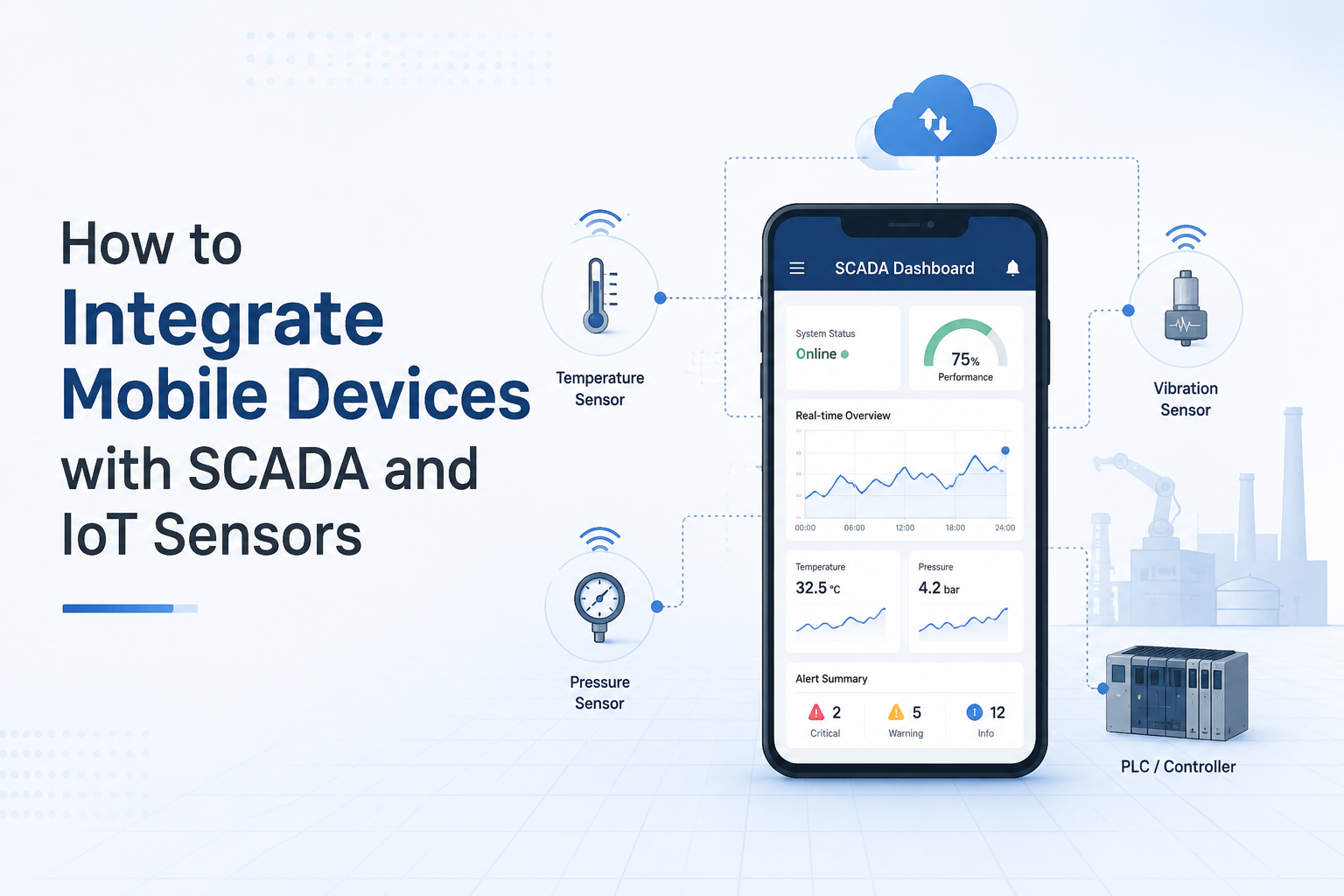
Mobile SCADA systems connect PLCs, IoT sensors, gateways, cloud platforms, and mobile apps into one industrial data ecosystem.
Understanding the architecture helps you plan your integration correctly and avoid costly mistakes later.
Core Components of the System
PLCs and RTUs are the foundation. They control machines and collect process data at the field level. A PLC manages inputs from sensors and outputs to actuators. RTUs are used in remote locations like pump stations or substations where network connectivity may be limited.
IoT Sensors are the data sources. Common types include:
- Temperature sensors for motor, bearing, and fluid monitoring
- Pressure transmitters for pipe, tank, and compressor systems
- Vibration sensors for rotating equipment and predictive maintenance
- Flow sensors for liquid and gas measurement
- Current transformers and smart energy meters for electrical monitoring
- Humidity sensors for environmental control in storage and cleanrooms
IoT Gateways sit between field devices and the cloud or SCADA server. They handle protocol conversion, edge processing, and secure data transmission. A gateway might read Modbus data from a PLC and convert it to MQTT before sending it to a cloud broker.
SCADA Software handles data visualization, alarm management, and historical logging. It’s the layer where raw sensor data becomes useful operational information.
Mobile Applications are the front end operators and engineers interact with. These can be vendor-specific native apps, cross-platform apps built on frameworks like React Native, or browser-based dashboards.
Architecture Flow
IoT Sensors → PLC/RTU → IoT Gateway → Cloud/SCADA Server → Mobile AppEdge processing at the gateway level reduces latency and keeps critical logic local even when cloud connectivity drops.
What Communication Protocols Connect SCADA to Mobile Devices?
Industrial communication protocols allow SCADA systems, sensors, PLCs, and mobile apps to exchange data reliably and securely.
Choosing the right protocol matters more than most engineers realize during early planning stages.
MQTT
MQTT is lightweight and designed specifically for IoT applications. It uses a publish-subscribe model where sensors publish data to a broker and applications subscribe to the topics they need. It runs efficiently over low-bandwidth networks and integrates cleanly with cloud platforms like AWS IoT Core and Azure IoT Hub. MQTT with TLS encryption is a strong choice for mobile SCADA projects.
OPC UA
OPC UA is the industrial standard for secure, interoperable data exchange. It supports complex data structures, built-in security, and works across different PLC brands and SCADA platforms. Most modern SCADA platforms support OPC UA natively. It’s the preferred protocol for plant-level integration.
Modbus TCP/IP
Modbus is the legacy workhorse. Billions of industrial devices speak Modbus, so it’s still relevant even in modern IIoT projects. Most IoT gateways support Modbus polling and can bridge Modbus data to MQTT or REST APIs for mobile access.
REST APIs
REST APIs are how mobile apps typically pull data from SCADA servers or cloud platforms. They’re stateless, easy to implement, and work natively over HTTP. Most cloud SCADA platforms expose REST endpoints for mobile dashboard integration.
5G and Industrial Wi-Fi
5G is opening new possibilities for mobile SCADA. Low latency and high bandwidth make it viable for real-time video, AR maintenance tools, and high-frequency sensor data transmission across large facilities. Industrial Wi-Fi with WPA3 security remains the standard for indoor plant environments.
How Do Mobile Devices Connect to SCADA Systems?
Mobile devices connect through cloud SCADA platforms, VPNs, industrial gateways, or web servers depending on the architecture.
Web-Based SCADA Dashboards
Browser-based access is the simplest approach. The SCADA server publishes a responsive web interface that operators access through a mobile browser. No app installation required. Platforms like Ignition with Perspective module serve responsive dashboards that adapt to phone and tablet screen sizes automatically.
Native Mobile Apps
Vendor-specific apps offer more functionality. They support push notifications for critical alarms, offline data caching, and biometric authentication. Some platforms like VTScada and Ignition have dedicated iOS and Android apps. Custom apps can be built using SCADA vendor SDKs or REST APIs.
Cloud SCADA Platforms
Cloud platforms aggregate data from multiple sites and serve mobile-friendly dashboards without requiring on-premises server access. Leading options include:
- AWS IoT Core with custom dashboards
- Azure IoT Hub integrated with Power BI mobile
- Ignition Cloud with Perspective mobile
- Siemens Insights Hub for industrial asset monitoring
- AVEVA System Platform with cloud connectivity
VPN-Based Remote Access
For secure access to on-premises SCADA systems, VPN tunneling is the standard approach. Operators connect their mobile device to a corporate VPN before accessing the SCADA dashboard. This adds a security layer without exposing the SCADA server directly to the internet.
How to Integrate Mobile Devices with SCADA and IoT Sensors: Step by Step
Step One: Identify Industrial Assets and Sensors
Start by defining which machines and processes you need to monitor. Prioritize assets based on criticality to production, maintenance cost, and failure impact.
Define your KPIs before selecting sensors. If you’re monitoring a compressor, you might care about discharge pressure, inlet temperature, vibration levels, and motor current. Each KPI maps to a specific sensor type.
Choose sensors rated for your industrial environment. IP ratings, temperature ranges, and explosion-proof certifications matter depending on your facility type.
Step Two: Connect IoT Sensors to PLC or Gateway
Wire analog sensors to PLC input cards or connect smart sensors using industrial fieldbus protocols like Profinet or EtherNet/IP. For wireless sensors, configure the mesh network or WirelessHART setup.
Connect the PLC or sensor network to an IoT gateway. The gateway is responsible for polling sensor data and transmitting it upstream. Configure scan rates based on how frequently you need data updates. Critical alarms may need one-second polling while energy data might only need one-minute intervals.
Step Three: Configure Industrial Communication Protocols
Set up your MQTT broker if using MQTT. Popular open-source brokers include Mosquitto and EMQX. Cloud brokers like AWS IoT Core simplify certificate-based authentication and TLS setup.
For OPC UA, configure the OPC UA server on your SCADA platform or PLC. Define the node structure that maps to your physical assets and tags.
For legacy Modbus devices, configure register maps on the gateway. The gateway reads Modbus registers and translates them into tags the SCADA system or cloud platform can consume.
Step Four: Integrate SCADA Software
Configure tags in your SCADA platform that correspond to the sensor data coming from the gateway. Set engineering units, scaling, and data types correctly at this stage.
Build real-time dashboards showing the KPIs you identified in Step One. Group data by asset, production line, or plant area depending on how operators think about the facility.
Configure alarm logic with setpoints based on normal operating ranges. Define alarm priorities: critical, high, medium, low. Critical alarms should trigger immediate mobile notifications.
Step Five: Enable Mobile Access
Install the SCADA vendor’s mobile app on operator and engineer devices, or configure the web dashboard for mobile browser access.
Set up user authentication with individual accounts. Never use shared credentials for industrial systems. Configure role-based access so field technicians see relevant data without access to control functions reserved for engineers.
Publish the dashboard to the mobile access endpoint and validate it loads correctly on both iOS and Android devices.
Step Six: Configure Alerts and Notifications
Set up push notifications for critical alarms through the mobile app. Configure email alerts and SMS notifications as backup channels for high-priority alarms.
Define notification routing based on shift schedules. The right operator should receive the alarm, not just the first person on the contact list. Most modern SCADA platforms support on-call scheduling for alarm routing.
Step Seven: Test Security and Connectivity
Validate VPN connectivity from mobile devices on cellular networks before going live. Test latency between sensor data update and dashboard refresh. Acceptable latency for most monitoring applications is under three seconds.
Verify role-based permissions are working correctly. Log in as each user role and confirm you only see what you should see. Run penetration testing on the mobile access endpoint if your facility handles critical infrastructure.
What Are the Best SCADA Platforms for Mobile Integration?
Modern SCADA platforms now include built-in mobile dashboards, cloud connectivity, and IoT compatibility.
Platform Comparison
| Platform | Mobile Support | Cloud Ready | IoT Compatibility | Best For |
|---|---|---|---|---|
| Ignition (Inductive Automation) | Perspective mobile app | Yes | Strong MQTT/OPC UA | Manufacturing, Water |
| AVEVA InTouch | Mobile HMI | Yes via CONNECT | OPC UA | Large enterprise |
| WinCC (Siemens) | WinCC WebNavigator | Insights Hub | Profinet, OPC UA | Siemens-heavy plants |
| FactoryTalk View | ViewPoint mobile | Yes | EtherNet/IP | Rockwell environments |
| VTScada | Native iOS/Android | Yes | Modbus, DNP3 | Utilities, Oil and Gas |
| Citect SCADA | Web client | Limited | OPC, Modbus | Mining, Industrial |
Ignition by Inductive Automation is widely considered the most flexible option for new mobile SCADA projects. Its Perspective module is built from the ground up for mobile and tablet interfaces and supports MQTT natively through the Cirrus Link modules.
AVEVA InTouch is the enterprise choice for large facilities already running AVEVA infrastructure. It offers strong historian integration and mobile visualization through the AVEVA Connect cloud platform.
VTScada stands out for utilities and remote monitoring applications. Its native mobile apps for iOS and Android are polished and purpose-built for operator use in the field.
What IoT Sensors Work Best for Mobile SCADA Projects?
Smart industrial sensors help collect live operational data for remote monitoring and predictive analytics.
Sensor Selection Guide
| Application | Sensor Type | Connection | Key Spec |
|---|---|---|---|
| Motor health | Vibration sensor | Wired or wireless | ISO 10816 range |
| Fluid systems | Pressure transmitter | 4-20mA, HART | Accuracy rating |
| Thermal monitoring | Temperature sensor (RTD/TC) | Wired | Response time |
| Electrical systems | Current transformer | Clamp-on | CT ratio |
| Energy management | Smart energy meter | Modbus RTU | Revenue-grade accuracy |
| HVAC and storage | Humidity sensor | Wireless | IP67 rating |
Wireless vs Wired Sensors
Wireless sensors reduce installation cost significantly, especially in retrofit projects where running conduit through an existing facility is expensive and disruptive. WirelessHART, Zigbee, and LoRaWAN are common wireless options for industrial environments.
Wired sensors are preferred where latency matters, reliability is critical, or the environment causes wireless interference. Vibration sensors on high-speed rotating equipment typically need wired connections for accurate high-frequency data capture.
Industrial-grade sensors need IP65 or higher ratings for dusty or wet environments. Temperature ranges, vibration resistance, and chemical compatibility all need to match the specific installation location.
What Are the Cybersecurity Risks of Remote SCADA Access?
Remote industrial access increases cybersecurity exposure. A breach in a SCADA system isn’t just a data problem. It can mean production shutdowns, equipment damage, or safety incidents.
Common Threats
- Unauthorized access through weak credentials or no MFA
- Ransomware targeting SCADA servers through unpatched vulnerabilities
- Man-in-the-middle attacks on unencrypted industrial protocols
- Compromised mobile devices used as entry points into OT networks
- Exposed SCADA interfaces indexed on Shodan or similar platforms
Security Best Practices for Mobile SCADA
Use VPN for all remote access. Never expose SCADA servers or HMI interfaces directly to the public internet. All mobile access should go through a VPN gateway with certificate-based authentication.
Enforce multi-factor authentication. MFA is non-negotiable for remote industrial access. Even if credentials are compromised, MFA prevents unauthorized login.
Implement role-based access control. Field technicians, engineers, managers, and administrators should each have access scoped to what they actually need. No shared accounts.
Segment OT and IT networks. Industrial control systems should sit on a dedicated network segment with firewall rules controlling what traffic can pass between IT and OT zones. Mobile access should go through a DMZ architecture.
Apply zero trust principles. Verify every access request regardless of where it originates. Don’t assume traffic from inside the network is safe.
Encrypt MQTT with TLS. Plain MQTT on port 1883 is unencrypted. Use MQTT over TLS on port 8883 for all industrial IoT communication.
Patch SCADA software regularly. Many high-profile industrial cyberattacks exploited known vulnerabilities in unpatched SCADA software. Keep platforms and OS updated on a scheduled cycle.
What Are the Common Challenges in SCADA and Mobile Integration?
Technical Challenges
Legacy PLC compatibility is one of the most common roadblocks. Older PLCs may not support modern protocols or may require specialized serial communication cards and protocol converters to bridge the gap to modern IoT gateways.
Network instability in industrial environments causes data gaps and alarm delays. Wi-Fi dead zones, interference from variable frequency drives, and cellular coverage gaps in remote areas all affect mobile SCADA reliability.
Sensor calibration drift over time causes incorrect readings that can trigger false alarms or mask real problems. Build calibration schedules into your maintenance program.
Operational Challenges
Operator training is underestimated on most projects. Even a well-designed mobile SCADA system fails if operators don’t trust it or know how to use it. Plan for hands-on training and a feedback period after go-live.
Data overload is a real problem when hundreds of sensors are all feeding a mobile dashboard. Focus dashboards on actionable KPIs, not raw data dumps. Operators should see what they need to act, not everything the system collects.
Cost Challenges
Cloud subscription costs add up across large deployments. Calculate ongoing SaaS costs against on-premises infrastructure costs before choosing an architecture.
Legacy infrastructure upgrades are sometimes required before mobile integration is even possible. Budget for network upgrades, gateway hardware, and potential PLC replacement when planning a mobile SCADA project.
What Does the Future of Mobile SCADA and Industrial IoT Look Like?
The next generation of industrial monitoring systems will combine AI, edge computing, 5G, and mobile SCADA into fully predictive operations platforms.
AI-Powered Alarm Analysis
AI models running on edge gateways or cloud platforms are starting to filter nuisance alarms and identify patterns that precede equipment failures. Instead of sending every threshold breach to a mobile device, the system learns what matters and escalates intelligently.
Digital Twins
Digital twin platforms create virtual replicas of physical assets and update them in real time using sensor data. Mobile interfaces tied to digital twins let engineers visualize asset health in 3D and simulate changes before making them on the actual machine.
Augmented Reality Maintenance
AR tools overlaying sensor data on physical equipment through a mobile device or smart glasses are moving from pilots to production deployments. A technician can walk up to a pump and see live vibration levels, temperature trends, and maintenance history without touching a keyboard.
5G-Enabled Factory Automation
Private 5G networks are enabling wireless communication with latency low enough for real-time control applications, not just monitoring. This opens the door to mobile SCADA that doesn’t just observe but interacts with industrial processes in real time.
Predictive Maintenance at Scale
Machine learning models trained on historian data are generating maintenance recommendations delivered directly to mobile apps. Instead of fixed PM schedules, operators receive work orders triggered by actual equipment condition.
Mobile SCADA Integration Best Practices
Start with a pilot deployment. Pick one production line or one asset class and prove the value before scaling across the facility. It’s easier to fix problems in a pilot than after a facility-wide rollout.
Prioritize critical assets first. Focus initial integration on assets where unplanned downtime is most expensive or where remote monitoring provides the biggest operational improvement.
Use scalable architecture. Choose platforms and protocols that can grow. MQTT with a cloud broker scales from ten sensors to ten thousand without redesigning the architecture.
Standardize protocols across the facility. Mixed protocol environments create integration complexity. Where possible, standardize on OPC UA for plant-level communication and MQTT for cloud connectivity.
Train operators before go-live. Schedule hands-on sessions with the actual mobile app on real devices. Cover alarm response procedures, navigation, and what to do when connectivity drops.
Monitor network security continuously. Set up logging and alerting on your VPN gateway and OT network firewall. Review access logs regularly. Industrial cybersecurity is an ongoing discipline, not a one-time configuration task.
Need Help with Industrial SCADA and IoT Integration?
At AutomatexLab, we help industries build modern automation systems by integrating SCADA platforms, PLCs, IoT sensors, cloud monitoring, and mobile dashboards. Whether you want remote industrial monitoring, smart factory visibility, or real-time machine analytics, our team helps design scalable Industry 4.0 solutions tailored to your operations.