In many factories, the entire production rhythm depends on PLC systems working correctly every second. When a PLC suddenly stops responding, machines can freeze mid-cycle, conveyors can stop moving, alarms can start flashing, and operators are left waiting while production silently bleeds money. A single unresolved PLC fault can turn a smooth-running plant into a slow-moving repair zone within minutes.
Industrial downtime is not just about stopped machines. It creates delayed deliveries, wasted raw material, overtime expenses, rejected products, and pressure on maintenance teams. In high-speed industries, even a short interruption can disturb the full manufacturing chain like a broken gear inside a moving engine.
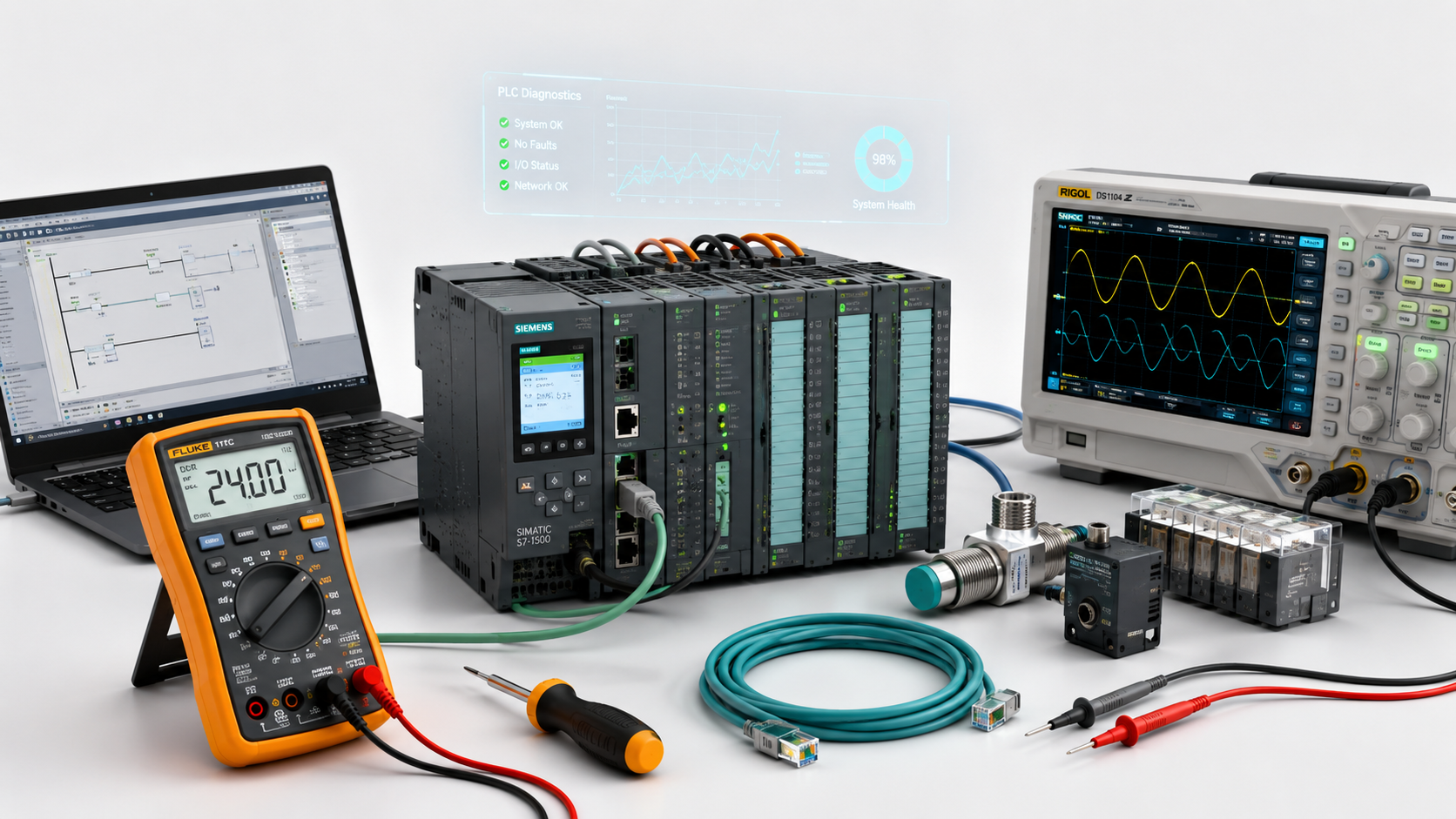
This is where PLC troubleshooting tools become extremely important. These tools help automation engineers detect faults faster, trace hidden issues, monitor PLC behavior, and restore machine operations before the problem spreads across the production floor. From electrical testing devices to software-based diagnostics, troubleshooting tools act like industrial problem trackers that help engineers find the exact point where the system loses balance.
Modern factories now rely heavily on professional troubleshooting instead of guesswork repairs. Random part replacement and temporary fixes often create deeper automation problems later. Accurate fault diagnosis saves both production time and maintenance cost.
AutomatexLab provides professional PLC troubleshooting services for industries that cannot afford long machine stoppages. From PLC communication failures and SCADA issues to HMI faults and industrial network problems, AutomatexLab helps businesses restore operational stability with practical automation support.
What Are PLC Troubleshooting Tools?
Definition of PLC Troubleshooting Tools
PLC troubleshooting tools are specialized devices and software systems used to identify, diagnose, and resolve problems inside industrial automation systems. These tools help engineers understand why a PLC-controlled machine is not behaving correctly.
In simple words, they work like industrial fault detectives. They help locate communication breakdowns, wiring issues, logic problems, hardware failures, and unstable electrical signals before they turn into bigger production problems.
These tools are commonly used in automated factories where PLC systems control motors, sensors, conveyors, robotic machines, pumps, and production equipment.
Why PLC Troubleshooting Tools Are Important
Modern industrial systems operate like synchronized mechanical orchestras. If one PLC signal becomes unstable, multiple machines can start behaving unpredictably.
PLC troubleshooting tools help industries:
- Reduce machine downtime by locating faults quickly
- Improve troubleshooting speed during emergency breakdowns
- Increase production reliability across automation systems
- Prevent major equipment damage before failure spreads
- Lower maintenance costs caused by repeated trial-and-error repairs
Without proper diagnostic tools, maintenance teams often waste hours checking random components while production remains stopped. Troubleshooting tools reduce this uncertainty and help engineers focus directly on the root cause.
Common Areas Where These Tools Are Used
PLC troubleshooting tools are widely used across many industrial environments where automation systems run continuously.
Manufacturing Plants
Used for diagnosing assembly line failures, motor control problems, and machine synchronization issues.
Packaging Systems
Help identify conveyor timing errors, sensor faults, and packaging sequence interruptions.
SCADA Systems
Used for detecting communication gaps between PLCs, HMIs, and supervisory systems.
Conveyor Automation
Help troubleshoot belt movement issues, overload conditions, and motor control failures.
Water Treatment Systems
Used for monitoring pump automation, valve control systems, and process reliability.
Industrial Robotics
Assist engineers in diagnosing robotic motion faults, signal interruptions, and controller communication issues.
Common PLC Problems in Industrial Automation Systems
PLC Communication Failures
Industrial machines constantly exchange information through communication networks. When this digital conversation breaks, automation systems become unstable.
Ethernet/IP Communication Loss
Machines may suddenly stop sharing data because of damaged cables, incorrect IP settings, or unstable switches.
Modbus Connectivity Issues
Modbus communication failures can interrupt data flow between PLCs, sensors, drives, and monitoring systems.
PLC to HMI Communication Errors
Operators may see frozen screens, missing data, or delayed machine responses when PLC-HMI communication becomes unstable.
SCADA Integration Problems
SCADA systems can lose visibility of industrial processes due to network interruptions or incorrect communication configurations.
Input and Output Faults
PLC systems depend heavily on accurate signals from sensors and field devices. Even one unstable signal can create chain-reaction machine faults.
Sensor Failures
Faulty proximity sensors, photoelectric sensors, or limit switches may send incorrect signals to the PLC.
Output Modules Not Responding
Motors, solenoids, or relays may fail to activate when output modules become damaged or disconnected.
Broken Wiring Connections
Loose terminals and damaged cables often create intermittent faults that are difficult to identify without proper testing tools.
Relay Malfunction
Industrial relays can wear out over time, causing delayed switching or complete output failure.
PLC Program Errors
PLC programs control the logical heartbeat of automated machines. Small programming mistakes can create unpredictable machine behavior.
Corrupted PLC Logic
Improper shutdowns, software corruption, or unauthorized modifications can damage PLC programs.
Timer and Counter Problems
Incorrect timer settings may disturb machine sequencing and create production delays.
Incorrect Sequencing Logic
Machines may operate out of order if logic conditions are incorrectly configured.
Memory Faults
PLC memory issues can cause random alarms, unexpected resets, or unstable machine operations.
Power Supply Issues
Stable electrical power is essential for healthy PLC performance. Voltage instability can silently damage automation systems over time.
Voltage Fluctuations
Sudden voltage changes may cause PLC shutdowns, communication loss, or module instability.
Loose Terminals
Poor electrical connections generate heat and unstable current flow inside control panels.
Power Module Failure
Damaged power supply units can stop the entire PLC system unexpectedly.
Electrical Noise Interference
Electrical noise from VFDs, motors, or improper grounding can disturb communication signals and PLC inputs.
PLC Hardware Failure
Industrial environments expose PLC hardware to heat, vibration, dust, and continuous operational stress.
Damaged I/O Modules
Input and output cards may fail because of overload conditions or wiring mistakes.
Burnt Communication Cards
Communication modules can become damaged due to voltage spikes or network instability.
Processor Malfunction
The PLC CPU may freeze, restart randomly, or stop processing machine logic correctly.
Overheating Components
Poor ventilation inside electrical panels can slowly weaken PLC hardware performance and shorten equipment lifespan.
Most Important PLC Troubleshooting Tools Used by Professionals
Modern industrial troubleshooting is no longer based on guesswork and random component replacement. Today’s automation systems are deeply connected networks of PLCs, HMIs, drives, sensors, industrial Ethernet devices, and SCADA platforms. When one part behaves abnormally, the fault can travel through the system like a silent electrical ripple.
Professional engineers use specialized troubleshooting tools to trace these hidden disturbances with precision. Each tool plays a different role inside the automation ecosystem. Some tools inspect electrical health, some analyze communication flow, while others allow engineers to enter directly into the PLC’s logical decision-making process.
The combination of these tools creates what many automation experts call a “machine visibility layer” — the ability to see what the industrial system is thinking, sending, receiving, and reacting to in real time.
1. PLC Programming Software
PLC programming software is one of the most powerful troubleshooting tools used in industrial automation. It acts like a live control window into the PLC brain, allowing engineers to observe how the controller is processing signals, executing logic, and responding to machine conditions.
Without programming software, troubleshooting becomes similar to repairing a machine while blindfolded. Engineers may see symptoms externally, but they cannot see the internal decision flow happening inside the PLC processor.
Purpose of PLC Programming Software
The primary purpose of PLC programming software is to connect engineers directly with the controller for live diagnostics and system analysis.
Instead of physically checking every relay, wire, or output device manually, engineers can monitor the PLC’s internal activity in real time.
This allows them to:
- Observe machine sequences while the system is running
- Track which inputs are active
- Identify where logic flow stops
- Detect abnormal operating conditions instantly
- Locate the exact section causing production interruption
In complex factories, PLC software behaves almost like a digital stethoscope for automation systems. It helps engineers hear the hidden pulse of the machine logic.
Monitor PLC Logic in Real Time
Real-time monitoring allows engineers to watch the PLC execute instructions live while machines are operating.
For example:
- If a conveyor refuses to start
- If a robotic arm pauses unexpectedly
- If a filling machine skips cycles
The engineer can monitor the ladder logic line-by-line to identify where the sequence stops responding.
This transforms troubleshooting from “guess-and-check maintenance” into data-driven fault tracing.
Instead of replacing components randomly, the engineer can isolate the fault location accurately.
Diagnose Faults Directly From the Controller
Modern PLC software also provides direct diagnostic information from the controller itself.
The PLC may internally report:
- module communication failure
- I/O overload conditions
- watchdog errors
- memory faults
- hardware mismatches
- firmware conflicts
These diagnostics help engineers discover problems hidden beneath surface-level symptoms.
In many cases, the actual issue is not the machine itself but the PLC’s inability to process information correctly because of communication instability or electrical interference.
Popular PLC Software Platforms
Different PLC manufacturers provide their own programming environments for troubleshooting and automation development.
Siemens TIA Portal
Widely used in advanced industrial automation systems. Known for integrated diagnostics, HMI integration, and industrial networking support.
Rockwell Studio 5000
Common in large manufacturing facilities using Allen-Bradley PLC systems. Provides deep real-time monitoring and structured troubleshooting capabilities.
Mitsubishi GX Works
Popular in fast-moving automation systems and compact machine control environments.
Schneider EcoStruxure
Used in industrial energy management and process automation applications with strong monitoring capabilities.
Each platform offers unique diagnostic tools, but all share the same purpose: helping engineers visualize machine logic behavior.
Key Troubleshooting Functions
PLC software includes multiple built-in diagnostic functions that help engineers isolate faults faster.
Online Monitoring
Displays live PLC activity while the machine is running.
Alarm Tracking
Shows active faults, warning history, and abnormal machine conditions.
Logic Debugging
Helps engineers analyze why specific sequences are failing.
Force Testing
Allows temporary activation of outputs or signals for controlled troubleshooting.
Program Backup Analysis
Compares current logic with backup versions to identify unauthorized changes or corrupted programs.
Buyer Insight
Many factories purchase expensive PLC software but still struggle with repeated breakdowns because software alone cannot solve automation problems.
Correct interpretation matters more than tool ownership.
An inexperienced technician may misread logic conditions, force outputs incorrectly, or overlook deeper communication faults. This can create unsafe machine behavior or even damage production equipment.
Professional troubleshooting requires both advanced tools and experienced automation engineers who understand industrial process behavior.
This is why industries often rely on professional service providers like AutomatexLab for complex PLC fault diagnosis and production-critical troubleshooting.
2. Digital Multimeter
The digital multimeter is one of the oldest yet most essential tools in industrial troubleshooting. While modern factories use advanced automation networks, electrical health still forms the foundation of every PLC system.
A single unstable voltage line or broken wire can silently disrupt an entire production process.
The multimeter acts like an electrical truth detector. It helps engineers verify whether power, signals, and electrical continuity are behaving correctly inside the system.
Why It Is Essential
PLC systems depend on clean and stable electrical conditions.
If voltage drops unexpectedly or wiring becomes unstable, machines may:
- restart randomly
- lose communication
- generate false alarms
- activate outputs incorrectly
A digital multimeter allows engineers to measure:
- voltage
- current
- resistance
- continuity
This helps them quickly confirm whether the electrical foundation of the automation system is healthy.
Measures Voltage, Current, and Continuity
Voltage Measurement
Used to confirm whether PLC modules, sensors, and devices are receiving proper electrical supply.
Current Measurement
Helps detect overloaded circuits and abnormal electrical consumption.
Continuity Testing
Checks whether wires, terminals, and connections are physically complete without hidden breaks.
These measurements help engineers identify electrical weaknesses before they evolve into major machine failures.
Detects Electrical Problems Quickly
Many industrial problems originate from simple electrical instability rather than software failure.
Examples include:
- loose control panel terminals
- damaged sensor cables
- unstable power supply units
- grounding problems
- overloaded circuits
The multimeter helps engineers eliminate uncertainty quickly during troubleshooting.
Common Applications
Power Supply Testing
Confirms stable voltage delivery to PLC systems.
Sensor Signal Verification
Checks whether sensors are sending correct electrical signals.
Output Voltage Testing
Ensures PLC outputs are properly activating field devices.
Wiring Continuity Checks
Detects broken cables and loose industrial connections.
3. PLC Communication Testers
Modern factories operate through industrial conversations happening every second between machines, controllers, drives, sensors, and SCADA systems.
When communication fails, machines may stop cooperating even though their hardware remains healthy.
PLC communication testers help engineers inspect the health of these industrial communication pathways.
Purpose of Communication Testing Tools
Communication testing tools diagnose network-related automation problems that are often invisible during normal inspection.
These tools help engineers verify:
- whether devices are exchanging data properly
- whether communication packets are reaching their destination
- whether industrial protocols are operating correctly
In smart factories, communication stability is as important as electrical power.
Diagnose Industrial Network Issues
Industrial communication problems can create unpredictable symptoms such as:
- delayed machine response
- missing sensor readings
- random alarms
- HMI freezing
- intermittent production stoppages
Communication testers help isolate the exact location where data flow becomes unstable.
Supported Industrial Protocols
Modbus
Widely used for industrial device communication.
Profinet
High-speed industrial Ethernet protocol common in Siemens environments.
Ethernet/IP
Used heavily in Allen-Bradley and Rockwell automation systems.
RS485
Reliable serial communication protocol used in industrial environments.
CAN Communication
Common in motion control systems and specialized automation equipment.
Problems These Tools Detect
Cable Faults
Damaged industrial cables can weaken communication reliability.
Packet Loss
Missing data packets can interrupt automation sequences.
IP Conflicts
Duplicate IP addresses can destabilize entire industrial networks.
Communication Interruptions
Temporary signal drops can trigger random machine stoppages.
4. Oscilloscope
An oscilloscope allows engineers to see electrical behavior visually instead of relying only on numerical readings.
It transforms invisible electrical activity into visible waveforms that engineers can analyze.
What an Oscilloscope Does
The oscilloscope displays live electrical signal patterns on a screen.
Instead of simply measuring voltage, it shows:
- signal shape
- frequency
- noise
- timing behavior
- instability patterns
This makes it extremely useful for diagnosing hidden electrical disturbances.
Importance in PLC Troubleshooting
Certain automation problems only appear for milliseconds and cannot be detected with basic testing tools.
The oscilloscope helps engineers identify these invisible disturbances.
Detects Unstable Signals
Fluctuating analog signals can confuse PLC inputs and create unstable machine operation.
Finds Electrical Noise Issues
Electrical noise generated by motors, VFDs, or improper grounding can interfere with communication systems.
Troubleshoots Analog and VFD Signals
Oscilloscopes help analyze:
- analog sensor outputs
- drive feedback signals
- encoder signals
- pulse communication patterns
5. Industrial Network Analyzer
Industrial automation systems now depend heavily on interconnected Ethernet networks.
If the network becomes unstable, the entire production environment can behave unpredictably.
Why Industrial Networks Need Monitoring
Modern factories are built around constant digital communication between:
- PLCs
- HMIs
- SCADA systems
- industrial PCs
- robotic systems
- remote I/O stations
Even small communication delays can create machine coordination problems.
Main Functions
Monitor Ethernet Traffic
Tracks real-time industrial network activity.
Detect Bottlenecks
Identifies overloaded network sections slowing data transmission.
Analyze Communication Delays
Detects timing inconsistencies affecting machine synchronization.
Identify Network Instability
Finds intermittent communication failures before they create major downtime.
6. PLC Simulation Software
PLC simulation software allows engineers to test automation logic in a virtual environment before applying changes to real machines.
This reduces the risk of production disruption during troubleshooting and system modification.
Purpose of PLC Simulation
Simulation software creates a digital testing environment where engineers can safely analyze machine logic behavior.
Instead of testing directly on production equipment, engineers can verify:
- sequence behavior
- timing accuracy
- interlock conditions
- alarm handling
- safety logic
before deployment.
Test PLC Logic Before Deploying Changes
Directly modifying live industrial systems without testing can create severe operational risks.
Simulation software helps engineers confirm logic performance safely before activating changes on actual machinery.
Benefits for Industries
Reduces Production Downtime
Problems are identified before affecting live production.
Prevents Testing Risks
Avoids accidental machine behavior during troubleshooting.
Improves Troubleshooting Accuracy
Engineers can isolate logic issues more clearly in simulation environments.
Saves Engineering Time
Testing virtual systems is faster than repeated live-machine troubleshooting.
Advanced PLC Diagnostic Technologies Used in Modern Factories
Industrial automation is evolving far beyond traditional maintenance practices. Earlier, factories used to wait for machines to fail before starting repairs. Modern industries now focus on intelligent diagnostics that can observe machine behavior continuously, detect hidden abnormalities early, and reduce unexpected downtime before it damages production flow.
Today’s advanced PLC diagnostic technologies work like digital nervous systems inside factories. They constantly monitor automation health, communication behavior, electrical stability, and machine performance patterns in real time.
Instead of reacting to breakdowns after production stops, these technologies help industries move toward predictive and data-driven maintenance strategies.
SCADA-Based Diagnostics
SCADA-based diagnostics have become one of the strongest visibility tools in industrial automation. SCADA systems do much more than simply display machine status on screens. They act like centralized operational watchtowers that monitor the heartbeat of the entire production environment.
Modern SCADA diagnostics help engineers observe machine behavior continuously across multiple departments, production lines, and industrial processes from a single monitoring location.
Real-Time Alarm Monitoring
SCADA systems continuously monitor PLC alarms, machine conditions, process values, and operational abnormalities in real time.
When a fault appears, the system immediately alerts operators and engineers before the issue spreads across production.
For example:
- motor overload conditions
- communication interruptions
- temperature abnormalities
- emergency stop activation
- pressure imbalance
- sensor malfunction
can all be detected instantly.
This creates a faster reaction cycle for maintenance teams.
Instead of discovering faults after production damage occurs, engineers can respond while the issue is still developing.
Many factories now treat SCADA alarms as early-warning industrial signals rather than simple notifications.
Historical Fault Tracking
One of the biggest strengths of SCADA diagnostics is historical fault recording.
Every machine interruption, alarm trigger, communication drop, and abnormal process event can be stored for future analysis.
This helps engineers identify:
- repeated machine failures
- recurring downtime patterns
- unstable production zones
- hidden electrical instability
- seasonal equipment stress behavior
Without historical tracking, maintenance teams often solve the same problems repeatedly without identifying the real root cause.
Historical analysis transforms troubleshooting from short-term repairs into long-term reliability improvement.
Engineers can study machine behavior almost like reading the operational memory of the factory.
Centralized Monitoring Systems
Large factories often contain multiple PLCs, HMIs, sensors, drives, and industrial communication networks spread across different production areas.
SCADA systems centralize all this information into one operational dashboard.
This allows maintenance teams to:
- monitor multiple production lines simultaneously
- compare machine performance
- identify bottlenecks faster
- coordinate maintenance activities efficiently
Instead of physically walking through the plant searching for problems, engineers can visually locate disturbances directly from the monitoring station.
This improves response speed significantly during emergency breakdown conditions.
Remote PLC Troubleshooting
Modern industrial troubleshooting no longer requires engineers to physically stand beside the machine for every issue.
Remote troubleshooting technologies now allow automation specialists to connect securely with industrial systems from different locations and diagnose faults in real time.
This has changed the speed and efficiency of industrial maintenance dramatically.
VPN-Based Remote Support
VPN-based industrial access allows engineers to securely connect with PLC systems remotely without exposing factory networks publicly.
Using remote access systems, engineers can:
- monitor PLC logic live
- analyze alarms remotely
- inspect communication networks
- review machine sequences
- diagnose software-related faults
This creates a virtual engineering presence inside the factory without immediate onsite travel.
For industries operating continuously, this capability can save critical production hours during emergencies.
Faster Troubleshooting Response
Traditional maintenance methods often involve delays such as:
- waiting for engineers to arrive onsite
- arranging travel
- accessing control panels manually
- collecting machine data physically
Remote troubleshooting removes many of these delays.
Automation engineers can start diagnostics almost immediately after the issue appears.
This faster response time helps industries:
- reduce downtime duration
- restart production faster
- minimize operational disruption
In many situations, remote diagnostics can solve problems before onsite maintenance becomes necessary.
Reduced Onsite Maintenance Visits
Not every automation issue requires physical hardware replacement.
Many industrial problems are related to:
- software configuration
- communication settings
- logic sequencing
- alarm conditions
- parameter mismatches
Remote troubleshooting helps engineers resolve these issues without repeated onsite visits.
This reduces:
- travel expenses
- maintenance delays
- operational interruption
- engineering dependency
For industries operating in remote locations or multi-plant environments, remote support creates major operational flexibility.
AI-Based Predictive Maintenance
Artificial intelligence is beginning to transform industrial troubleshooting from reactive maintenance into predictive maintenance.
Instead of waiting for failures to occur, AI systems analyze machine behavior patterns continuously and identify warning signs before breakdowns happen.
This approach changes maintenance from “repair after failure” to “prevent before disruption.”
Predict Equipment Failures Early
AI systems can analyze large amounts of operational data collected from:
- PLC systems
- SCADA platforms
- industrial sensors
- drives
- motors
- process equipment
By studying these patterns, AI can identify unusual operational behavior that humans may overlook.
For example:
- increasing motor current
- irregular cycle timing
- abnormal vibration
- temperature drift
- unstable sensor response
can all indicate future equipment failure.
Early prediction allows industries to schedule maintenance before production stops unexpectedly.
Monitor Abnormal Machine Behavior
Machines often show subtle warning symptoms long before actual breakdown occurs.
AI-based monitoring systems continuously observe:
- machine speed patterns
- production consistency
- electrical stability
- communication health
- process variation
When abnormal patterns appear, the system alerts engineers automatically.
This helps maintenance teams react before minor instability grows into major operational failure.
In many factories, AI now acts like a silent industrial observer that watches machine behavior continuously in the background.
Improve Preventive Maintenance Planning
Traditional preventive maintenance is usually time-based.
Machines are serviced after fixed intervals whether problems exist or not.
AI-based systems improve this process by introducing condition-based maintenance.
This means maintenance decisions are based on actual machine health instead of fixed schedules.
Benefits include:
- reduced unnecessary servicing
- better spare part planning
- lower maintenance costs
- improved equipment lifespan
- fewer unexpected shutdowns
This creates a more intelligent and cost-efficient maintenance environment.
Signs Your Factory Needs Professional PLC Troubleshooting Services
Many industrial facilities continue operating with hidden automation instability for months before realizing the seriousness of the problem.
Small warning signs often appear long before major production failure happens.
Ignoring these symptoms can slowly weaken machine reliability, increase maintenance expenses, and reduce production efficiency.
Professional PLC troubleshooting becomes necessary when recurring automation disturbances start affecting operational stability.
Frequent Machine Downtime
Frequent downtime is one of the clearest signals that deeper automation problems exist inside the system.
If machines stop repeatedly without obvious mechanical damage, the issue may be connected to PLC logic, communication instability, electrical problems, or signal failures.
Unexpected Production Stoppages
Machines suddenly stopping during normal operation often indicates unstable automation behavior.
These interruptions may appear random but usually have hidden technical causes.
Examples include:
- unstable sensors
- intermittent communication loss
- power fluctuation
- logic sequencing errors
Repeated stoppages slowly damage production efficiency and operator confidence.
Repeated System Resets
If operators frequently restart machines to restore operation, the automation system is likely masking unresolved faults internally.
Healthy industrial systems should operate consistently without repeated resets.
Frequent restarting often indicates deeper PLC instability that requires professional diagnosis.
Random PLC Fault Alarms
Random alarms are dangerous because they create uncertainty inside production environments.
Many factories start ignoring alarms when they appear too frequently, which increases operational risk later.
Intermittent Fault Messages
Intermittent alarms appear temporarily and disappear before engineers can inspect them properly.
These faults are often caused by:
- loose wiring
- unstable communication
- electrical noise
- failing modules
- fluctuating sensors
Such issues require advanced troubleshooting tools and experienced analysis.
Unknown PLC Errors
Sometimes PLC systems display fault codes that operators cannot interpret easily.
Without proper diagnostic knowledge, incorrect actions may worsen the situation.
Professional troubleshooting helps decode these machine warnings correctly before unnecessary repairs are performed.
Communication Problems Between Machines
Modern factories depend heavily on stable communication between automation devices.
When communication weakens, machines stop coordinating properly.
PLC-HMI Communication Loss
Operators may lose visibility of machine data when PLC-HMI communication becomes unstable.
This creates operational confusion because machines may continue running without proper monitoring feedback.
SCADA Data Interruptions
Missing SCADA data can affect production tracking, process monitoring, and alarm visibility.
Communication instability can silently reduce the reliability of the entire automation system.
Unstable Sensor Signals
Sensors act like the sensory organs of industrial automation systems.
If sensor signals become unstable, the PLC receives inaccurate machine information.
Incorrect Readings
Faulty sensors may send incorrect process values that disturb automation logic.
This can cause:
- false alarms
- incorrect machine decisions
- unstable production behavior
Signal Fluctuation Issues
Electrical interference and poor wiring often create fluctuating sensor signals.
These unstable signals can confuse PLC systems and trigger unpredictable machine operation.
Reduced Production Efficiency
Many automation problems do not stop production completely but slowly reduce overall efficiency.
These hidden losses often remain unnoticed for long periods.
Slower Machine Cycles
Machines taking longer to complete operations may indicate:
- communication delay
- overloaded processors
- inefficient sequencing logic
- unstable automation coordination
Increased Rejection Rates
Automation instability can reduce product consistency and increase defective output.
This directly impacts production profitability.
Repeated Electrical Failures
Electrical instability is one of the most common hidden causes of PLC problems.
Frequent Fuse Trips
Repeated fuse failure often indicates overload conditions, grounding issues, or unstable electrical components.
Module Failures
Repeated I/O or communication module replacement usually signals deeper electrical or environmental problems.
Overheating Issues
Excess heat inside control panels weakens PLC reliability and shortens equipment lifespan significantly.
Why DIY PLC Troubleshooting Often Increases Downtime
Many factories attempt internal troubleshooting to reduce maintenance expenses. However, improper diagnosis often creates larger operational problems later.
Industrial automation systems are deeply interconnected. A mistake in one section can affect the entire production environment.
Incorrect Fault Diagnosis
One of the biggest dangers in DIY troubleshooting is solving symptoms instead of solving the real root cause.
Misidentifying the Actual Issue
For example, replacing a faulty sensor may not solve the problem if the real issue is electrical noise affecting the signal line.
Without proper diagnostic analysis, maintenance teams may continue replacing healthy components unnecessarily.
Replacing Unnecessary Components
Random part replacement increases maintenance costs and wastes valuable production time.
It also creates confusion because the original issue remains unresolved.
Unsafe Troubleshooting Practices
Industrial automation systems involve electrical, mechanical, and communication risks.
Improper troubleshooting methods can create serious safety hazards.
Electrical Safety Risks
Incorrect testing procedures can expose maintenance staff to:
- electrical shock
- arc flash hazards
- equipment damage
Improper Testing Methods
Using incorrect diagnostic procedures can generate misleading results and worsen automation instability.
PLC Program Modification Risks
Unauthorized or unplanned logic changes are one of the most dangerous troubleshooting mistakes in industrial automation.
Accidental Logic Changes
Small program modifications can unexpectedly affect machine sequencing and safety conditions.
Loss of Backups
Without proper backup management, original PLC programs may become unrecoverable after incorrect edits.
Production Instability
Improper logic modifications can create unstable machine behavior that becomes difficult to trace later.
Hidden Industrial Automation Problems
Many industrial problems exist beneath the visible machine symptoms.
Without advanced troubleshooting knowledge, these hidden issues remain unresolved.
Undetected Communication Faults
Communication instability may appear randomly and disappear temporarily, making it difficult for inexperienced teams to isolate.
Grounding Issues
Improper grounding creates electrical noise that affects sensors, communication networks, and PLC performance.
Network Instability
Industrial Ethernet problems can silently disrupt machine synchronization across the factory.
Consequences of Improper Troubleshooting
Poor troubleshooting decisions often create long-term operational damage instead of solving the actual problem.
Extended Downtime
Incorrect diagnosis delays the repair process and keeps production stopped longer.
Equipment Damage
Improper testing or unsafe modifications can damage expensive industrial components.
Increased Maintenance Cost
Repeated repairs and unnecessary component replacement increase operational expenses significantly.
Production Losses
Long downtime periods affect delivery schedules, production targets, and customer satisfaction.
How AutomatexLab Provides Professional PLC Troubleshooting Services
Modern factories cannot afford long production silence caused by unstable automation systems. AutomatexLab helps industries restore machine stability through practical PLC troubleshooting, industrial diagnostics, and automation recovery support designed for real production environments.
Instead of temporary fixes, the focus remains on identifying the true disturbance point inside the automation chain.
PLC Fault Diagnosis Services
AutomatexLab performs structured fault tracing for industrial PLC systems where hidden automation issues often behave like moving targets inside production lines.
Real-Time PLC Analysis
Live system observation to detect unstable machine behavior, sequence interruptions, and abnormal controller activity.
Logic Troubleshooting
Identification of broken automation flow, sequencing imbalance, timer conflicts, and hidden ladder logic disturbances.
Hardware Diagnostics
Inspection of PLC modules, communication cards, processors, and electrical health conditions affecting machine reliability.
SCADA and HMI Troubleshooting
Visualization systems are the operational eyes of modern factories. When SCADA or HMI systems become unstable, operators lose process clarity.
Alarm Troubleshooting
Detection of repetitive alarm storms, false alerts, and unstable fault conditions.
Communication Debugging
Resolution of interrupted data exchange between PLCs, HMIs, SCADA systems, and industrial devices.
Visualization Issue Resolution
Correction of frozen screens, delayed data updates, missing process values, and unstable monitoring behavior.
Industrial Network Troubleshooting
Industrial communication networks behave like the digital bloodstream of automation systems. Even small network instability can disrupt entire production sequences.
Ethernet/IP Diagnostics
Analysis of industrial Ethernet traffic, packet flow, and communication stability.
Modbus Troubleshooting
Detection of register communication failures, slave device interruptions, and unstable data transfer.
Profinet Support
Identification of Profinet communication imbalance, network timing issues, and industrial device synchronization faults.
Emergency Breakdown Support
Unexpected breakdowns can rapidly convert productive factories into high-pressure maintenance zones. AutomatexLab provides fast-response automation support for critical situations.
Fast Response Assistance
Quick diagnostic action to reduce production standstill duration.
Reduced Industrial Downtime
Focused troubleshooting methods aimed at restoring operational continuity faster.
Remote and Onsite Support Options
Flexible support structure based on fault severity, plant accessibility, and production urgency.
Preventive Maintenance Services
Many automation failures begin as silent instability long before machines actually stop. Preventive maintenance helps industries catch these hidden warning signals early.
PLC Health Checks
Inspection of controller stability, communication performance, and electrical operating conditions.
Backup Management
Secure management of PLC programs, HMI projects, and industrial configuration backups.
Performance Optimization
Improvement of automation response speed, communication stability, and operational efficiency.
Fault Prevention Planning
Structured preventive strategies designed to reduce future breakdown probability.
Industries That Need PLC Troubleshooting Services
Automation instability affects industries differently, but downtime impacts every production environment. AutomatexLab supports multiple industrial sectors where PLC systems control continuous operations.
Manufacturing Plants
Production-heavy environments where machine synchronization and uninterrupted automation directly affect output speed and delivery schedules.
Food Processing Industries
High-speed processing systems where automation stability helps maintain production consistency, hygiene control, and operational timing.
Pharmaceutical Industries
Precision-driven environments where controlled automation behavior supports process accuracy and compliance reliability.
Packaging Industries
Fast-cycle packaging lines where small automation disturbances can rapidly interrupt large-scale output flow.
Water Treatment Plants
Critical infrastructure systems where PLC stability helps maintain uninterrupted monitoring, pumping, and process regulation.
Automotive Industries
Complex automation environments with robotic coordination, assembly synchronization, and high-speed manufacturing demands.
Textile Industries
Continuous production systems where automation precision supports fabric handling, machine timing, and operational consistency.
How to Choose the Right PLC Troubleshooting Service Provider
Choosing the right PLC troubleshooting partner is not only about fixing machine faults. It is about selecting a technical team that understands industrial pressure, production urgency, and automation reliability. A weak troubleshooting approach can keep factories trapped in repeated breakdown cycles, while an experienced automation partner can stabilize operations for the long term.
Industrial Automation Experience
Factories should always choose service providers with real industrial troubleshooting exposure rather than general electrical maintenance experience.
Experience With Complex Industrial Systems
Modern automation environments contain interconnected PLCs, SCADA systems, HMIs, drives, sensors, and industrial communication networks. Troubleshooting these systems requires practical field experience across multiple production environments.
Multi-Brand PLC Expertise
Industrial facilities often operate mixed automation environments where different PLC brands work together inside the same production ecosystem.
Siemens
Strong experience in Siemens PLC architectures, Profinet communication, and TIA Portal diagnostics.
Allen-Bradley
Knowledge of Rockwell automation systems, Ethernet/IP troubleshooting, and industrial process control.
Mitsubishi
Support for high-speed automation systems, compact machine control, and GX Works diagnostics.
Schneider Electric
Experience with industrial energy automation, process systems, and EcoStruxure platforms.
Delta
Troubleshooting support for compact automation systems, drives, and industrial communication setups.
Fast Response Time
Production downtime behaves like a financial leak inside manufacturing operations. Slow technical response can quickly increase operational losses.
Quick Troubleshooting Support
Fast diagnosis helps industries restore machine operation before downtime spreads across production schedules.
Reduced Production Downtime
Efficient troubleshooting minimizes operational interruption, delayed dispatches, and productivity decline.
Remote Support Capability
Modern industrial troubleshooting should not depend entirely on physical site visits.
Online Diagnostics
Remote system access allows engineers to inspect PLC logic, alarms, and communication behavior in real time.
Faster Issue Resolution
Remote diagnostics often reduce troubleshooting delays by starting analysis immediately after fault occurrence.
SCADA and HMI Knowledge
Many automation issues are connected to visualization systems rather than the PLC itself.
Complete Automation System Expertise
A reliable troubleshooting provider should understand the full automation chain including PLCs, HMIs, SCADA systems, industrial networking, and process communication.
Preventive Maintenance Support
The best troubleshooting companies do more than repair breakdowns. They help industries reduce future failures.
Long-Term Reliability Improvement
Preventive maintenance strategies help stabilize automation performance, reduce repeated faults, and improve production continuity.
Why Businesses Choose AutomatexLab for PLC Troubleshooting
AutomatexLab supports industries with practical automation troubleshooting focused on operational recovery, system stability, and reduced downtime pressure.
Experienced Automation Engineers
Industrial troubleshooting requires more than technical theory. It requires field-tested automation understanding.
Skilled Industrial Troubleshooting Specialists
AutomatexLab engineers work on real production systems where fast fault isolation and operational recovery are critical.
Multi-Brand PLC Support
Industrial facilities often operate multiple PLC platforms across different production areas.
Expertise Across Major PLC Platforms
Support is available for Siemens, Allen-Bradley, Mitsubishi, Schneider Electric, Delta, and other industrial automation systems.
Fast Industrial Support
Production interruptions require immediate technical attention.
Quick Fault Diagnosis and Resolution
Focused troubleshooting methods help identify fault origins faster and restore production stability efficiently.
Complete Automation Expertise
Modern automation problems rarely stay limited to a single device.
PLC, SCADA, HMI, and Networking Support
AutomatexLab provides integrated troubleshooting across controllers, visualization systems, communication networks, and industrial process automation.
Downtime Reduction Approach
The priority is not temporary fixes but operational continuity.
Focus on Restoring Production Quickly
Troubleshooting strategies are designed to reduce production standstill duration and stabilize machine performance rapidly.
Customized Industrial Solutions
Every factory operates differently based on production type, machine architecture, and operational load.
Tailored Troubleshooting Strategies for Each Facility
Automation support is adapted according to plant requirements, machine complexity, communication structure, and production goals.
Key Takeaways
PLC troubleshooting tools have become a critical part of modern industrial automation environments where uninterrupted production depends on stable machine communication, accurate control logic, and reliable electrical performance.
Professional diagnostics help industries:
- reduce unexpected machine downtime
- improve operational reliability
- identify hidden automation instability
- prevent repeated production interruptions
- improve maintenance efficiency
Modern troubleshooting is no longer limited to checking wires and replacing components. Advanced industrial systems require intelligent diagnostics, communication analysis, software monitoring, and experienced automation understanding.
The right troubleshooting tools are important, but the real difference comes from skilled engineers who know how to interpret machine behavior correctly inside real production environments.
Don’t wait for a complete production shutdown to discover hidden PLC problems inside your automation system. Early troubleshooting can prevent expensive downtime, equipment damage, and repeated operational losses.
Contact AutomatexLab to restore machine stability, improve automation reliability, and keep your production running without interruption.
FAQs
There is no single tool that solves every PLC problem because industrial faults can come from electrical issues, communication instability, software errors, or hardware failure. Professional engineers usually use a combination of troubleshooting tools such as PLC programming software, digital multimeters, communication analyzers, oscilloscopes, and industrial diagnostic platforms.
Among all tools, PLC programming software is considered one of the most important because it allows engineers to monitor machine logic, alarms, inputs, outputs, and controller behavior in real time.
Engineers diagnose PLC faults through a step-by-step troubleshooting process instead of random component replacement.
The process usually includes:
checking PLC alarms and fault logs
monitoring ladder logic behavior
testing electrical signals
inspecting communication networks
verifying sensor and output performance
analyzing SCADA and HMI data
identifying abnormal machine sequences
Professional troubleshooting focuses on locating the root cause of the problem rather than only fixing visible symptoms.
Yes, many PLC problems can now be diagnosed and resolved remotely using secure industrial remote access systems.
Engineers can remotely:
monitor PLC logic
analyze alarms
troubleshoot communication faults
inspect SCADA systems
modify software parameters
restore backups
Remote troubleshooting helps industries reduce downtime because engineers can begin diagnostics immediately without waiting for onsite visits.
However, hardware failures and electrical damage may still require physical inspection inside the facility.
PLC communication failures usually happen because of unstable industrial networks or incorrect communication settings.
Common causes include:
damaged Ethernet cables
IP address conflicts
electrical noise interference
faulty communication modules
loose network connections
incorrect protocol configuration
overloaded industrial switches
grounding problems
Even a small communication disturbance can interrupt machine coordination and create unexpected production stoppages.
PLC failures can create anything from short production interruptions to full operational shutdowns depending on the severity of the issue.
In highly automated factories, even a few minutes of downtime can lead to:
production losses
delayed shipments
rejected products
labor inefficiency
overtime expenses
If the root cause is not identified quickly, downtime can continue for several hours or even multiple days in large industrial facilities.
Many industries outsource PLC troubleshooting because modern automation systems have become highly complex.
Professional automation service providers offer:
faster fault diagnosis
advanced troubleshooting tools
multi-brand PLC expertise
industrial networking knowledge
SCADA and HMI support
emergency breakdown assistance
Outsourcing also helps factories avoid incorrect troubleshooting methods that may increase downtime or damage expensive equipment.
PLC troubleshooting tools are widely used in industries where automation systems control production processes continuously.
Industries that rely heavily on PLC troubleshooting include:
manufacturing plants
food processing industries
pharmaceutical industries
packaging industries
automotive manufacturing
textile industries
water treatment facilities
chemical processing plants
material handling systems
These industries depend on stable automation performance to maintain productivity, quality, and operational safety.