Industrial automation is growing faster than ever. Factories, power plants, water treatment facilities, and packaging lines all rely on smart control systems to run efficiently. At the center of it all is PLC programming.
If you work in manufacturing, electrical engineering, or industrial automation, understanding PLC programming is no longer optional. It is a core skill that drives modern industry.
This guide covers everything you need to know, from what PLC programming is to career opportunities, programming languages, applications, and how to get started.
What Is PLC Programming?
PLC programming is the process of writing control logic that tells a Programmable Logic Controller how to operate machines and industrial processes automatically.
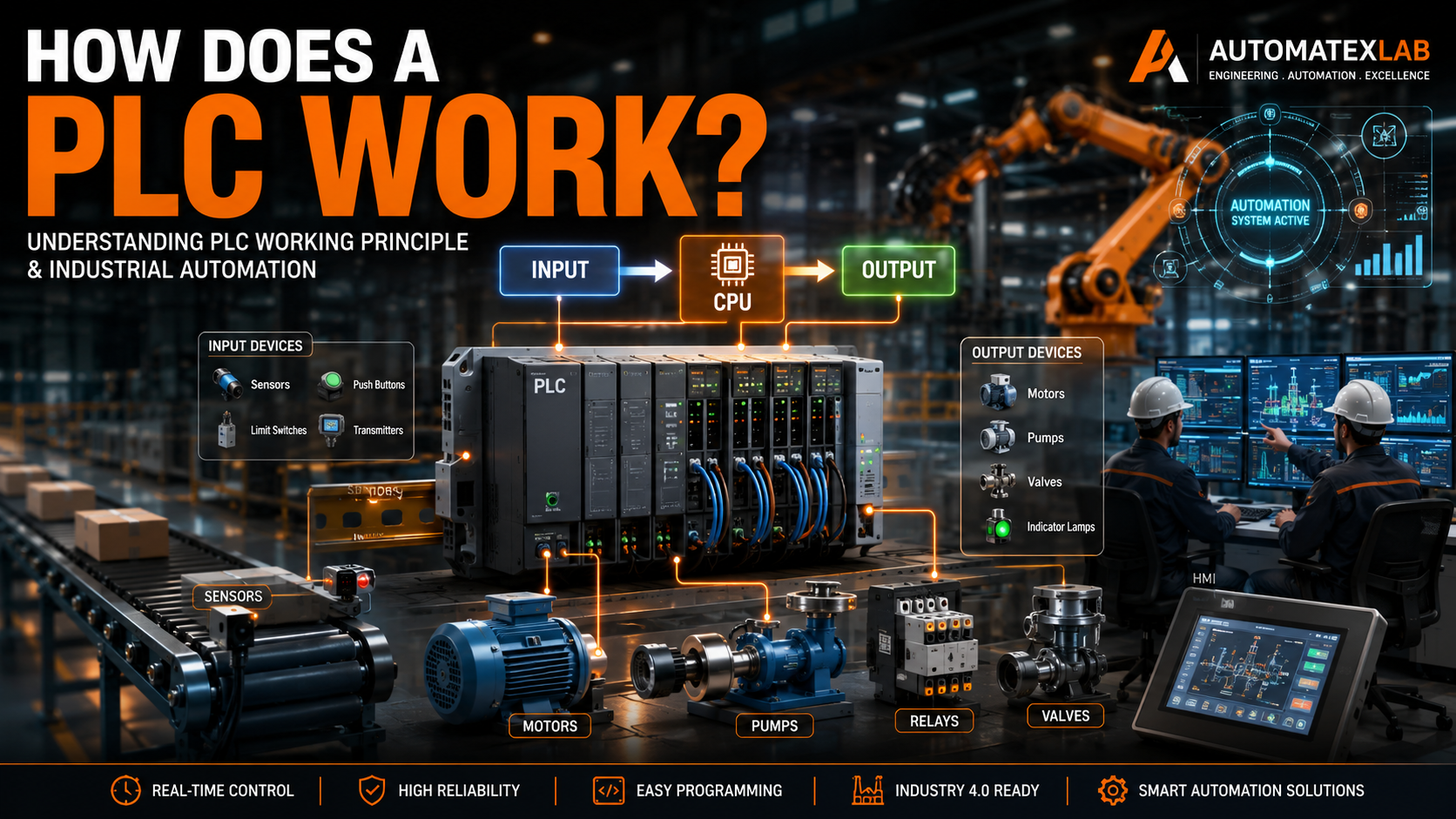
A PLC reads inputs from sensors and switches, processes that data using a program, and then sends output signals to control motors, valves, lights, and other equipment.
Simple example: Press a button, and a conveyor starts automatically. The PLC handles the logic between the button press and the conveyor motor.
PLC programming replaces manual wiring and relay-based control systems with flexible, software-driven automation. It is used across manufacturing, oil and gas, food production, pharmaceuticals, automotive, and dozens of other industries.
What Is a PLC (Programmable Logic Controller)?
Definition of PLC
A Programmable Logic Controller is an industrial-grade computer designed to control machines and processes in harsh environments. Unlike standard computers, PLCs are built to handle extreme temperatures, vibration, dust, and electrical noise.
PLCs monitor real-world conditions through input signals and respond with output commands, all in real time.
History of PLCs
Before PLCs existed, factories used relay logic systems. These systems relied on hundreds or thousands of physical relays wired together to control machines. They were bulky, hard to modify, and expensive to maintain.
In 1968, General Motors issued a request for a replacement. The result was the first programmable controller, developed by Dick Morley and his team at Bedford Associates.
The first PLCs eliminated the need for complex relay panels. Engineers could change the control logic through software instead of rewiring physical components.
Over the decades, PLCs evolved to include advanced communication protocols, analog control, motion control, and integration with SCADA and HMI systems.
Why PLCs Are Important in Automation
PLCs are the backbone of industrial automation because they offer:
- Reliability — Built to run continuously without failure in industrial conditions
- Speed — Process thousands of logic operations per millisecond
- Flexibility — Change the program without rewiring hardware
- Reduced wiring — Software logic replaces physical relay connections
- Easy troubleshooting — Diagnostic tools built into the system
How PLC Programming Works
Input, Processing, and Output Concept
Every PLC system operates on a three-stage process.
Inputs are signals coming into the PLC from field devices like push buttons, temperature sensors, pressure switches, and proximity sensors.
Processing happens in the CPU, where the PLC executes the control program and makes logical decisions based on the input data.
Outputs are signals sent from the PLC to field devices like motors, solenoid valves, indicator lamps, and relay coils.
PLC Scan Cycle
The PLC does not process everything at once. It follows a continuous scan cycle with four stages:
Read Inputs — The CPU reads the current status of all input signals and stores them in memory.
Execute Program — The CPU runs through the ladder logic or control program from top to bottom, making decisions based on input values.
Update Outputs — The CPU sends updated output signals to all connected devices based on the program results.
Diagnostics and Communication — The PLC checks for errors, updates communication modules, and prepares for the next scan.
This cycle repeats hundreds or thousands of times per second, giving real-time control.
Real-Life Working Example
Automatic water tank control system:
- A level sensor detects that the tank water level is low
- The PLC reads the low-level input signal
- The control program activates the pump motor output
- The pump fills the tank
- Once the high-level sensor is triggered, the PLC turns off the pump
This entire sequence runs automatically without any human intervention.
Main Components of a PLC System
CPU (Central Processing Unit)
The CPU is the brain of the PLC. It runs the control program, manages memory, and coordinates all modules. The CPU determines processing speed, memory capacity, and supported programming languages.
Input Modules
Input modules connect field devices to the PLC. Common input devices include:
- Push buttons
- Limit switches
- Proximity sensors
- Photoelectric sensors
- Temperature sensors
- Pressure transducers
Output Modules
Output modules send control signals from the PLC to field devices. Common output devices include:
- Electric motors
- Relay coils
- Solenoid valves
- Indicator lamps
- Alarms
Power Supply
The power supply converts AC line voltage to the DC voltage required by the PLC CPU and modules. Most PLCs operate on 24V DC internally.
Communication Modules
Communication modules allow the PLC to exchange data with other systems. Common protocols include:
- Ethernet/IP
- Modbus TCP/RTU
- Profibus
- Profinet
- CANopen
Programming Device
A laptop or desktop computer running PLC software is used to write, upload, download, and monitor PLC programs. The programming device connects to the PLC via USB, Ethernet, or serial port.
Types of PLCs
Compact PLC
Compact PLCs have a fixed number of input and output connections built into a single unit. They are small, cost-effective, and ideal for simple applications with limited I/O requirements.
Common uses include small conveyor systems, pump controls, and basic machine automation.
Modular PLC
Modular PLCs have a base unit with slots for additional I/O modules, communication cards, and specialty modules. They can be expanded as automation needs grow.
They are widely used in mid-size to large industrial plants where flexibility and scalability matter.
Rack-Mounted PLC
Rack-mounted PLCs house all modules in a chassis or rack enclosure. They support high I/O counts and are used in large-scale automation systems like power plants, refineries, and automotive assembly lines.
Safety PLC
Safety PLCs are designed to meet international functional safety standards such as IEC 61508 and SIL ratings. They are used in emergency shutdown systems, safety interlocks, and applications where a control failure could harm personnel or equipment.
PLC Programming Languages
The IEC 61131-3 standard defines five official PLC programming languages.
Ladder Logic (LD)
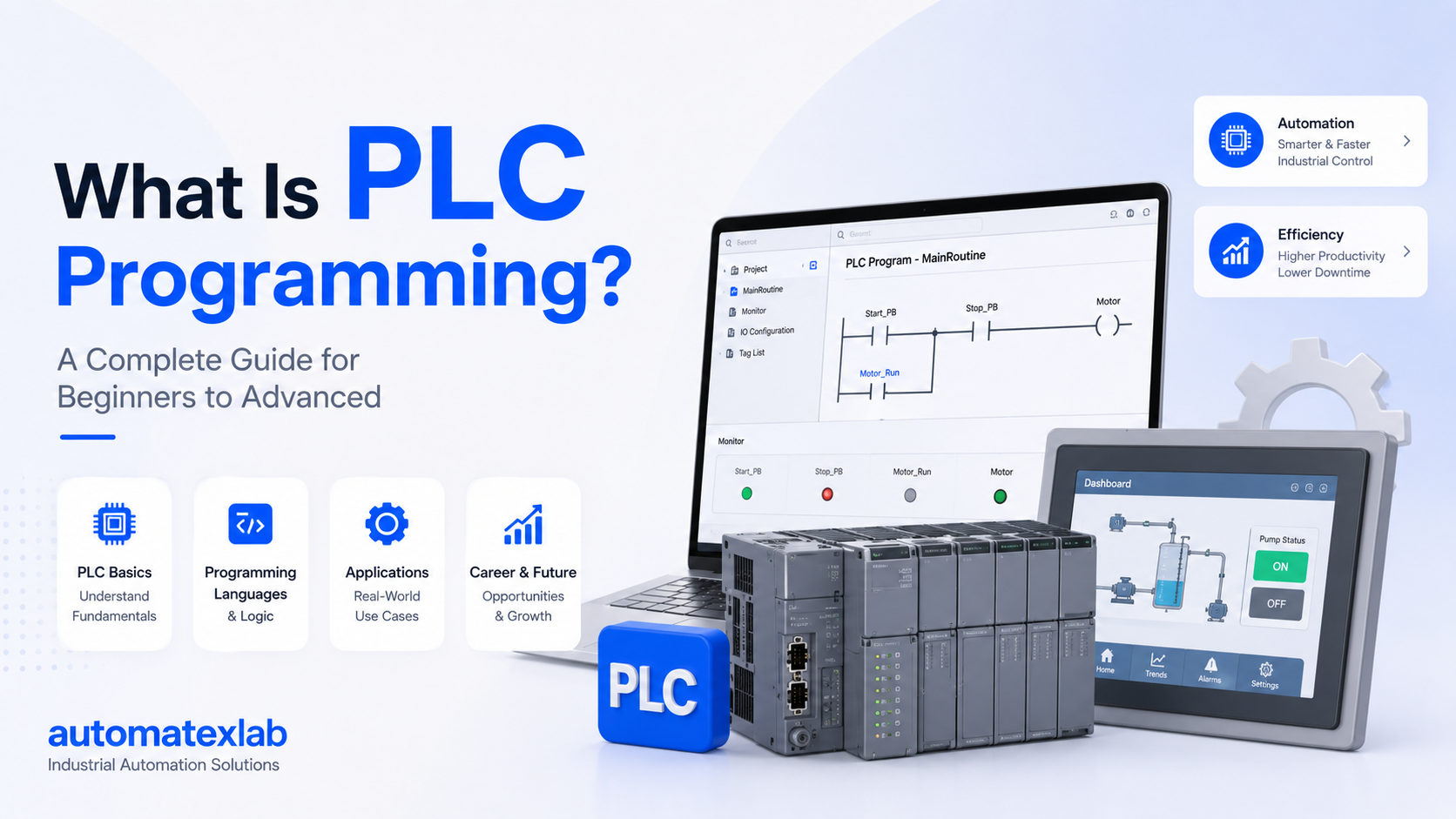
Ladder logic is the most widely used PLC programming language. It resembles the electrical relay diagrams that engineers used before PLCs existed, making it easy for electricians and control technicians to understand.
A ladder logic program consists of rungs, with contacts representing input conditions and coils representing output actions.
Example: A normally open contact wired to a coil means “if the input is active, turn on the output.”
Function Block Diagram (FBD)
FBD uses graphical blocks connected by lines to represent control logic. Each block performs a specific function such as AND, OR, timer, or counter operations.
FBD is popular in process industries like oil and gas, chemical plants, and water treatment where continuous control is required.
Structured Text (ST)
Structured Text is a high-level language that looks similar to Pascal or C. It is used for complex mathematical calculations, data manipulation, and advanced control algorithms that are difficult to express in ladder logic.
ST is increasingly popular as automation systems become more sophisticated.
Sequential Function Chart (SFC)
SFC breaks a process into steps and transitions. Each step represents an action, and transitions define the conditions required to move from one step to the next.
SFC is ideal for batch processes, filling systems, and any application with clear sequential stages.
Instruction List (IL)
Instruction List is a low-level, assembly-style language. It is older and less commonly used today, as most modern PLC platforms have moved toward graphical and structured languages.
What Is Ladder Logic Programming?
Ladder logic is the foundation of PLC programming for most industrial applications.
Basic Ladder Logic Concepts
Rungs are horizontal lines in the ladder diagram. Each rung represents one logical condition or action.
Contacts represent input conditions. A normally open (NO) contact passes power when the associated input is active. A normally closed (NC) contact passes power when the input is inactive.
Coils represent output actions. When a rung has power flowing through it, the coil at the end energizes the corresponding output.
NO and NC Contacts
A normally open contact is open by default and closes when the input signal is activated. It is used when you want something to happen when a button is pressed or a sensor is triggered.
A normally closed contact is closed by default and opens when the input is activated. It is used for stop buttons, overload contacts, and safety interlocks.
Timer Instructions
Timer instructions create time delays in the control program. Common timer types include:
- TON (Timer On Delay) — Delays turning on an output
- TOF (Timer Off Delay) — Delays turning off an output
- RTO (Retentive Timer) — Accumulates time even if interrupted
Counter Instructions
Counter instructions count events such as parts produced, machine cycles completed, or items passing a sensor. Common counter types include up counters, down counters, and up/down counters.
Motor Start/Stop Example
A basic motor control circuit in ladder logic includes:
- Start button (NO contact) in series
- Stop button (NC contact) in series
- Motor coil as the output
- Seal-in contact (parallel with start button) to maintain the motor run state after the start button is released
- Overload relay (NC contact) for protection
Popular PLC Brands in Industry
Siemens PLC
Siemens offers the S7-1200 for small to mid-size applications and the S7-1500 for large industrial systems. Siemens PLCs are widely used in Europe and globally, with strong support for Profinet and TIA Portal software.
Allen-Bradley PLC
Allen-Bradley, manufactured by Rockwell Automation, dominates the North American market. Popular models include the MicroLogix, CompactLogix, and ControlLogix series.
Mitsubishi PLC
Mitsubishi Electric offers the MELSEC series, widely used in Asia and globally for manufacturing and machine automation.
Delta PLC
Delta Electronics provides cost-effective PLC solutions popular in smaller manufacturing operations and OEM machine builders.
Omron PLC
Omron PLCs are known for high reliability and are widely used in automotive, food processing, and electronics manufacturing.
Schneider Electric PLC
Schneider Electric offers the Modicon series, well-established in process industries and building automation.
| Brand | Popular Series | Strength |
|---|---|---|
| Siemens | S7-1200, S7-1500 | Europe, process industries |
| Allen-Bradley | CompactLogix, ControlLogix | North America |
| Mitsubishi | MELSEC | Asia, manufacturing |
| Delta | DVP, AS Series | Cost-effective |
| Omron | NX, NJ Series | Precision automation |
| Schneider | Modicon M340, M580 | Process control |
PLC Programming Software
Siemens TIA Portal
TIA Portal (Totally Integrated Automation Portal) is the unified software platform for programming all Siemens S7 PLCs, HMIs, and drives. It supports all IEC 61131-3 languages and includes built-in diagnostic tools.
RSLogix / Studio 5000
Studio 5000 Logix Designer is the programming environment for Allen-Bradley ControlLogix and CompactLogix PLCs. RSLogix 500 is used for older MicroLogix and SLC 500 platforms.
GX Works
GX Works is Mitsubishi Electric’s programming software for MELSEC PLCs. GX Works3 supports the latest iQ-R and iQ-F series controllers.
CX-Programmer
CX-Programmer is Omron’s programming tool for CP and CJ series PLCs, part of the CX-One automation software suite.
EcoStruxure Control Expert
Formerly known as Unity Pro, EcoStruxure Control Expert is Schneider Electric’s software for Modicon M340, M580, and Premium PLCs.
Applications of PLC Programming
Manufacturing Industry
PLCs control assembly lines, robotic systems, conveyors, and quality inspection processes. They manage production sequences, monitor machine health, and coordinate multiple machines simultaneously.
Packaging Industry
Automated filling, sealing, labeling, and palletizing systems rely on PLC control for precise speed, position, and count management.
Water Treatment Plants
PLCs manage pump stations, chemical dosing systems, filtration processes, and tank level control across water treatment and distribution systems.
Food and Beverage Industry
Temperature control, mixing, pasteurization, bottling, and conveyor systems in food plants use PLCs to maintain consistency, hygiene, and production speed.
Pharmaceutical Industry
Strict regulatory requirements make PLC-controlled batch processing, clean-in-place systems, and environmental monitoring essential in pharmaceutical manufacturing.
Oil and Gas Industry
Wellhead control, pipeline monitoring, compressor stations, and emergency shutdown systems in oil and gas operations depend on PLCs for reliable and safe operation.
Automotive Industry
Automotive assembly lines use PLCs to control robotic welding, painting, stamping, and component assembly operations across highly automated production environments.
Power Plants
PLCs manage turbine control, boiler systems, switchgear operations, and load management in power generation facilities.
Advantages of PLC Programming
High Reliability
PLCs are designed to operate continuously in industrial environments without failure. Mean time between failures for quality PLCs is measured in decades.
Faster Operations
A PLC scan cycle executes in milliseconds, enabling real-time control of fast-moving processes.
Reduced Human Error
Automated control eliminates inconsistencies caused by manual operation, improving product quality and process repeatability.
Easy Troubleshooting
Built-in diagnostics, online monitoring, and force functions allow engineers to identify and resolve faults quickly without stopping production.
Flexible Modifications
Changing process logic requires only a software update. No rewiring is needed, saving significant time and cost compared to relay systems.
Reduced Wiring
Software logic replaces miles of relay wiring, reducing installation cost, space requirements, and potential failure points.
Improved Safety
PLCs can monitor safety devices continuously and trigger emergency shutdowns in microseconds when hazardous conditions are detected.
Cost Savings
Lower installation costs, reduced maintenance, faster troubleshooting, and improved uptime deliver strong return on investment over the system lifecycle.
PLC vs Relay Logic
| Feature | PLC | Relay Logic |
|---|---|---|
| Wiring | Minimal | Complex |
| Troubleshooting | Easy | Difficult |
| Flexibility | High | Low |
| Speed | Fast | Slow |
| Physical Space | Compact | Large |
| Maintenance | Low | High |
| Modification | Software change | Rewiring required |
| Cost Over Time | Lower | Higher |
Relay logic served industry well for decades, but as machines became more complex, the limitations of relay panels became clear. Hundreds of relays required constant maintenance, took up large panel spaces, and were extremely difficult to modify. PLCs solved all of these problems in one solution.
PLC vs Microcontroller
| Feature | PLC | Microcontroller |
|---|---|---|
| Environment | Industrial, harsh | Lab, consumer products |
| Reliability | Extremely high | Moderate |
| Programming | IEC 61131-3 languages | C, C++, Python |
| I/O | Industrial grade | General purpose |
| Cost | Higher | Lower |
| Maintenance support | Manufacturer backed | Community-based |
PLCs are built for industrial environments and long service life. Microcontrollers are better suited for prototyping, consumer electronics, and cost-sensitive applications where industrial-grade reliability is not required.
Communication Protocols Used in PLCs
Modbus
Modbus is one of the oldest and most widely supported industrial communication protocols. It operates over serial (RTU) and Ethernet (TCP) connections and is used to read and write data between PLCs, sensors, and drives.
Ethernet/IP
Ethernet/IP uses standard TCP/IP infrastructure to connect PLCs with other controllers, HMIs, and enterprise systems. It is the dominant protocol in Allen-Bradley systems.
Profibus
Profibus is a fieldbus protocol developed by Siemens and widely used in European process and factory automation. It connects PLCs with field devices over a dedicated bus cable.
Profinet
Profinet is the Ethernet-based successor to Profibus. It supports real-time control and is the standard communication protocol for Siemens TIA Portal systems.
CANopen
CANopen is used in motion control applications and machine automation where multiple drives and controllers need to communicate on a single network.
DeviceNet
DeviceNet is a network protocol used primarily in Allen-Bradley systems to connect PLCs with sensors, actuators, and drives at the field level.
PLC and SCADA Integration
What Is SCADA?
SCADA stands for Supervisory Control and Data Acquisition. It is a software system that monitors and controls industrial processes across an entire facility or across multiple sites.
How PLC and SCADA Work Together
PLCs handle local machine control in real time. SCADA systems connect to multiple PLCs across a facility, collect data, display process information to operators, and send supervisory commands.
The PLC is the field-level controller. SCADA is the plant-level supervisor.
Benefits of Integration
- Real-time process monitoring across entire facilities
- Historical data logging and trend analysis
- Remote process control from a central location
- Alarm management and event notification
- Production reporting and performance tracking
PLC and HMI Integration
What Is HMI?
HMI stands for Human-Machine Interface. It is a touchscreen panel or computer display that operators use to monitor and control machines connected to a PLC.
Role of HMI in Automation
HMIs display process values, alarm messages, equipment status, and production data. Operators use HMI screens to start and stop machines, enter setpoints, and acknowledge alarms.
PLC-HMI Communication
The HMI communicates with the PLC through a network connection using protocols like Ethernet/IP, Profinet, or Modbus. Tags configured in the PLC program are mapped to display elements on the HMI screen.
A common example is a conveyor control panel where operators can view belt speed, start and stop the line, and see fault messages in real time.
Basic PLC Programming Examples
Motor Control Example
A motor start/stop circuit includes:
- Start button input activates the motor output
- Seal-in contact maintains the run state
- Stop button input breaks the circuit and de-energizes the motor
- Overload relay input provides protection against overcurrent
Conveyor Automation Example
A parts conveyor uses a proximity sensor to detect parts. When a part reaches the end of the conveyor, the PLC stops the belt, signals a robot or operator, and restarts the belt after the part is removed.
Tank Level Control Example
Upper and lower level switches connected to the PLC control a fill valve. The valve opens when the level drops below the lower switch and closes when it reaches the upper switch, maintaining a consistent tank level automatically.
Common PLC Instructions Explained
Bit Logic Instructions
Bit logic instructions include AND, OR, NOT, XOR, and other logical operations that evaluate the state of input bits to produce output results.
Timers
Timer instructions create time-based delays and measurements. TON, TOF, and RTO timers are the most common across all PLC platforms.
Counters
Counter instructions count input events. CTU counts up, CTD counts down, and CTUD counts both directions.
Compare Instructions
Compare instructions evaluate numeric values. Common comparisons include equal to, greater than, less than, and not equal, used to trigger actions based on measured process values.
Math Functions
Math instructions perform addition, subtraction, multiplication, division, and more complex calculations used in scaling sensor values and process calculations.
Move Instructions
Move instructions transfer data between memory locations, copy values between tags, and load constants into variables.
PLC Troubleshooting Basics
Input Problems
Check field wiring continuity, verify sensor power supply, confirm signal levels match input module specifications, and use online monitoring to verify input status in the PLC.
Output Failures
Verify output module status LEDs, check field wiring to actuators, confirm output voltage levels, and test actuator operation independently if possible.
Communication Errors
Check network cable connections, verify IP addresses and node configurations, confirm protocol settings match between devices, and review diagnostic logs in programming software.
Program Errors
Review fault codes in the PLC diagnostic buffer, check for out-of-range values triggering math errors, and verify timer and counter presets are correctly configured.
Power Supply Issues
Measure DC output voltage under load, check for loose terminal connections, verify input AC voltage is within specification, and inspect for signs of overheating.
Safety in PLC Programming
Emergency Stop Systems
Emergency stop buttons must be wired as hardwired safety circuits in addition to PLC inputs. The E-stop circuit directly interrupts power to controlled equipment independent of the PLC program.
Safety Interlocks
Interlocks prevent machines from operating under unsafe conditions. Guards, safety mats, light curtains, and door switches connected to the PLC prevent hazardous motion when personnel are in the danger zone.
Fail-Safe Design
Fail-safe design means the system defaults to a safe state when power is lost or a fault occurs. Normally closed contacts are used for safety-critical inputs so that a broken wire defaults to the safe condition.
Safety PLCs
Safety PLCs meet IEC 61508 and ISO 13849 functional safety standards. They use redundant processing and diagnostic checks to detect internal failures and maintain safe system states.
Career Opportunities in PLC Programming
PLC Programmer
PLC programmers write, test, and commission control software for industrial machines and systems. Entry-level positions start around $55,000 to $70,000 annually, with experienced programmers earning well above $90,000.
Automation Engineer
Automation engineers design complete control systems including PLCs, HMIs, drives, and networks. This role requires a broader skill set and typically commands salaries from $75,000 to $110,000 or higher.
SCADA Engineer
SCADA engineers develop and maintain supervisory control systems. They work closely with PLC programmers and IT departments to build plant-wide monitoring solutions.
Control Systems Engineer
Control systems engineers handle everything from electrical design to PLC programming, HMI development, and system commissioning. It is one of the most well-compensated roles in industrial automation.
Maintenance Engineer
Maintenance engineers use PLC diagnostic tools to troubleshoot faults, perform preventive maintenance, and keep automated systems running at peak efficiency.
Skills in demand:
- Ladder logic and structured text programming
- Knowledge of major PLC platforms (Siemens, Allen-Bradley)
- Understanding of industrial networks and communication protocols
- SCADA and HMI development experience
- Electrical panel design and commissioning
How to Learn PLC Programming
Learn Electrical Basics
Start with AC and DC circuit fundamentals, relay logic, and reading electrical schematics. This foundation makes learning ladder logic much easier.
Understand Sensors and Actuators
Study how proximity sensors, limit switches, pressure transducers, and motor drives work. PLC programming is meaningless without understanding the field devices it controls.
Practice Ladder Logic
Use free or trial versions of PLC software to write basic programs. Practice motor control, timer-based sequences, and counter applications.
Use PLC Simulators
Software simulators like PLCSIM (Siemens), RSEmulate (Allen-Bradley), and third-party tools let you test programs without physical hardware.
Work on Real Projects
Hands-on experience with actual PLCs accelerates learning faster than any other method. Look for internships, apprenticeships, or build your own small automation project.
Learn SCADA and HMI
Expand your skill set by learning FactoryTalk View, WinCC, Ignition, or other SCADA and HMI platforms to become a more complete automation professional.
Future of PLC Programming
Industry 4.0
Industry 4.0 is transforming manufacturing by connecting machines, PLCs, and enterprise systems into a unified digital ecosystem. PLCs are evolving to support OPC-UA, MQTT, and cloud connectivity.
IIoT Integration
The Industrial Internet of Things connects PLC data to cloud platforms for remote monitoring, predictive maintenance, and real-time analytics. PLCs now serve as edge devices feeding data upstream to analytics platforms.
Smart Factories
Smart factories use interconnected PLCs, robots, and AI-driven systems to optimize production automatically, adjust to changing demand, and minimize downtime.
AI in Industrial Automation
AI and machine learning algorithms are being integrated with PLC control systems to improve quality inspection, predict equipment failures, and optimize energy consumption.
Cloud Monitoring Systems
Cloud-based SCADA and monitoring platforms are replacing traditional on-premise servers, giving operations teams access to plant data from anywhere in the world.
Why Choose AutomatexLab for PLC Programming Services
AutomatexLab delivers end-to-end industrial automation solutions for manufacturers, processors, and utilities.
Services include:
- PLC Programming and commissioning
- SCADA system development
- HMI design and configuration
- Control panel manufacturing
- Industrial automation system design
- Troubleshooting and maintenance support
- Machine automation and retrofit projects
Whether you are starting a new automation project or upgrading an existing system, AutomatexLab brings the expertise to get it done right.
Need reliable industrial automation solutions? AutomatexLab helps industries improve productivity with advanced PLC, SCADA, and automation systems. Contact us today to get started.
Conclusion
PLC programming is the foundation of modern industrial automation. From simple pump controls to complex automotive assembly lines, PLCs make automated control reliable, flexible, and efficient.
The demand for skilled PLC programmers and automation engineers continues to grow as industries worldwide invest in automation technology. Industry 4.0, IIoT, and smart manufacturing are creating new opportunities for professionals with strong PLC skills.
Whether you are a business looking to automate operations or an engineer building your technical career, understanding PLC programming puts you at the center of where manufacturing is heading.
AutomatexLab delivers reliable PLC programming and industrial automation solutions tailored for modern industries. Contact us to automate your operations efficiently.
FAQs
PLC programming is used to automate machines and industrial processes. It controls conveyors, motors, pumps, valves, robots, and entire production lines without manual operation.
PLC programming is accessible for people with an electrical or technical background. Ladder logic is especially beginner-friendly because it resembles relay diagrams. With consistent practice, most people can learn the basics within a few months.
Ladder logic is the best starting point for beginners and is the most widely used language in North America. Structured text is preferred for complex calculations. Function block diagram is popular in process industries.
PLCs are used in manufacturing, automotive, food and beverage, pharmaceuticals, oil and gas, water treatment, power generation, packaging, and many other industries.
Ladder logic is a graphical PLC programming language that resembles electrical relay diagrams. It uses contacts to represent input conditions and coils to represent output actions, arranged on horizontal rungs.
The best PLC brand depends on your industry and region. Siemens leads in Europe and process industries. Allen-Bradley dominates North America. Mitsubishi and Omron are strong choices in manufacturing automation.
Common PLC programming software includes Siemens TIA Portal, Rockwell Studio 5000, Mitsubishi GX Works, Omron CX-Programmer, and Schneider Electric EcoStruxure Control Expert.
A PLC is a field-level controller that directly operates machines in real time. SCADA is a supervisory software system that monitors and manages multiple PLCs across a facility or plant.
Yes. Beginners with basic electrical knowledge can start learning PLC programming using free software simulators and online resources. Ladder logic is one of the more beginner-friendly programming languages available.